Yesterday, I finally received my AirPods. After getting to know them for about a day, here are my first impressions. First off, they do in fact stay in my ear. I have shook my head very hard, and they have yet to fall out. Obviously, results may vary for different ear sizes, but they definitely work for me. The sound quality is also very good. I'm no music critic, but I have no complaints about music quality. My only real wish is that I want to be able to double tap on an AirPod to skip a song. This setting is customizable, but skipping a song is not an option. Other than that, it's just a matter of price. I feel that Apple could've added in a 1-month promo code for Apple Music to sweeten the deal. They'd likely profit in the end, by hooking people in on the convenience of Apple Music. That would make the $159 price tag a bit better. Overall, I really like my AirPods and they join my phone, keys, and watch in my daily routine.
Showing posts with label Review. Show all posts
Showing posts with label Review. Show all posts
Wednesday, December 28, 2016

Monday, September 28, 2015
iPhone 6s: Speed
With 2 GB of RAM and a better CPU, the iPhone 6s is the fastest iPhone to date. It works fast with iOS 9 and has a consistent fluid experience. One thing I notice about this is that Siri works much faster. I don't typically use Siri because I type faster than Siri dictates on my old iPhone, but I found that she has an immediate response and action ready for me almost instantly. This is useful for me when I need to send out a quick text. The speed of iPhone exemplifies how well software and hardware work together when they're designed together.
Sunday, September 27, 2015
iPhone 6s: Touch ID
I can't stress enough about how fast Touch ID is on the new iPhone 6s. Every time I need to open my phone, I just press the home button to wake it, and in less than a second, I'm at my home screen. Although it seems like a minor feature, one could argue that this will save me a couple of months or years over the course of my life. Honestly, I really love this improvement because I use it each time I wake up my phone. If you have an iPhone 6s, definitely enable Touch ID (Settings > Touch ID & Passcode).
Friday, September 25, 2015
iPhone 6s: First Impressions
Today, I tried out an iPhone 6s at an Apple Store. Here are my first impressions. Compared to my iPad Air 2, the iPhone 6s is definitely twice as fast, if not more, than the iPad. 3D Touch is very comparable to Force Touch on the Apple Watch. It does a very light vibration when you do it. Live Photos is nice if you have the right situation. Not good for faster motion, as it only captures 15 fps for Live Photos. However, I found a really good Live Photo taken within the Apple Store (not even a demo picture), so there's a lot of potential. Anyways, hopefully I'll be able to do a more extensive review in the near future.
Tuesday, July 21, 2015
iOS 9 Devices Can No Longer Review Apps
I have to rant for a second. Developer previews have the word "developer" in them for a reason! Don't download this on your everyday iOS device or half of your apps will be broken. Why? Because developers haven't optimized them yet. That's the whole purpose of the developer preview! Developers need to explore the technologies of iOS 9. Developer previews are not a playground, they are a construction site. So, don't spend $99 thinking, "I can get iOS 9 early" because that's not the intended purpose! You will lose data!
Okay, rant over...
Anyways, because people find their apps breaking in iOS 9 developer previews, they leave bad, undeserved reviews on apps in the Apple App Store. This brings their overall rating down. Apple has addressed this by not allowing reviews on apps from devices running the iOS 9 beta. This will prevent misconceptions of the app caused by a developer preview. Strangely, they have left in the ability to leave ratings in the form of stars (1-5 scale). Whatever you do, don't rate apps in the iOS 9 beta. Any problems you experience are probably due to your iOS 9 beta software. Also, reading the description helps. Sometimes, there are explanations for problems there, like outdated hardware.
Okay, rant over...
Anyways, because people find their apps breaking in iOS 9 developer previews, they leave bad, undeserved reviews on apps in the Apple App Store. This brings their overall rating down. Apple has addressed this by not allowing reviews on apps from devices running the iOS 9 beta. This will prevent misconceptions of the app caused by a developer preview. Strangely, they have left in the ability to leave ratings in the form of stars (1-5 scale). Whatever you do, don't rate apps in the iOS 9 beta. Any problems you experience are probably due to your iOS 9 beta software. Also, reading the description helps. Sometimes, there are explanations for problems there, like outdated hardware.
Sunday, July 5, 2015
First Impressions of iOS 9: Keyboard
A few weeks back, I installed iOS 9 on my dad's old iPhone 4S. While this iPhone isn't capable of everything iOS 9 has to offer, it does show us some new changes to the interface. For example, the keyboard shows lower case characters when in lowercase and vise versa. Also, the keys don't pop out. I find this disorientating, but I could get used to it. I hope they fix the popping key thing. Check out my screenshots below.


Thursday, May 28, 2015
Apple Watch: First Impressions
Today, I got my Apple Watch. It is a 42mm Apple Watch with Brown Leather Loop. I'll just ramble on about some of my thoughts. One of the things I like is how I can easily picture it as a lifestyle device. I can see myself using it for a workout or using the MLB At Bat app at a ballpark. It brings new potential to the playing field. It's not just a tiny iPhone. I like how notifications popup with a subtle vibration. Also, people seemed to be turned off by its battery only lasting a single day, however it's not to say that you'll run out in a single day. With a lot of use, you should have 20% at the end of the day, assuming healthy battery life. The main drawback to the Apple Watch is the reliance on the iPhone. Every time you open an app, it has to load the app from the iPhone. These loading times vary based on the size of the app and the proximity from the iPhone. Typically, they're short loading times, but if your iPhone is more than 10 feet away, loading can get tedious. Overall, I'm a big fan of this watch and look forward to using it, however I do see some area for improvement. When the next generation comes out, we pioneers only hope that our current bands will work with the next few generations.
 |
| Sorry about the quality and lighting of this picture! |
Friday, August 1, 2014
Google Glass Review
After several months of planning, cinematic taking, and editing, I have finally finished my Google Glass review! I hope you like it!
Google Glass is a great example of the potential of wearables, but does it live up to all of its speculated expectations? Find out in this review!
Sunday, July 27, 2014
The Duplicate Finder
Do you ever seem to have an endless amount of duplicate files? Whether it's multiple downloads from a site or a glitch, The Duplicate Finder can help! Just drag a drive or a folder and see how much storage space you can save! With a beautiful iTunes-esque interface, it removes duplicates with style. It's on sale from $9.99 to $2.99 for a limited time, so don't miss out [Direct Link].

Sunday, May 25, 2014
C.E.O. of Quizlet Highlights My Tutorial
Recently, I found out that Quizlet highlighted my tutorial on Quizlet News. I'm very proud of this so bear with me. It wasn't just Quizlet, it was their C.E.O.! His name is Dave Margulius.
If you want to see his post, click here.
If you want to watch the tutorial, you can watch it below.
If you want to see his post, click here.
If you want to watch the tutorial, you can watch it below.
Friday, April 25, 2014
2048
If you like Candy Crush Saga, then you'll LOVE 2048! It's a great game to relax the mind and pass some time. Combine the equal numbers and create the 2048 tile. Try this game out! It's free and fun! 2048 is available from the Apple App Store for free [Direct Link] and Google Play Store [Direct Link].

Sunday, March 30, 2014
MuseScore
Some people are very passionate about music. For those people, I have a great app to tell you about! It's called MuseScore. You can digitize your sheet music, play the music, add your own little touch, and print new, crisp, clean sheets of music. In addition, you can write your own music. This has a very nice music editor that's user friendly for those who know how to write. In addition, you can import various file types, including MIDIs. MuseScore is available at it's official website for free on Mac, Windows, and Linux!

Sunday, January 26, 2014
Google Glass: First Impressions (Explorer Edition)
Yesterday, I had the opportunity to try out Google Glass (Explorer Edition / Beta Version), the wearable device that lets people use certain operations that they could do on a smart device, but hands-free. The first thing I want to note is the hardware. Google Glass has some features that aren't apparent at first glance. The first feature is the trackpad. On the right side of Glass, there is a small surface where one can use simple gestures to navigate through screens. Also, it seems that Glass will have specially made lens and sunglasses made for Glass, however regular eyeglasses (at least mine) fit fine while wearing Glass. The prism that is used as the display is a futuristic screen. It, in a way, looks like R2-D2's hologram. Slightly tinted and translucent. As for the size, it is the equivalent of "a 25 inch high definition screen from eight feet away (Google)." The display can also be projected to a smartphone using the app for iPhone or Android. The camera has a slight angle above your eye, so calibrate for that when you record a video or take a video. As for software, look forward to the Glass App Store (which isn't available yet, but probably will be with the final product). The only really cool app is the navigation (Google Maps). It's nice to have an annotated version of the road in front of you in the corner of your vision. It's helpful and not distracting. As for Glass overall, it's definitely something to look forward to (as long as you don't mind being pulled over in you car from time to time or being thrown out of the movies) once it's price comes down and the product is refined in the final version. The current price is about $1499 and it should hopefully come down to $499 (just an estimate by me).


Sunday, January 19, 2014
Nomad Micro USB Cable Review and Giveaway!
You can own this convenient and helpful cable just by entering this contest.
INSTRUCTIONS:
1. Click here to go to the entry form.2. Follow @TechTalk4Geeks on Twitter.
3. Post a tweet with "@TechTalk4Geeks" in it about how you would use it.
The contest ends on January 25, 2014 or when it reaches 10 responses. Whichever comes later. Contest limited to the U.S. region.
Music Credit: Animal Crossing: City Folk - 2 AM
Friday, December 13, 2013
Pencil: First Impressions


Tuesday, October 29, 2013
Christmas App
There are many apps for Christmas shopping season, but there's no better one than "The Christmas List" (https://itunes.apple.com/us/app/the-christmas-list/id340779800?mt=8) by Limbua. This app lets you keep track of all the gifts you need to buy, how much they cost, and what store to buy them from. This app is definitely worth your two dollars. Try it. But, hurry! You only have 56 days left until Christmas! And don't even get me started on how early Hanukkah starts this year!


Wednesday, October 16, 2013
Chromebook: The Pros and Cons
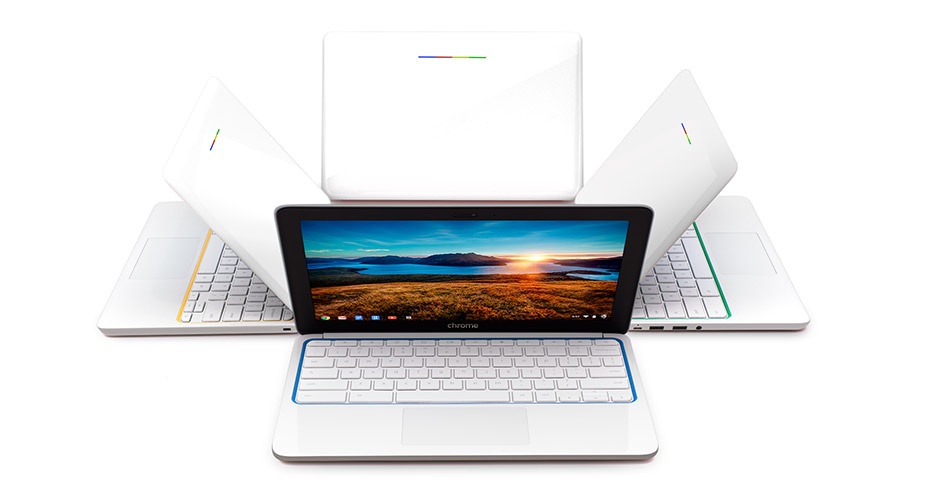
Today, I made a trip to do a quick review on the Chromebook OS. I tested this out on a Samsung Chromebook. For this post, I'll be listing the pros and cons of Google's new laptop, the Chromebook.

Cons:
The rest of the OS didn't seem to be nearly as fast as other laptops. Other tasks (such as searching the web) also took about 10 seconds. :-(

Speed and 10 Second Startup Time:
Pros:
First off, the Samsung Chromebook truly does have a 10 second startup time. It's really living up to its title.Cons:
The rest of the OS didn't seem to be nearly as fast as other laptops. Other tasks (such as searching the web) also took about 10 seconds. :-(
Uses:
Pros:
Have you been wondering why Google has been making seemingly random software that few people need (Google+ Hangouts, Google Cloud Print, Google Talk, etc.)? There are two reasons. First off, this is because that Google wants you to use their software specifically for the Chromebook.
Cons:
The other reason lies in the cons area unfortunately. The Chromebook really doesn't handle any other software than Google-made software. It has very little compatibility with third-party software. In fact, there is only one application on the Chromebook. That is Chrome. Every application is run from inside of a browser. Yes, even the settings. In summary, the Chromebook's "apps" are really just links to URLs that you could get on any other computer.* This means that the majority of tasks you can do on a Chromebook are online (With a purchase of a Chromebook, you get 100 GB of free Google Drive cloud storage). This is also why the Chromebook only has 16 GB of storage (a standard laptop has at least 64 GB).
"One Subject Notebook"
Pros:
One of the great parts of a Chromebook is how cost-efficient it is! Starting at $249! Which brings us to the "cons" section (P.S. Don't think I'm trying to rant on the Chromebook. It's truly a cool computer. I am simply telling the true facts.).
Cons:
The Chromebook has only a few functions and only is useful for one thing. You can make that school or work, but it's not the best tool for combining the two. It really is a modern version of a old computer. It's primary function is only one thing. Surfing the web.
My Thoughts Of The HP Chromebook 11:
Just as a little side note before I wrap up this post, this laptop symbolizes Google. It showcases all four of Google's primary colors (red, yellow, green, and blue) on its backlight and comes in your choice of the same colors, or black. You can even charge it using a micro-USB cable (the same cable that most Android phones use). It looks really cool for only $249.
Final Thoughts of the Chromebook OS:
This is truly a great notebook. I find this notebook most useful for a student attending a school or college because of its amazing cost-efficency and integration of school-friendly apps such as Google Drive, Google+ Hangouts, and Google Search for research. For a full list of uses for the Chromebook, click here. This product is also on my Holiday Gift List 4 Geeks.
* You can get your Mac and PC apps using Chrome Remote Desktop (which also runs in the Chrome app). I haven't tested this out which is why I put this as a footnote.
Sunday, October 6, 2013
The Click: Adonit Jot Classic Review
#DigitalInkRevolution What does that mean? Watch the video to find out!
To buy, click here!
To go to the "Holiday Gift List," click here!
Music credit goes to JezDayy
Song: 7PM (Remix) - Animal Crossing New Leaf
To buy, click here!
To go to the "Holiday Gift List," click here!
Music credit goes to JezDayy
Song: 7PM (Remix) - Animal Crossing New Leaf
Thursday, October 3, 2013
Notability
Notability is the best way to take notes (stylus not included). It uses advanced editing tools to allow you to quickly take a note. Just draw or write. It's simple. An intuitive welcome tutorial shows you the basics. It lets you export to a countless amount of apps. Notability is on sale for $2.99 on the Apple App Store.

Monday, July 1, 2013
Atari Arcade: Review
The Atari Arcade is an accessory for the iPad. It's app-enabled for the game, "Atari's Greatest Hits". It's a great concept that looks plain-out great as a dock. It consists of a joystick and four buttons. Remember that this has a 30-pin adapter and isn't compatible with iPhone 5, iPad 4, and iPad Mini. The controls need a bit of getting used to. However, you can't really blame Atari due to how old the games are. The Arcade also provides a new viewpoint of the games. I'm giving this product four geek glasses out-of-five.


Subscribe to:
Posts (Atom)