Showing posts with label iOS. Show all posts

Saturday, May 18, 2019

My Favorite iPad Apps

Good iPad apps are something special because they are designed with a large screen in mind. With such a big canvas at a developer's disposal, there's a lot of potential for great user interfaces and experiences. Below are some of my favorite iPad apps.

iStudiez Pro

iStudiez Pro is a planner app for students. I use it everyday in college to keep track of assignments, classes, exams, and overall GPA. It's really useful. I think my only criticism of it is that it doesn't use iCloud, so syncing is manual. The overview screen is very useful on the iPad, as it shows your schedule, calendar, and assignments on one screen. In short, if you're a college student, I highly recommend this app [Direct Link].


Procreate

Procreate is a drawing app that rivals Adobe Photoshop's abilities. It has a great interface, a wide selection of brushes, and a ton of control given to the user. It was clearly written from the ground up for the iPad. It even has an entire Apple Book written as a guide for how to use the app [Direct Link].  It also has no in-app purchases or subscriptions. Procreate is available from the Apple App Store and is exclusive to iPad [Direct Link].

Bear

Bear is a beautiful writing app that uses Markdown to format text. It's very simple, and that's what makes it so great. My only issue with it is that a good amount of its features require a subscription. I'd happily pay $5 for the full version, but that isn't an option. It's a great way to jot down a few notes or an idea quickly, with a great organization system [Direct Link]

GoodNotes

If you want an alternative to OneNote, GoodNotes is a pretty nice notebook app that gives you a lot of customizability for notebook covers and paper. I like how you can search text, regardless if it was typed or handwritten. With a variety of paper sizes, this app is best experienced on an iPad with an Apple Pencil. I plan to use this app for my notes this fall semester [Direct Link].

Honorable Mentions

There are too many apps that I love on the iPad to name, but here are a few more. 1Password, Day One, Concepts, Paprika, and Flipp are apps that are all worth checking out.

Friday, May 17, 2019

The Spotlight Glitch on iOS

This has been a glitch that has annoyed me for the longest time. I finally found out how to consistently recreate it on multiple devices. The process is fairly simple. Unlock your iOS device to the home menu and swipe down to reveal the Spotlight search screen. The keyboard will appear, then disappear, and reappear again. This has been driving me insane. As someone who uses Spotlight for nearly everything, it's frustrating when the keyboard decides to seemingly randomly disappear. I now know that this only seems to happen when Spotlight is opened immediately after unlocking the device, but this has been going on for sometime now. You'd think Apple would've found it and fixed it by now. I wish I had the time to make a video demonstrating it, but I've found that the screen recording seems to cause the glitch to not occur. In short, you can try it out for yourself. Maybe you've noticed this glitch but didn't know the cause. Regardless, hopefully Apple fixes it soon.

Monday, April 15, 2019

Reset Advertising Identifier

With Mozilla's recent petition to get Apple to change how advertising identifiers are enabled out of box, here's a quick rundown of how to get advertisers to track you less. On iOS, go to Settings > Privacy > Advertising > and enable "Limit Ad Tracking." On macOS, go to System Preferences > Security & Privacy > Privacy > Advertising > and check the box for "Limit Ad Tracking." Every once in a while, I also recommend hitting the "Reset Advertising Identifier" button under the "Limit Ad Tracking" button on both iOS and macOS. This should help limit advertiser tracking.

Wednesday, March 13, 2019

Rolando Makes a Return to the App Store

For my tenth birthday, I got an iPod Touch, and I have so many fond memories of it. So many apps I owned then are no longer available today. Super Monkey Ball, We Rule, and countless others. They just haven't been maintained for the most part. And the other day, I was thinking of one of my favorite games, Rolando. Rolando was a game heavily advertised by Apple in the early years of the iPhone. It was a fun platforming puzzle game that demonstrated the accelerometer feature of the iPhone and iPod Touch. Rolando: Royal Edition will be returning to bring back some of the nostalgia of the early days of the App Store. It is a remaster of the original game. It is available for pre-order for $1.99, which is 60% off the full price [Direct Link].

This does beg the question of whether other apps and games could do the same. Rolando comes from a time where you would buy a game and you owned it. Today, it's hard to find apps that cost more than 99¢. It's all about in-app purchases or mining your personal data or processing power today. I think it would be cool to see a return to form for some part of the App Store. It's not going to happen just because that's not how money works, but I do long for those days sometimes.

Thursday, March 7, 2019

Use Your PS4 on Your Phone

Sony released an app called Remote Play today for iOS that allows you to stream the video output of your PS4 console to your smartphone. Not only that, but you can also control the console using your iPhone's touch controls. So, you essentially have a portable PS4 on your smartphone. While there are some compromises, a good connection usually provides negligible latency for most games. Turn-based games or button mashers should be no problem for this app. It also works on local networks or networks away from the console. A compatible controller can also be connected. While this is by no means the best way to play PS4 games, it offers a portable spin on a great home console. Remote Play is available from the Apple App Store for free [Direct Link].

Sunday, February 10, 2019

Memoji and Avatars

Memoji is Apple's first attempt at having avatars represent the user. Memoji currently are in use for iMessage and FaceTime. Animoji and Memoji are largely considered boring and gimmicky, which I agree with. So, why does Apple try to push these so much? Could Apple be trying to make Memoji have the same glory as Nintendo's Miis? If so, let's see the divide between the two.

Miis were released with the Nintendo Wii in late 2006, before the original iPhone was released. As a very quick synopsis, they served a simple purpose, to represent the player in a game and to bring personality to the console. It makes sense for a game console to do something like this, but for a phone to do this seems weird.

Phones don't really need to have a representation of the user in them, especially when it can take photos of the user. The most representation of a user a phone usually gives is through a contact photo or a wallpaper. These are two elements that are explicitly determined by the user. Seeing a contact's photo when you receive a call is meant to feel natural and as an augmentation of reality. Let's say Apple makes it so the caller's Memoji appears making random facial expressions when you receive a call. It definitely doesn't feel natural. Sometimes it's better to leave things more simple.

I think timing could also be a major factor in the perception of Memoji. Miis came out in a time where superimposing a face on a player was a big deal. In addition, emoji weren't even a mainstream thing yet. Today, we've been oversaturated with emoji, to the point where some people can find it cringey at times. It's completely hypothetical if Apple decides to integrate Memoji into iOS further this year, but many will agree that the focus of iOS 13 should be put into any number of other areas. I don't think there would be riots in the streets if we went a year without any new emoji-related features.

Friday, February 8, 2019

How iOS 7 Changed UI Design

When iOS 7 first released, there was controversy to say the least. Changing the design of something as big as iOS at the time was unprecedented. All of the iconic icons we had grown used to would be replaced with flat imagery. Yet, despite the criticism, every piece of software eventually changed to the flatter design. Today, users seem to like flat, unrealistic assets and design choices, which isn't inherently a bad thing. I personally like the flat vector design when it's done right. The design was an important step for software design.

The unrealistic design makes the software feel like an augmentation of reality, rather than blending with it. Imagine if smart watches attempted to look realistic, instead of using flat graphics. It would look like an eyesore, because it's trying to be something it's not. When design embraces its limitations, rather than mask them, something new and fresh can be brought to the table.

It also brought focus to color and accents. With no more gradients and just solid colors, developers could show off their brand in each app, while keeping a cohesive experience throughout the device. It's the little things like this that bring personality to each app. The sky blue and white of Twitter are perfect examples of color branding done well.

Was iOS 7's design choice better than the previous? That's entirely subjective. But being able to try something new despite our natural fear of change is a risk that can be applauded. Not every company can do that. And thinking of design this way will be important when the next big design change comes. With the increasing popularity of dark mode and less bright design choices, how operating systems will adapt to this will be an interesting story.

Thursday, February 7, 2019

Apple Releases iOS 12.1.4 With FaceTime Privacy Fix

As we all know by now, there was a bug discovered in FaceTime where an un-consenting user could have their conversation listened to. After a bit of delay, iOS 12.1.4 was released today, which contains "important security updates." That being said, you will have to update in order to use group FaceTime again. Group FaceTime has been disabled for all iOS versions prior to this update. Be sure to update if you plan to use group FaceTime.

Saturday, February 2, 2019

iOS 13 Rumors

With WWDC coming up in a few months, a new rumor regarding iOS 13 has popped up. Bloomberg reports that iOS 13 will include dark mode, a feature that's been highly anticipated. Given that macOS Mojave introduced this last year, it would only be natural for iOS to get dark mode this year. iPad will be getting its own slew of features, along with a new home screen. A tabbed interface for apps is also expected. We will see how these rumors hold up when WWDC 2019 goes live, likely in early June.

Wednesday, January 30, 2019

Apple Music Subscribers Can Stream for Free on American Airlines Flights

Apple announced today that Apple Music subscribers will be able to stream music through Apple Music for free starting Friday. Any domestic flight equipped with Viasat satellite technology will offer this. With music being an essential part of any long flight, this is a pretty nice partnership. Today, people aren't used to being put in a situation where they don't have cellular access, so many travelers may find themselves without a downloaded playlist. This offer reminds me a lot of those T-Mobile deals, where you could stream from partnered services without having it impact your data. American Airlines will also offer city-themed playlists through Apple Music beginning on February 1. Overall, this is a pretty nice deal. All the more reason to join Apple Music. I love how Apple even has the marketing for this designed as an airline safety booklet.


Monday, January 28, 2019

Major FaceTime Bug Causes Apple To Disable Group FaceTime

Group FaceTime has been a long awaited feature for years now. However, a new bug has been discovered that could violate the privacy of people. To do this, all a FaceTime caller needs to do is to call someone using FaceTime, and add their self into the call. This, for whatever reason, causes the other person's audio to be streamed into the call, even though they never accepted the call. Apple has disabled group FaceTime to prevent this from occurring. It's obvious to see how this could be abused very quickly. Apple plans to send out a fix later this week [Source: Axios]. 

Sunday, January 27, 2019

Improved Search Suggestions Coming to Safari in iOS 12.2

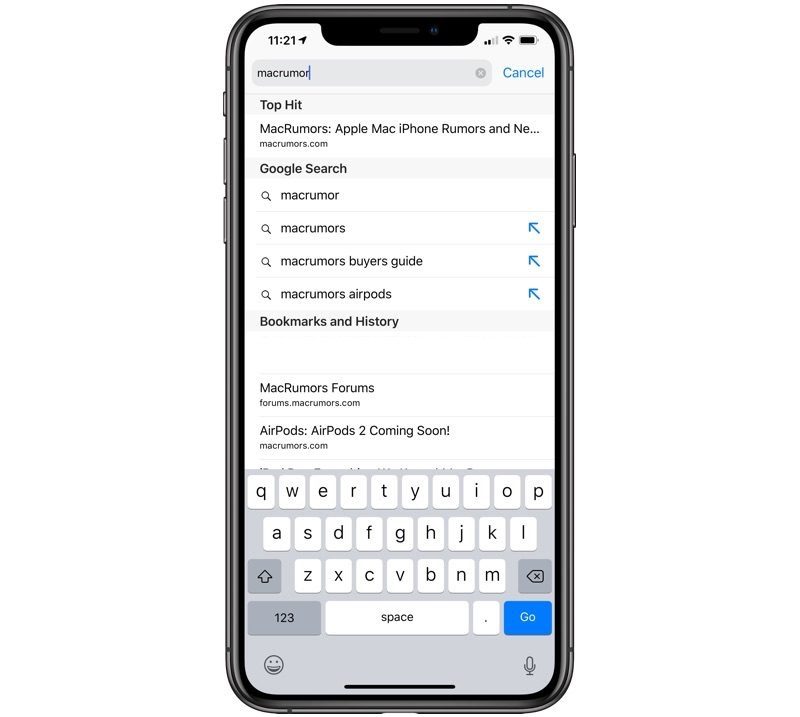
Search suggestions are pretty useful for short search queries. However, for longer queries it can be annoying. Say you wanted to search for "How to sell an iPhone on eBay." As you type, the results would show up as "How to," "How to sell," "How to sell an iPhone," and finally "How to sell an iPhone on eBay." To search what you wanted, you'd have to type all of that out. However, with new search options coming in iOS 12.2, you can tap on the arrow next to the search suggestion to complete your current query. This would help typing out searches in Safari. It's been a feature in many other apps, like YouTube and Google Chrome, so it's nice to finally see the native iOS browser get this treatment.

Image Credit: MacRumors

Saturday, January 26, 2019

New iPod Touch All But Confirmed

Thanks to Steve Troughton-Smith on Twitter, we now have evidence that a new iPod Touch is in the works. Datamining iOS 12.2 shows that a new iPod Touch has been listed. Interestingly enough, the iPod Touch does not seem to feature Touch ID nor Face ID. This begs the question if it will be a notched-iPod without Face ID? I could definitely picture it, as the iPod Touch has never had any alternative to using a passcode for security. If so, this would be a great way for Apple to offer an iPod Touch that's distinct from iPhone, yet much cheaper.

Thursday, January 24, 2019

iOS 12.2 Adds Support for New Smart TVs

Apple recently announced that select popular TVs will be compatible with AirPlay 2 and HomeKit. HomeKit will add this functionality in iOS 12.2, which had its first beta released today. Usually, we can expect the golden master to release a little over a month later. Most of these TVs will be expected in Spring of 2019. It will be interesting to see what controls are introduced in the Home app.

Sunday, January 20, 2019

How to Setup Cellular on an Apple Watch

The Apple Watch Series 3 introduced cellular connectivity for Apple Watch. Because the Apple Watch is so dependent on your iPhone, you need your iPhone to enable cellular. Your watch will have the same phone number as your iPhone, so any calls you'd normally receive on your iPhone will also be on your Apple Watch, should your watch be out of range from your iPhone. All you need to do is go through the Apple Watch app, tap Cellular on the "My Watch" tab, and follow your carrier's instructions. While Apple advertises a $10/month cellular plans, some carriers may deviate from that. In addition, many carriers have a one time activation fee.

Friday, January 18, 2019

Microsoft Recommends Alternatives to Windows 10 Smartphones

It's hard to look back on, but Windows 10 phones used to be the third most popular smartphone platform, behind iOS and Android. Granted, they had such a small amount of the marketshare, 3rd place isn't saying much. They have since been discontinued. However, their support window will end on December 10, 2019. In a support document, Microsoft states that they "recommend that customers move to a supported Android or iOS device." While it's easy to call it a failure now, you can't blame Microsoft for wanting to bridge the same continuity that Apple did between macOS and iOS. With such a large marketshare for Windows, a Windows phone wasn't the craziest idea.

Sunday, December 30, 2018

The Problem with Multitasking on iPad

iPad multitasking before iOS 11 was simple and to the point. Swipe left from the right edge of the screen to reveal an iPhone-sized second app. Swipe from the top to pick a different app. It wasn't perfect but it got the job done. Probably the most annoying thing with it was that you have to scroll through the app selection, instead of having them all on one page, but everything else felt solid. Now, you have this terrible system where you slide up from the bottom of the iPad. But, not too quickly, otherwise you'll close your current app. That is terrible design philosophy. Power users are the prime demographic for multitasking and you're telling me I have to slide up slowly? Then, tap and hold on an app in the dock, wait for it to hover, and drag it over to the right side of the screen. This feels so cryptic. It's like finding a hidden room in the original Legend of Zelda. How was I supposed to know that specific action would accomplish this? The difference with this is that video games are fun to explore every nook and cranny. You shouldn't have to do that with a mobile operating system. Hopefully, in iOS 13, we see a complete overhaul of this system. It's simply unacceptable.

Saturday, December 29, 2018

The Problem with Control Center

Control Center has changed constantly over the past few years. It used to be simple. Swipe up and toggle Wi-Fi or something. Later, you'd have to swipe over a page to control volume. Then that was scratched and we have the tile view we have today. On the iPhone X and later, along with all supported iPads, you have to swipe down from the top-right corner of the screen to get to Control Center. But on iPhone 8 and earlier, you have to swipe up from the bottom. While change can be hard to accept for some, I think we can all agree that change is easier to swallow when it's a consistent change. iPads have no notches, so it seems weird that only iPhones with notches follow the new swipe down rule. What's worse is that iPhone 8 and earlier owners are likely unaware of this change, so if Apple makes it consistent now, between major updates, there will be riots in the streets. Apple needs to make sure that iOS has a consistent ruleset across all devices.

Tuesday, December 25, 2018

Tips for Your New iOS Device

If you just got a new iOS device for Christmas, be sure to follow these tips to get the most out of your new device.

If this is your first upgrade in a while, remember that there are more features than what is advertised for your device. The iPhone 7 introduced water-resistance and better speakers. The iPhone 8 introduced wireless charging. The iPhone X has portrait mode and two cameras in all models. Be sure to see what's changed since your last iPhone.

If you like starting fresh, rather than restoring from a backup, check the Apple App Store for some new apps. Their front page and collections are great starting points and can help you find apps you never knew you needed. I recommend 1Password and Deliveries for starting out fresh.

Finally, take note of the devices your old iPhone interacted with. For example, Bluetooth devices may need to be repaired. Your car will likely keep searching for your old phone. Bluetooth speakers will need repairing as well. However, AirPods will automatically connect to your new device, as long as it shares your Apple ID.

Wednesday, December 19, 2018

Apple Sending Unsolicited Notifications

One of Apple's guidelines for notifications is that developers may not use them for advertising or promotional purposes, however, it seems that Apple's own Music app is now guilty of that. Many users have reported getting notifications regarding new episodes of Carpool Karaoke and Amazon Echo support for Apple Music. Not all users got these notifications, but many of those who did were upset. iOS has always been free of ads on the base operating system, and to see an ad for something like Carpool Karaoke can easily be seen as a desperate attempt by Apple to get more people to watch the show. Apple needs to ensure that their entire team is aware of their own guidelines and find better ways to communicate their marketing materials.