Most of the time, the zoom limit in the Photos app is not a big deal. However, there are times where I'd like to zoom in more without flooding my camera roll with screenshots. Thanks to iDownloadBlog, there is an easy glitch that will allow unlimited zoom. Simply pick a photo, tap "Edit", select the crop icon, and rotate the photo 90° in any direction. You should now be able to zoom in without any limits. You can also rotate the photo into any orientation and have the same effect. Exiting the app or switching photos will cause the make it so that the glitch must be done again. Note that this glitch requires iOS 9.3.2 or the beta of iOS 9.3.3.
Showing posts with label iOS 9. Show all posts
Showing posts with label iOS 9. Show all posts
Tuesday, May 31, 2016

Thursday, April 28, 2016
CareKit Now Available
While it's currently only available for four apps, CareKit officially launched today. CareKit is a new Apple API that allows users to share their medical information to their doctors. This allows for real time tracking and daily reports. Patients can look at their own progress over time. Hopefully, we'll see CareKit expand into more apps in the future that are more centralized for overall health.


Wednesday, April 6, 2016
Ability To Hide Included iOS Apps Coming Soon
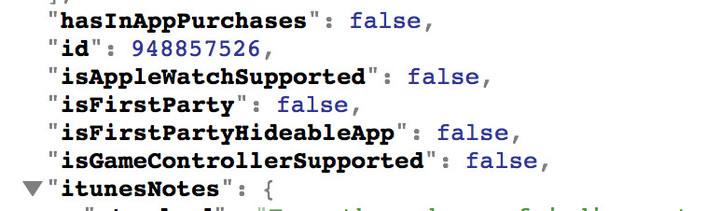
iTunes metadata suggests that the ability to hide built-in apps from iOS will be available in a future update, according to AppAdvice. In the App Store, there are two new attributes for apps. The first one is named "isFirstParty". This one seems self-explanatory, but the more important one is the second attribute. It's named "isFirstPartyHideableApp". This would be assigned true for apps that are built-in to iOS and that can be hidden. This being said, it would make sense for first-party apps to have the ability to be hidden. This has been a long requested feature by iOS users.
 |
| Image Credit: AppAdvice |
Monday, March 21, 2016
Let Us Loop You In: The Scoop
While today's Apple event was a short one, only 63 minutes, it did have some interesting things. After school when I first saw what was announced, I was a bit disappointed to only see rehashed versions of already existing products like the iPhone SE and the iPad Pro.
But you do have to consider the most important business practice of all time, and that is timing.
You could have the greatest innovation, but if it isn't timed properly, it won't work. Take YouTube for example. There were many other companies with their own video services before YouTube, but they didn't take off because of timing. Dial up was slow and the internet wasn't ready for Markiplier and dank memes. The same goes with Apple and today's event. You shouldn't expect a new generation of products during a Spring launch. Apple has shifted away from Spring launches, with the exception of the Apple Watch. Apple very well knows that the holiday season is their time. That is the time when they should time their new generations.
Today was just a refresh. Evolving the iPad Air 2 (which was long overdue for an update) into the iPad Pro and proving that a good iPhone can be both budget-friendly and up-to-date. See Apple? This is what we wanted when you released the iPhone 5c! We wanted Johnny Ive on a budget, not a phone made in a 3D printer.
So, with that said, let's go over today's events.
iPad Pro
As I said earlier, today was a refresh day, so you really can't go into too much detail in terms of what's new. However, the new iPad Pro does bring more continuity with the Mac line of products. Apple is now advertising the iPad Pro as coming in two sizes. Sound familiar? Similar to the MacBook Pro and MacBook Air line, iPads now come in multiple sizes under one name. The new 9.7 inch iPad Pro can do pretty much everything the big iPad Pro can do. It's even getting its own Smart Keyboard case.
iPhone SE
Now we come to the little smartphone that could, the iPhone SE. I'll admit, I thought this was going to be an awful release when I first heard about it. But when the details and specs came out, I was astonished. It had all of the internals (with the exception of 3D Touch) of the current iPhone 6s. It had a 12 MP camera, Rose Gold color option, A9 chip, Live Photos, and support for the latest iOS. It succeeds where the iPhone 5c failed, proving that Apple did learn from their mistake. Guess how much (with a two-year contract) the iPhone SE costs for a 64 GB model. $49. Boom! And for the 16 GB model, it's free with a contract. Heck, that makes me want to get one as a developer phone.
Anyways, those were the bulk of the presentation. There were some software updates, Apple Watch bands, and a new thing called CareKit, but other than that, that was it. Oh, and Apple's 40th anniversary. So be sure to check out Apple's website for more information on the keynote.
Sunday, March 20, 2016
What I Could Dig Up: Let Us Loop You In
Here's a quick roundup of rumors for tomorrow's Apple Event entitled, "Let Us Loop You In."
iPhone SE
- Similar to iPhone 5s in design
- Up to date processors
- No 3D Touch
iPad Air 3
- Regular sized iPad Pro
- Compatible with Smart Keyboard and Apple Pencil
- Possible retiring of the "iPad Air" naming convention
- Could be named "iPad Pro"
- Similar design to iPad Air 2
- Starts at 32 GB for $599
Apple Watch Bands
- New color variations
- Sport Band
- Modern Buckle
- Leather Loop
- New Nylon Apple Watch Band
- Space Black Milanese Loop
iOS 9.3
- Night Shift
- More Quick Actions (3D Touch)
- New Health App
- Activity from Apple Watch
- Third party apps list shown in charts
- Password protected notes
- Apple School
watchOS 2.2
- Multiple Apple Watches to one (Developer only?)
- Revamped Maps app
- Quickly access home and work directions
- Search Nearby
OS X 10.11.4
- Performance improvements
- Password protected notes
- Import Evernote notes into Notes app
- View Live Photos in the Messages app
tvOS 9.2
- Supports Bluetooth keyboards and Dictation
- Folders for apps
- New Multitasking view
- Improved Photos App
- Support for iCloud Photo Library
- Live Photo Support
- Ask Siri to search for apps in the App Store
- MapKit support
Wednesday, March 2, 2016
Night Shift Disabled In Low Power Mode
Anyone who has used Low Power Mode in iOS 9 may find it really annoying. Having your phone go to sleep after 30 seconds can get really annoying depending on the situation. Well, Night Shift, a feature coming soon in iOS 9.3, will actually be disabled during Low Power Mode. This is kind of interesting. Night Shift is made to limit the amount of blue light the screen emits to help your circadian rhythm. This is leading to some complaints as Low Power Mode and Night Shift are features that would typically be used at the end of the day. Meaning that users would hope to be able to use both features at the same time. We'll see if this makes it into the final public release.
Monday, February 22, 2016
Apple Disables Most Of Apple Pencil's Functionality In New Beta
In the iOS 9.3 beta, Apple has removed a lot of functionality for the Apple Pencil for iPad Pro. Essentially, you can only use Apple Pencil for drawing. Yes, you can do all those cool things you saw in the official announcement video (i.e. rotation and pressure), but simple functions have been removed. Functions like selecting and swiping have been removed. Why? My best guess is that it's Apple vision to have the Apple Pencil be exclusive for artists. I'm not really cool with this. While I don't own an iPad Pro or an Apple Pencil, I loved the Apple Pencil from the start. I loved that it was a truly universal wireless stylus that worked with any app because it was developed by Apple. A lot of that has been taken away now. That's not how you get the consumer to like your product. They bought your product, Apple. They should expect it to work with simple things like swiping and scrolling, they shouldn't expect these essential features to be removed, and they certainly shouldn't expect this stylus to be a product only useful to artists after being useful for everyone. It should be noted that Apple has been known to remove features and bring them back in their final form.
Tuesday, February 9, 2016
Verizon Wi-Fi Calling To Be Implemented in iOS 9.3
With the release of the iOS 9.3 beta, Verizon Wi-Fi calling has been implemented. When data connectivity is poor, Wi-Fi can be used to improve the quality of calls. I can see this being pretty useful at conventions and urban areas. I've been waiting for this feature for quite a bit, as you'll see in my previous blog posts. Looking back, I first talked about this in November. Talk about a "Throwback Tuesday." Anyways, let's hope to see a golden master version of this beta soon.
Wednesday, January 27, 2016
iOS 9.3: Updating Accessories
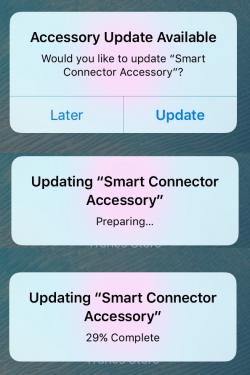
By now, it is clear that the independence of iOS devices from their computer counterparts is in full swing. Apple is now making the iPad Pro able to update accessories in iOS 9.3. For example, a keyboard could potentially be updated, if an update was made, via the iPad Pro. This is actually pretty cool. It opens up the potential for the ability to update all kinds of stuff, if this ability rolls out to other devices, like iPhones. Imagine being able to update your speakers or Wemo switches, without the need for any separate apps. iOS 9.3 is currently in beta, but will probably come out in the coming weeks.
 |
| Image Credit: MacRumors |
Wednesday, January 13, 2016
iOS 9 Is Now Installed On 75% of iOS Devices
After four months, iOS 9 is now installed on 75% of active iOS devices. For scale, this is faster than iOS 8 adoption, where it would've been at 68% of active iOS devices. This is just slower than iOS 7 adoption, as it would've been at 79%. Apple said that when iOS 9 adoption hit 50% in its first month, it was the fastest adoption iOS in history. iOS 9.3 is going to come out in the coming weeks hopefully, so there's another reason to upgrade.


Monday, January 11, 2016
iOS 9.3: Night Shift
Apple released the beta of iOS 9.3 today to developers. One of the new features is called Night Shift. It reduces the amount of blue light the screen emits. Blue light is known to make it harder to fall asleep. iOS will enable Night Shift when it is sunset in your area. And knowing how strained my eyes can get while looking at my iPad's screen on a late night, I am looking forward to this feature.


Tuesday, November 10, 2015
Request Desktop Site: iOS 9
Earlier this year, I talked about how you can request a desktop site from an iOS device. This would let you view the desktop version of a site on your iOS device for many sites. In iOS 9, that's changed. To do it now, you'll have to hold the refresh button down until the option appears to "Request Desktop Site." I hope this helps!
Wednesday, October 28, 2015
Walgreens Becomes First Apple Pay Loyalty Program
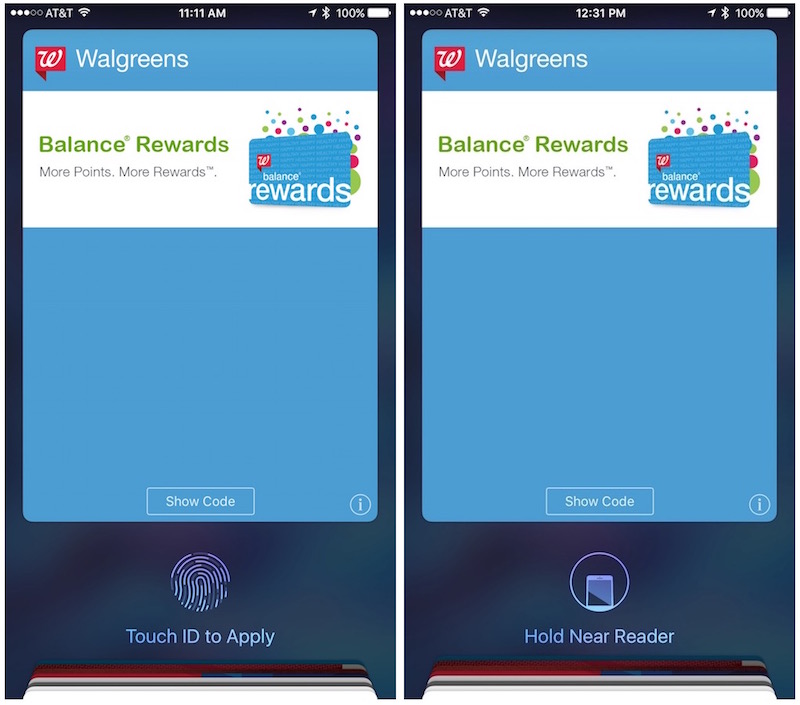
Implementing one of my most anticipated features for iOS 9, Walgreens is now supporting Apple Pay's new loyalty program. Although not fully implemented, it will essentially let you walk into a Walgreens, use Apple Pay to pay, and your Walgreens card will be sent with your credit card. No barcode scanning required. As for how this will work with Walgreen's acquisition of Rite Aid, I have no idea what will happen, but I assume Rite Aid will carry this over into their stores.
 |
| Image Credit: MacRumors |
Monday, October 12, 2015
Apple Pay Coming To KFC and Chili's
I forgot to mention that full Apple Pay integration will also be coming to KFC and Chili's. I'm not sure if they have any rewards programs, but if they do, they'll probably be getting the same support that Starbucks will get. What's cool is that Chili's will have a small Apple Pay-enabled kiosk that will enable people to pay with Apple Pay from the table and leave without needing to pay an actual person. Let's hope we see more restaurant chains doing this in the near future!
Sunday, October 11, 2015
Apple Pay Coming To Starbucks
Apple Pay is coming to Starbucks, and here's why you should care. At Apple's WWDC event, whenever they talk about Passbook, Wallet, or Apple Pay, it's always a disappointment to see what they talked about isn't available, or at least doesn't function as advertised, at launch with the launch of the next iOS release later that year. However, Starbucks is going to prove this wrong with a fast rollout (hopefully) next year. Let me explain... At WWDC, Apple revealed that you'd be able to hold your iPhone (or Apple Watch) near a compatible NFC reader, and it would pull up any rewards card or coupons for that store. Then, you'd use Touch ID to beam that info to the terminal and it'd be applied to your transaction. Sounds pretty cool, right? Now my hope is that Starbucks will implement this into their system, allowing users to use their Starbucks gift cards to earn Starbucks rewards all via NFC and Touch ID. That's my hope anyways... Apple Pay VP, Jennifer Bailey, says it will support Starbucks Rewards, and she did brag about this feature at WWDC, so I think that's a reliable source. However, we have seen other companies go back on their word to support Apple's services (Adobe, Fitbit, etc.). Anyways, let's hope we get this feature.
Saturday, October 10, 2015
Peek and Pop
With 3D Touch on the iPhone 6s, you can use the new features Peek and Pop. You can use this is in the Messages app (with convos), Mail app (with emails), links, and more! To use Peek and Pop on an eligible item, just press hard on it to Peek and press even harder to Pop. Peek gives you a preview of your content and Pop lets you view it in full screen. In Peek mode, you can swipe up to reveal options, like quick replies in Messages. I hope this helps!
Tuesday, September 29, 2015
Search Settings
In iOS 9, one of the most useful features is the ability to search the settings within the Settings app. To do this, just open the Settings app, and pull down to reveal the search bar. From here, you can type in keywords of what you want to find within the Settings app. They don't even have to be exact search terms. The search uses generalized keywords to find your results, if that makes any sense. You have to try it to understand it... I hope this helps!
Monday, September 28, 2015
iPhone 6s: Speed
With 2 GB of RAM and a better CPU, the iPhone 6s is the fastest iPhone to date. It works fast with iOS 9 and has a consistent fluid experience. One thing I notice about this is that Siri works much faster. I don't typically use Siri because I type faster than Siri dictates on my old iPhone, but I found that she has an immediate response and action ready for me almost instantly. This is useful for me when I need to send out a quick text. The speed of iPhone exemplifies how well software and hardware work together when they're designed together.
Wednesday, September 23, 2015
How Live Photos Work
If you've been curious as how Live Photos work, then this is for you! Live Photos are photos that have embedded movies in them to show seconds before and after the photo was taken. Basically, these Live Photos are saved as a .JPG file as a .MOV file. The .MOV file is a video with 15 fps that is typically takes up less storage than the photo. It's about 66% of the photo's file size. Of course, the photo is a 12 MP shot with much higher resolution. Anyways, that's pretty much what we know about Live Photos so far. The iPhone 6s releases this Friday.
Friday, September 18, 2015
Apple News To Deliver Exclusive, Early Content
Re/code editor, Peter Kafka, tweeted that a Wired article would be available on Apple News today. The article would be available on the rest of the internet on Tuesday. That's four days difference! Hopefully, we'll see more exclusive news on Apple News. This is some of the first that I've heard about.
New Wired feature about "starchitect Bjarke Ingels" exclusively on Apple News 3pm today. Available on Web Tues. pic.twitter.com/BK5za4zflu
— Peter Kafka (@pkafka) September 18, 2015
Subscribe to:
Posts (Atom)