With Mozilla's recent petition to get Apple to change how advertising identifiers are enabled out of box, here's a quick rundown of how to get advertisers to track you less. On iOS, go to Settings > Privacy > Advertising > and enable "Limit Ad Tracking." On macOS, go to System Preferences > Security & Privacy > Privacy > Advertising > and check the box for "Limit Ad Tracking." Every once in a while, I also recommend hitting the "Reset Advertising Identifier" button under the "Limit Ad Tracking" button on both iOS and macOS. This should help limit advertiser tracking.
Showing posts with label security. Show all posts
Showing posts with label security. Show all posts
Monday, April 15, 2019

Thursday, February 7, 2019
Apple Releases iOS 12.1.4 With FaceTime Privacy Fix
As we all know by now, there was a bug discovered in FaceTime where an un-consenting user could have their conversation listened to. After a bit of delay, iOS 12.1.4 was released today, which contains "important security updates." That being said, you will have to update in order to use group FaceTime again. Group FaceTime has been disabled for all iOS versions prior to this update. Be sure to update if you plan to use group FaceTime.
Wednesday, February 6, 2019
Ask Websites Not to Track Me
In the latest beta of Safari, for both iOS and macOS, a setting labeled "Ask Websites Not to Track Me" was removed. This setting has been around since 2011, but there's an interesting story as to what this actually does. The FTC proposed a setting that would request websites to not track the client browser. The only problem was that websites and its advertisers did not have to comply with this request. This setting is actually more of a security threat than anything in today's world, which is why it is being removed. Because advertisers can build a digital profile of you based on browser settings and other variables, this one setting could be used to add to that digital profile. A massively simplified example would be if Facebook noticed that a browser was searching for dog videos, and that browser was based in Anytown, USA, with macOS 10.11.3 and is requesting websites not to track them. It's that much easier to guess a person's digital identity through browser variables alone. It's truly ironic that this mechanism meant to prevent tracking only facilitated it even more.
Thursday, January 31, 2019
Google Also Incentivized Users to Install Their Data Collecting App
This has been a terrible week for data privacy. Which is very ironic considering Data Privacy Day was this week on January 28, 2019. Apple had their FaceTime bug and Facebook paid users to install a data-hungry VPN. It turns out that Google was doing the exact same thing as Facebook, which does not surprise me at all [Source: TechCrunch]. Google had an app called Google Screenwise which gave gift cards to users who shared their internet traffic with Google. Google has apologized for this, but it is harder to take companies like Facebook and Google seriously when they get caught like this. It begs the question, how often do they not get caught? It's important to remember that with Google, you are the product. It's not like Amazon where it's clear where the bulk of a company's income is from. You rarely see Google ever bring up money.
Google apologizes for placing the app under Apple’s developer enterprise program pic.twitter.com/ktYoiFtCUU— Richard Nieva (@richardjnieva) January 30, 2019
Tuesday, January 29, 2019
Facebook Paid Users to Install a VPN
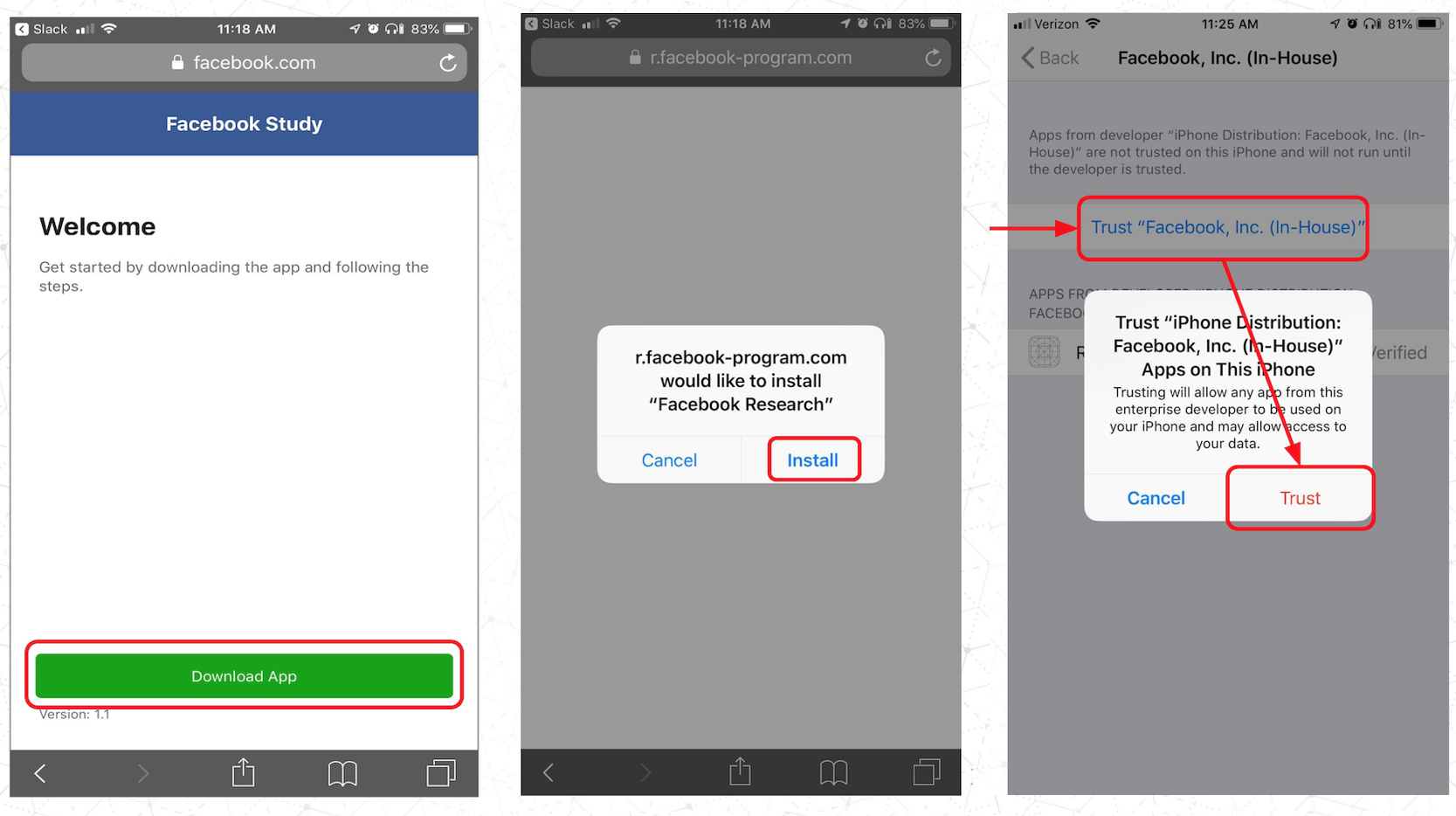
Facebook has a terrible reputation in the privacy department. They have made themselves very clear that they are hungry for data last year. They didn't help their case by making an Alexa competitor with a camera. Now, it seems that they are at it again. According to TechCrunch, Facebook paid select users $20 a month to use their VPN, under the name "Project Atlas." You have to figure if Facebook can afford to pay each user $20 a month, they make way more in exchange. Users were aged between 13 and 35 years old. This VPN essentially gave Facebook access to some of the most personal data of the users involved. It's very scary when a company starts doing something like this.
 |
| Image Credit: TechCrunch |
Thursday, January 17, 2019
Collection #1 Breach
As we invest more of our time and resources into technology, more is at stake with each digital footstep we take. Unfortunately, we've had one of the biggest data breaches in history today. Troy Hunt, a security researcher who works on the site Have I Been Pwned, broke the news of a data breach he calls Collection #1. This collection has a total of 1,160,253,228 unique combinations of emails and passwords. At this point, I recommend you enter your emails into Have I Been Pwned to see if your email was found on a breached site. Even if your email or password wasn't found on a breached site, you should change your password regardless. This breach is believed to be totaling 87 GB of usernames and de-hashed passwords. Brian Krebs says that there are likely more breaches on the way that could total 1 TB of data.
Sunday, December 16, 2018
3D Printed Head vs. Facial Recognition
Forbes used a 3D printed head in an attempt to fool various smartphones with facial recognition. They used an iPhone X, an LG G7 ThinQ, a Samsung S9, a Samsung Note 8 and a OnePlus 6. Every Android phone of the bunch opened up to the 3D printed head, but the iPhone X remained locked. While facial hacking isn't something most people should worry about, it does speak volumes of Apple's TrueDepth system.
 |
| Image Credit: Forbes |
Tuesday, November 27, 2018
DriveSavers' iOS Unlocker
The latest device that can unlock your iPhone has arrived. Earlier this year, there was the GrayKey box, which was advertised to law enforcement. Now we have DriveSavers, who have released a product that can unlock an iPhone marketed towards consumers. It works on iOS, in addition to Android, Windows, and Blackberry products. While Apple may patch out this device's usability, it's doubtful a company like Blackberry would, so it would still have some use. The device is priced at about $3,900 and is for device owners only.
Saturday, October 20, 2018
macOS Mojave Notorization
With the Mac App Store unable to compete with website distribution of macOS apps, Apple has created a program that will notarize apps. Similar to how Mac App Store apps must be approved before being published, notarizing a macOS app not on the Mac App Store will help give users piece of mind knowing the software isn't malicious. The software will be reviewed by Apple. Especially after some apps were found to be using computer power to mine for cryptocurrency earlier this year, it would be nice to have apps that followed this review process. It's totally optional for developers, but it doesn't hurt to try it.
Saturday, September 29, 2018
Attempts to Avoid Vulnerabilities
I've been looking at various forums and comment sections after a new vulnerability was discovered in iOS 12 (it's not that serious in my opinion and will likely be patched soon). A few people say they disable Control Center on the lock screen thinking that will prevent a thief from enabling Airplane mode. Enabling Airplane mode would make your iPhone untraceable on Find my iPhone. However, this is redundant as they could either turn off the iPhone and take out the SIM card to prevent any data from being uploaded over cellular. Locking them out of Control Center does very little. The same goes for disabling Siri on the lock screen. I believe that the benefits of being able to access Control Center and Siri on the lock screen outweigh the potential risk. Regardless, that's just me. But most thieves know to steer clear of stealing iPhones unless they're looking for scrap parts to sell. As soon as they steal an iPhone, they've just stolen a very expensive paperweight and nothing more. Not every person should feel like they're a target for having their iPhone stolen.
Wednesday, May 9, 2018
iOS 11.4 Finds Slight Workaround for GrayKey
Found by Elcomsoft, the iOS 11.4 beta has an interesting workaround for GrayKey, the box that can unlock an iPhone. After seven days of not being unlocked or being connected to a paired computer, the iOS device will limit its Lightning port's capabilities. It will only be able to charge, with no data through the port being allowed until the iOS device is charged. This puts a time limit on how long GrayKey has to unlock the iOS device. This is a clever workaround. I think seven days is a bit generous given how often people use their phones.
Thursday, May 3, 2018
Twitter Password Bug
Twitter is suggesting to its users that they change their passwords due to a bug that stored passwords in plain text on Twitter's internal servers. Before anyone freaks out, this is a precautionary step. There is no reason to believe your password is compromised. The password never left Twitter's internal servers. That being said, changing your password on Twitter and any account that used the same password is a helpful way to ensure security.
Monday, April 16, 2018
Why You Shouldn't Worry About GrayKey Box
GrayKey Box has been making the news lately. GrayKey Box is a device that can unlock an iPhone. It has been heavily marketed to police forces. Suddenly, you have clickbait articles telling you to change your passcode to alphanumeric. Relax. Let's get two things straight. First, as a regular law-abiding citizen, there's no reason to believe your phone will be confiscated. But more importantly, GrayKey Box has no promise of being future-proof, as a single update from Apple could close this backdoor. In addition, these cost $15,000 for the base-model, and $30,000 for the enhanced model. A regular thief won't have access to this. So, don't worry. Your iPhone is as secure as it always has been.
Wednesday, February 28, 2018
Apple Releases Support Document on Identifying Phishing Emails
In the past few years, some of my friends and family have shown me emails asking me if they're from Apple. I've seen really well and really poorly crafted emails. Needless to say, these can be common. Even legitimate emails can be worrying. Luckily, Apple has released a support document about how to identify phishing emails posing as Apple. It states that genuine purchase receipts will always have your current billing address. In addition, if you find a phishing email, you should report it to reportphishing@apple.com.
Wednesday, January 24, 2018
A Dimminishing Need for Anti-Virus
Before you raise your pitchforks, I’m not suggesting you delete your anti-virus software. I’m just stating that it’s less important now than it was 10 years ago. When McAfee reigned supreme, the biggest worry was having your computer hit with some form of virus. However, the computer evolved and society did with it. Our important stuff is in the cloud, not on local drives. Everything important is with us, but only protected by a username and password. That’s why people are getting more worried about hacks on our internet accounts and not about viruses these days. It’s also why I try to limit how many accounts I’ve created, although at this point, it doesn’t matter for me, since they’re inevitable. If I use the same combination on a site that could easily be hacked, it’s easy to gain access to a site that wouldn’t be easy to hack. That’s why we need to have two-factor authentication on as many sites as possible. That’s what anti-virus has evolved into.
Wednesday, January 10, 2018
Strange macOS Password Bypass
There is a very minor and non-threatening security flaw in the latest version of macOS that Apple let slip. If you go to System Preferences, find App Store, and attempt to unlock to make changes, you can type any password into the password field. Anything. Thank goodness this is just contained in this section. While it's a security flaw, I should note that the most you can do here is change if apps are updated automatically and how long until an App Store password is required after typing in a password. For many, you probably had to re-lock the padlock to test this out.


Monday, January 8, 2018
iOS and macOS Updates Issued for Spectre Exploit
If you have the chance tonight, I highly recommend updating your phones for a crucial security fix for the Spectre and Meltdown exploits. These can manipulate the CPU and potentially expose sensitive data. This is iOS 11.2.2 and macOS 10.13.2. While I don't believe everyone is at risk, it's better safe than sorry. For iOS, it's a simple 70 MB download, so it should install fairly quickly. For iOS, just go to Settings > General > System Update and for macOS, open the App Store and find the Updates tab.
Friday, October 13, 2017
Avoiding Apple ID Phishing
There is an easy way for malicious developers to request Apple ID credentials while looking completely legitimate. Simply display a prompt with the exact text the legitimate prompts would have. This isn't something you should be constantly worried about since these apps are rare and likely won't come from popular apps. Felix Krause wrote an excellent article about this topic. In short, to verify these popups are legitimate, just press the home button. If you exit to the Home Menu, it's a hoax. If nothing happens, it's legitimate and from the system. This is the best way to ensure you're not a phishing victim.
 |
| Image Credit: Felix Krause |
Saturday, August 19, 2017
iOS 11 Fixes Passcode Exploit
Apple will fix the world's dumbest passcode bypass in iOS 11 [Source: TechCrunch]. Do you have $500 you feel like burning? Just buy this passcode guessing box and follow these extremely conditional steps. Take a pre-iOS 11 iPhone and plug it into the box. Make sure the passcode was changed in the past 10 minutes. Also, the passcode should only be 4-digits long. Yeah, Apple fixes that in iOS 11.
Tuesday, August 15, 2017
The Issue with Smart Locks
Everything in the home is becoming tech-enabled, including door locks. Door locks is a bit too much, even for me. Before you buy a smart lock, read this first and determine if they're right for you. Consumer Wi-Fi-enabled locks are what keep your home secure, should you install one. While I don't believe hacking to be a concern, because it would have to be specifically targeted towards you. That being said, I don't think the convenience is worth the sacrifice of security. In addition, if you have an Amazon Echo or similar device (even an iOS device) near an open window, it could potentially hear commands from outside. Since these devices can control smart devices, including smart locks, that could be an unintended security hole. With this in mind, choose wisely if a smart lock is right for you.
Subscribe to:
Posts (Atom)