Apple released another iPhone ad showcasing Siri's features. This one shows Neil Patrick Harris practicing his thank you speech by asking Siri to read him a note. It's another pretty funny ad by Apple. The combination of watching Harris use a hairbrush as a microphone and mouth out his speech while Siri recites it is priceless. The video is embedded below.
Showing posts with label iPhone 6s Plus. Show all posts
Showing posts with label iPhone 6s Plus. Show all posts
Monday, May 9, 2016

Monday, April 25, 2016
Fingerprint and 4K Ads
Today, Apple released two ads about the iPhone 6s. The first one is about Touch ID. It shows how many different things you can do with your fingerprint. For example, opening a physical lock, unlocking a car, and signing a document.
The second ad is about the 4K camera on the iPhone 6s. It's about a girl who shoots a 4K video of her mother cutting onions. The video ends up being so good that everyone goes crazy over it and the short clip gets turned into a feature film. That ad is below.
Wednesday, March 16, 2016
Apple Releases Timer Ad With The Cookie Monster
Apple released a new ad starring the Cookie Monster from Sesame Street. It depicts the Cookie Monster setting a timer for his cookies with the "Hey Siri" function. Next, he goes through a montage of crazy antics while waiting for his cookies to bake. After all of that, he checks back on the timer to find that only a minute had passed. Anyways, the video is embedded below if you'd like to watch.
Tuesday, March 8, 2016
Google Photos Supports Live Photos
It's interesting to see that Apple's biggest competitor supporting an iOS exclusive feature on their platform. Of course, I'm talking about Live Photos. In an update today, Google Photos now supports Live Photos, allowing iPhone 6s users to store their moving mementos in Google's cloud. As far as I know, Android has no equivalent of Live Photos. Google Photos is available for free from the Apple App Store [Direct Link].
Wednesday, February 17, 2016
Apple Releases New 3D Touch and Live Photo Ads
Today, Apple released two more, very funny, advertisements about the iPhone 6s. These two are about 3D Touch and Live Photos. I think I can vouch for Apple when they said that Live Photos of cats are a great use of Live Photos. Best lock screen ever. Anyways, the videos are embedded below.
Thursday, January 14, 2016
OS X 10.11.4 Beta Improves Live Photo Support
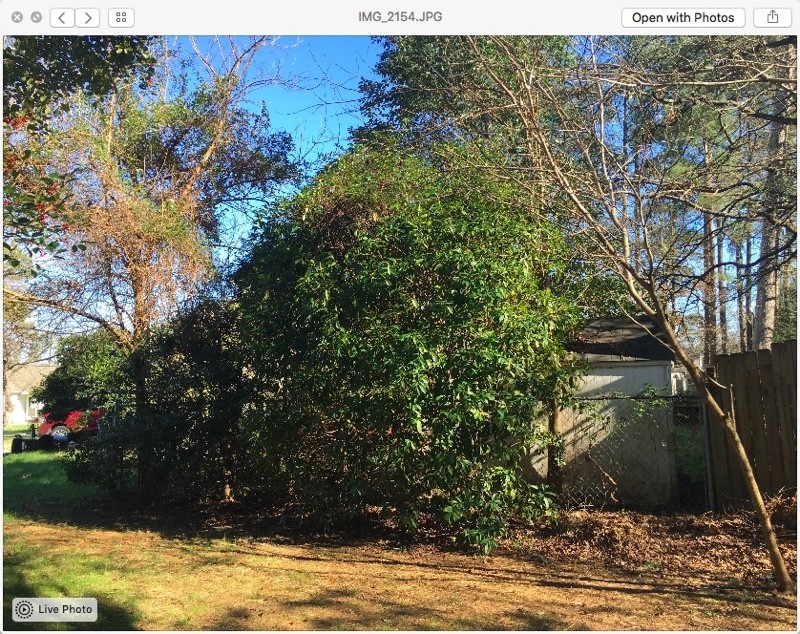
iOS 9.3 and OS X 10.11.4 betas were released the other day to developers and we now have an idea of where Apple wants to take their operating systems in the coming weeks. Live Photos were a big deal for Apple, but in OS X, they were only viewable in the Photos app. This changes with OS X 10.11.4. They are now viewable in the Messages app, which, in theory, is where you'd see most of your Live Photos (aside from the Photos app). Just use the Live Photo icon in the photo you receive.
 |
| Image Credit: MacRumors |
Monday, December 14, 2015
Samsung Galaxy S7 Will Feature 3D Touch-Like Display
The iPhone 6s introduced a new feature called 3D Touch. It's a very handy feature that I often find myself using. According to The Wall Street Journal, Samsung is going to "implement" the same technology in their next flagship smartphone, the Samsung Galaxy S7, which hasn't been announced yet. If you remember, the Samsung Galaxy S5 (5s backwards), "implemented" the iPhone 5s' Touch ID feature. The Samsung Galaxy S7 is expected to be announced in February, so we'll see how this plays out then.
Saturday, December 12, 2015
BOGO Free AT&T iPhone 6s
AT&T is currently offering until the end of the year a buy one get one free promotion for the iPhone 6s. This is only for AT&T Next customers. So, if you get an iPhone 6s or iPhone 6s Plus on AT&T Next, you'll receive a second iPhone 6s with 16 GB of storage. To learn more, go to the official AT&T site (Note: The link goes to the Samsung S6 Promotion, but it works with iPhone 6s as well.).
Sunday, November 22, 2015
Rose Gold Beats
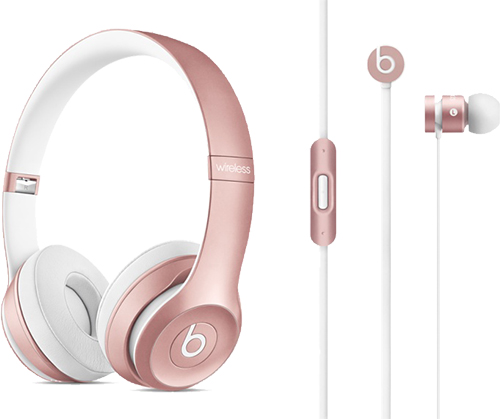
When the iPhone 6s came out in Apple's newest trademark color, Rose Gold, I was curious if Apple would update their Beats line to add the new color. After all, Beats come in Space Gray, Silver, and Gold. Well, now Beats Solo2 Wireless (headphones) and urBeats (earphones) come in Rose Gold. So now you On-Ear can have matching Beats for your iPhone 6s, even if you have Rose Gold! The Beats Solo2 Wireless Headphones cost $299.95 [Direct Link] and the urBeats In-Ear Headphones cost $99.95 [Direct Link].

Thursday, November 19, 2015
100 Million iPhones In Use
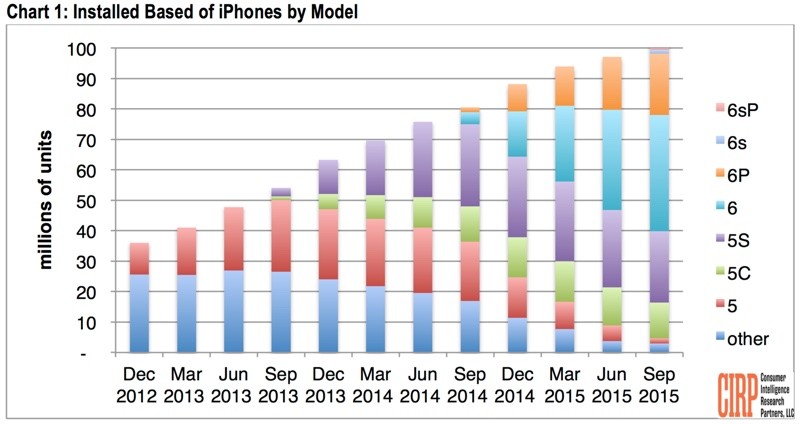
According to Consumer Intelligence Research Partners, 100 million iPhones are currently in use. Not just sold, but in use. About two-thirds of these iPhones are composed of iPhone 6 models and later. This means that two-thirds of current iPhone users have a larger screen, have access to Apple Pay, and have the lock button on the side of the phone. The chart is below and shows data as of September 2015.
 |
| Image Credit: CIRP |
Wednesday, October 28, 2015
Walgreens Becomes First Apple Pay Loyalty Program
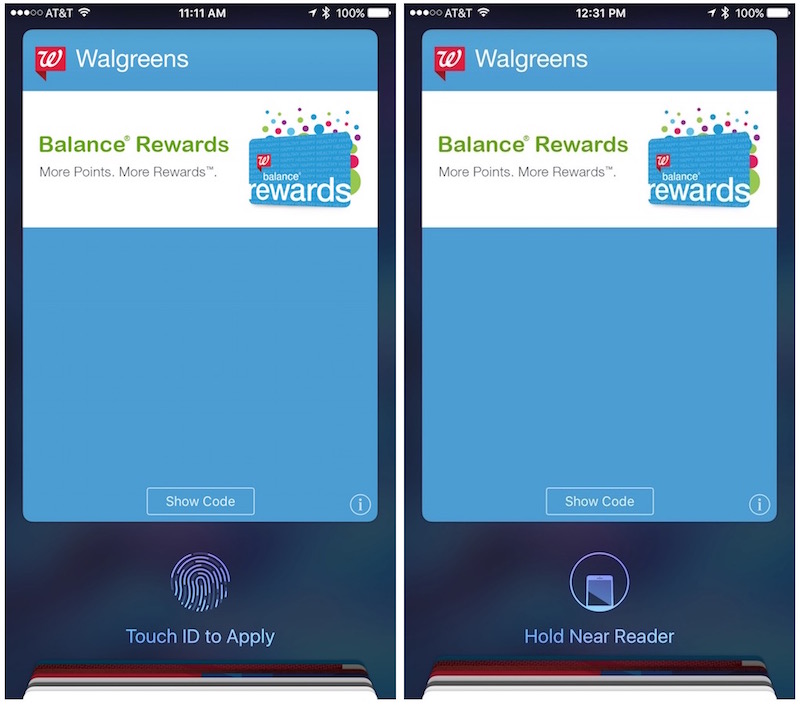
Implementing one of my most anticipated features for iOS 9, Walgreens is now supporting Apple Pay's new loyalty program. Although not fully implemented, it will essentially let you walk into a Walgreens, use Apple Pay to pay, and your Walgreens card will be sent with your credit card. No barcode scanning required. As for how this will work with Walgreen's acquisition of Rite Aid, I have no idea what will happen, but I assume Rite Aid will carry this over into their stores.
 |
| Image Credit: MacRumors |
Tuesday, October 27, 2015
Apple Releases iPhone 6s Ad Starring Bill Hader
Apple released another ad for the iPhone 6s today. This time starring Bill Hader. It shows him using the "Hey Siri" feature to have Siri read his unread emails. Siri reads him a spam email sent to his inbox asking for an investment from Prince Oseph (Don't try this at home kids!). He then replies with "Sign me up!" The video is embedded below.
Friday, October 16, 2015
Apple Store 3D Touch Table
In only the flagship San Francisco and New York Apple Stores, Apple has a new 3D Touch table. It basically shows an image of a surface of water, while the iPhones on it show an interactive fish. Force touching the screen creates ripple effects on the water. To see what I mean, check out the video below (Credit Grate App).
Thursday, October 15, 2015
iPhone 6s Ad - 3D Touch
Today, Apple released a new ad for the iPhone 6s centered around the 3D Touch feature. It shows how you can use Peek and Pop to preview links, flight information, and more. The video is embedded below.
"This is iPhone 6s. Not much has changed, except it feels different. Now you press lightly to peek and deeper to pop. It changes how easily you can peek a flight, check a post, search for dinner - ooh, you guys are going to love that place. You can find a getaway easier - Yeah, go there. And find music easier - wait, are you listening to your own song? So pretty much everything you do feels different and that's what's changed."
Monday, October 12, 2015
Apple Pay Coming To KFC and Chili's
I forgot to mention that full Apple Pay integration will also be coming to KFC and Chili's. I'm not sure if they have any rewards programs, but if they do, they'll probably be getting the same support that Starbucks will get. What's cool is that Chili's will have a small Apple Pay-enabled kiosk that will enable people to pay with Apple Pay from the table and leave without needing to pay an actual person. Let's hope we see more restaurant chains doing this in the near future!
Sunday, October 11, 2015
Apple Pay Coming To Starbucks
Apple Pay is coming to Starbucks, and here's why you should care. At Apple's WWDC event, whenever they talk about Passbook, Wallet, or Apple Pay, it's always a disappointment to see what they talked about isn't available, or at least doesn't function as advertised, at launch with the launch of the next iOS release later that year. However, Starbucks is going to prove this wrong with a fast rollout (hopefully) next year. Let me explain... At WWDC, Apple revealed that you'd be able to hold your iPhone (or Apple Watch) near a compatible NFC reader, and it would pull up any rewards card or coupons for that store. Then, you'd use Touch ID to beam that info to the terminal and it'd be applied to your transaction. Sounds pretty cool, right? Now my hope is that Starbucks will implement this into their system, allowing users to use their Starbucks gift cards to earn Starbucks rewards all via NFC and Touch ID. That's my hope anyways... Apple Pay VP, Jennifer Bailey, says it will support Starbucks Rewards, and she did brag about this feature at WWDC, so I think that's a reliable source. However, we have seen other companies go back on their word to support Apple's services (Adobe, Fitbit, etc.). Anyways, let's hope we get this feature.
Saturday, October 10, 2015
Peek and Pop
With 3D Touch on the iPhone 6s, you can use the new features Peek and Pop. You can use this is in the Messages app (with convos), Mail app (with emails), links, and more! To use Peek and Pop on an eligible item, just press hard on it to Peek and press even harder to Pop. Peek gives you a preview of your content and Pop lets you view it in full screen. In Peek mode, you can swipe up to reveal options, like quick replies in Messages. I hope this helps!
Friday, October 9, 2015
Buy iPhone 6s SIM-Free
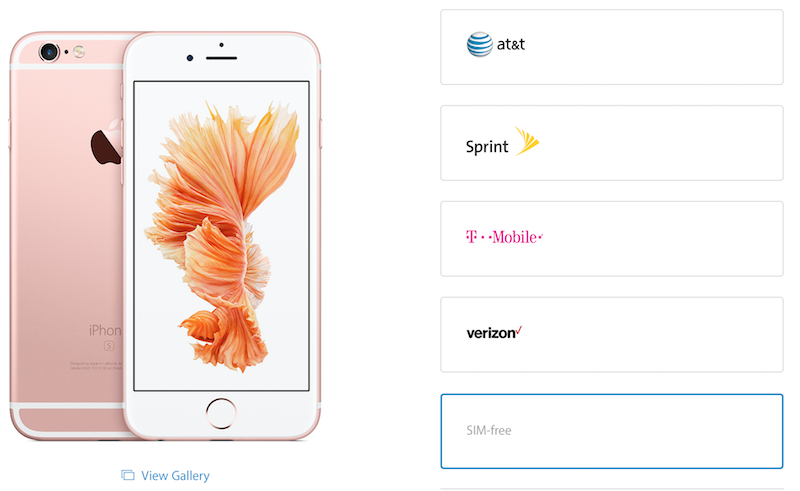
If you want to buy iPhone 6s without a SIM card, now is the time! You can buy an iPhone without a carrier from the Apple Online Store. This is useful for people who travel to different countries a lot. It's also good for people who want to choose their own carrier and those who don't want to worry about commitments with carriers. You do have to pay full price since it's not with a contract. You can buy a SIM-free iPhone 6s from the Apple Online Store.
 |
| Image Credit: MacRumors |
Wednesday, October 7, 2015
How To Remove Live Photos
If you took a photo on your iPhone 6s and you wanted to remove the Live Photo (video portion) of it to, for example, save space, here's how to. Just find the photo you want to remove it from, select it, tap "Edit," and tap the circle icon in one of the corners of the screen (depending on how your phone is orientated). This will remove the Live Photo part of the photo. I hope this helps.
Sunday, October 4, 2015
The Best Way to Use Siri
Although Apple is pushing the "Hey Siri" command, I personally thing the best way to activate and use Siri is still through the home button (at least when you're holding it or if it's in close proximity). Just hold down the home button, talk, and then release the home button. Think of it like a walkie-talkie or an intercom. This saves a lot of time with Siri as you don't have to wait for the phone to detect the end of your speech. I hope this helps!
Subscribe to:
Posts (Atom)