Apple has updated two iPad models today: the iPad mini and the iPad Air. The new iPad mini is the fifth iteration of the small tablet with Apple Pencil support and the A12 chip. The new iPad Air replaces the 10.5" iPad Pro, simultaneously simplifying and confusing the iPad lineup. It made sense to get rid of the 10.5" iPad Pro, as it conflicted with the new iPad Pros. But it is confusing because the iPad Air brand has been absent for several years, and the regular iPad branding is still on the 9.7-inch iPad. The iPad and iPad Air have no major weight differences, so it's unclear why they've created inconsistent branding. Regardless, the new iPad Air gives up ProMotion and quad-speakers for a cheaper price point. It still has Apple Pencil support. Aside from the branding, this was a good choice by Apple. The main gripe from consumers is that the prices could've been a bit lower, but that's not to say they're super overpriced. The iPad Air and iPad mini start at $499 and $399 respectively.
Showing posts with label iPad Air. Show all posts
Showing posts with label iPad Air. Show all posts
Monday, March 18, 2019

Sunday, March 13, 2016
More iPad Air 3 Cases
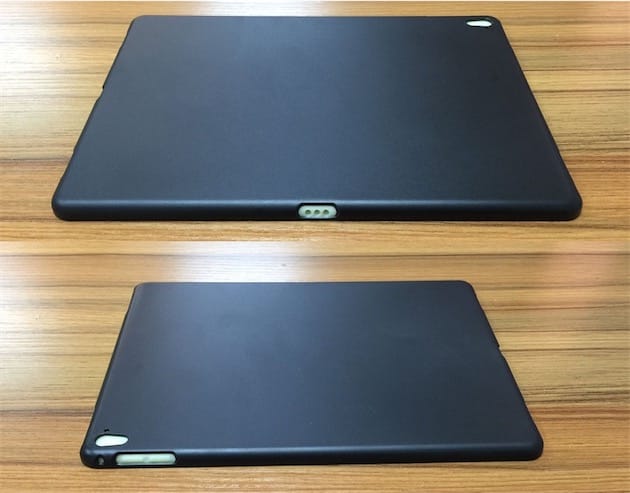
I've mentioned awhile back that there were some leaks for iPad Air 3 cases. A little over a month later, we have more of these cases as near definitive evidence of the physical features of the iPad Air 3. The Smart Connector cutout on the side suggests that the iPad Air 3 will support the Smart Keyboard and the Apple Pencil. Camera cutouts provide evidence for an LED flash for the camera. And finally, there are cutouts for four speakers. That settles it, we're seeing a smaller iPad Pro (with an LED flash built in). By the way, this was exactly what I was hoping for. A smaller, more reasonably priced iPad Pro. I absolutely love my iPad Air 2. The screen size is good, it's the perfect size for my backpack, it's great for taking notes, and it's still big enough for me to enjoy my content with a few friends. That being said, I'm really looking forward to the iPad Air 3 with Apple Pencil support. That will be great.
 |
| Image Credit: iGeneration |
Tuesday, February 2, 2016
iPad Air 3 and iPhone 5se Reveal Event Expected March 15
Move over Ides of March, because Apple is expected to have their iPad Air 3 and iPhone 5se reveal on March 15th according to 9to5Mac. While the date is a rumor, most event date rumors have proven to be accurate. This would be the first Apple event of the year. Apple would reveal the iPad Air 3, iPhone 5se, and possibly some Apple Watch updates (but no Apple Watch 2). Let's get this hype train started and hope for something good!
"As the scheduled event is still a month-and-a-half away, the date could conceivably still shift or turn into an online announcement. The media event would be Apple’s first since September, and much like the fall event, is planned to touch on three major product categories for the company."
-9to5Mac
Sunday, January 31, 2016
iPad Air 3 Cases
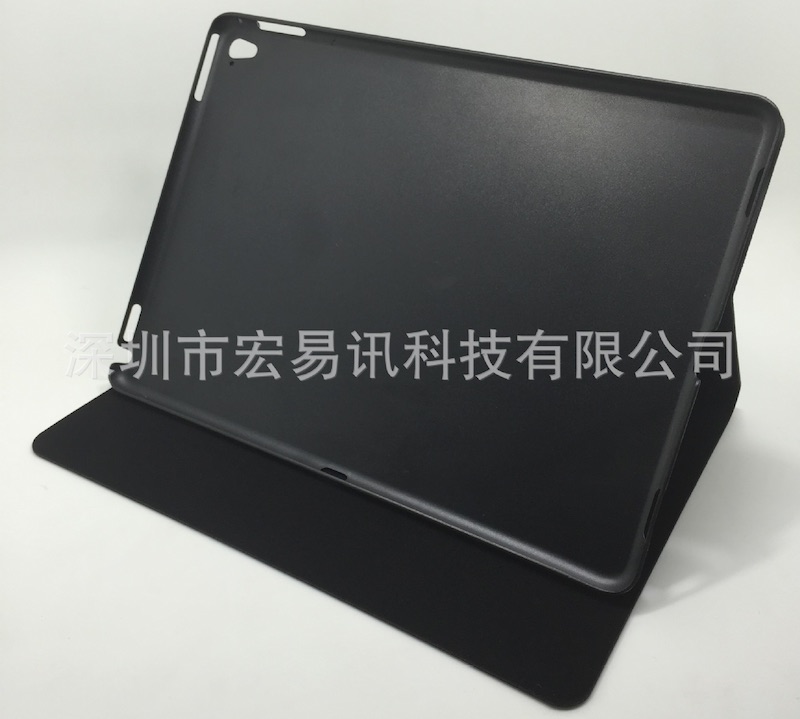
We just keep seeing new rumors that show that the iPad Air 3 will be similar to the iPad Pro, something that I am really hoping for. Now, we have a new case that fits an iPad Air with the specifications of an iPad Pro. This case is likely from a third-party, but whoever made it seems confident that the iPad Air 3 will be similar to the iPad Pro. Evidence of this is clear with the indents and creases for four speakers, a Smart Connector (for Smart Keyboard), and LED flash. Even if this case is from a third party, there are many likely true rumors that support this case's design.
 |
| Image Credit: Nowhereelse.fr |
Monday, January 25, 2016
iPad Air 3 Could Have LED Flash
After about 5 years (not counting the original iPad), the iPad has never had LED flash for its camera. That could change with the iPad Air 3. It could potentially have LED flash according to Nowhereelse.fr. This would further enhance the iPad's picture taking capabilities, although the iPad is usually not the first choice for a camera, due to its size. In addition, it could have four speakers, similar to the iPad Pro. After this, the only real feature it'd be missing from the iPhone would be a vibrate function and 3D Touch.


Friday, January 22, 2016
Potential March Apple Event?
From multiple sources, a March event could be used to announce several products. At first, this event was thought to be to announce an Apple Watch 2, however, it is more likely that new bands will be released. In addition, an iPad Air 3 (fingers crossed for Apple Pencil support) and an "iPhone 5se" could be announced. The iPhone 5se is expected to be a 4-inch iPhone that would look similar to an iPhone 5s. Let's hope for some great announcements until then.
Friday, January 1, 2016
What To Expect In 2016 From Apple
Happy New Year! It's officially 2016. That means that it's time to discuss what Apple may have up their sleeves for this year. This year, we can expect the iPhone 7 and iPhone 7 Plus, however, we may also see an iPhone 6c. Not only that, but the iPhone 6c is expected to be only 4-inches, down from the iPhone 6's 4.7-inches. Wow. Apple has some weird new year's resolutions. Apple Watch 2 may also make a debut with a better battery and faster processor, along with watchOS 3. Speaking of watchOS 3, we'll also see iOS 10 (iOS X?), and OS X 10.12! Finally, we may see an iPad Air 3 (fingers crossed for Apple Pencil support) and an iPad Pro 2. Anyways, I wish all of you have a wonderful 2016!
Monday, July 13, 2015
Apple Constraining Certain Products To Third-Party Retailers
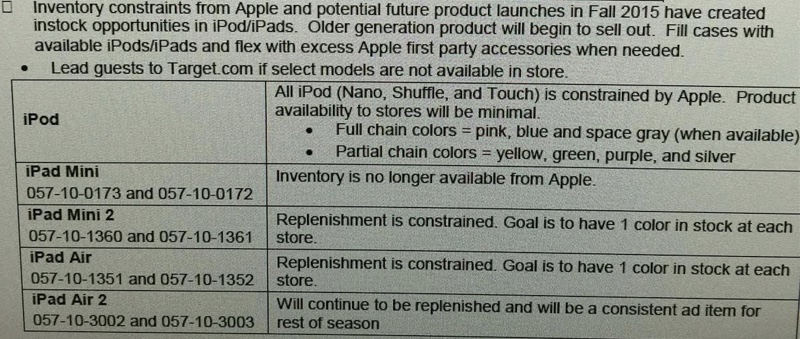
An inventory analysis from Target shows that Apple will be constraining some products. Products affected include the entire iPod lineup, iPad mini, iPad mini 2, iPad Air, and iPad Air 2. This points to a color refresh in the iPod lineup, leaked in an iTunes update. The iPads are most likely be removed in favor of the latest iPad Air 2 and iPad mini 3. This seems to confirm a lot of recent rumors.
 |
| Image Credit: Target Employee |
Sunday, February 8, 2015
Apple Releases New iPad Air 2 Ad Ahead of Grammy Awards
As I type, the Grammy Awards are going on. Today, Apple released an ad about the iPad Air 2 focusing on its potential for music. It features Elliphant, a Swedish singer, Gaslamp Killer, a band, and Riton, a DJ. The video is embedded below.
Monday, January 26, 2015
Quickly Swipe Between Tabs on iPad
In Safari for iPad, you can quickly switch between tabs with a flick of the wrist. Just take two fingers and swipe up or down. Depending on the direction you swiped, you will see another tab. I'm not sure which versions of iOS support this, but I tried it on an iPad Air 2 running iOS 8. Anyways, I hope this helps!
Wednesday, January 14, 2015
WeMo and HomeKit: Update
Several months ago, I talked about Belkin's plans to integrate HomeKit with their home automation product line, WeMo. Now, we know that this will be a reality thanks to MacObserver.
"WeMo will continue to evolve as we deliver on our promise of being the most approachable entry point to the connected home, and it is a natural progression based on Belkin's long-term partnership with Apple that compatibility with HomeKit will be a part of that evolution.
We are currently in conversations with Apple, but no specifics have been finalized at this point. Though our primary goal will always be to create a robust WeMo platform and unparalleled user experience for both current and future WeMo users, we are actively engaged in bringing HomeKit compatibility to fruition in the very near future. Stay tuned."Note how this spokesperson says "very near future." We can only hope we'll get more information on this as soon as they say it will. As for how this update would apply to existing WeMo products, I don't know. I'm sure myself and many other people hope that it's a software update. Otherwise, people would have to buy all new WeMo devices. At $50 a pop, that's an expensive update. It should be noted that WeMo devices are capable of receiving software updates. However, it should also be noted that HomeKit devices use a chip for their capability. Of course, because Apple and Belkin are in talks together, they may allow Belkin to make a software update with the chip's code on it. I assume the chips are mostly intended for new home automation products from new brands. I could ramble on about this all night. Anyways... Let's hope for a software update.
Monday, January 12, 2015
Auto-Delete Messages
If text messages are clogging up your phones storage, you might want to consider having them auto delete after a month or a year. Just go to Settings > Messages > Keep Messages and select your preference. I hope this helps!

Saturday, January 10, 2015
Flyover City Tours
In iOS 8, you can now get Flyover Tours. It takes you around different landmarks of certain cities. Just open Maps in iOS and search for a city. If it has a tour, it will have a button for it at the top of the screen. Try out the Statue of Liberty or the Eiffel Tower for starters.


Sunday, January 4, 2015
Disable Zoom on iOS
Many of my friends have been having a problem with the zoom feature of iOS. For some reason, zoom is enabled by default. This can lead to people inadvertently zooming their screen and they won't know how to get out of it. The fix is simple! Just double-tap the screen with three fingers at once. To disable this feature, just go to Settings > General > Accessibility > Zoom > and switch off the "Zoom" switch. I hope this helps!

Saturday, January 3, 2015
Send Last Location To Find My iPhone When Battery Is Low
When the battery of your iOS device is low, that's the worst possible time you want to lose it. However, in iOS 8, you can have the last location of your iOS device sent to Find My iPhone automatically when its battery is critically low. You can enable this by going to Settings > iCloud > Find My iPhone > and switching "Send Last Location" on. It should be noted that this is disabled by default. I hope this helps!

Friday, January 2, 2015
Apple Launches 'Start Something New' Campaign
Apple has launched a new Apple campaign called "Start Something New." It highlights real masterpieces from real people made on iOS devices and Macs. They're quite amazing. Each story shows what device the story was made on. In addition, the app used to make the story is also shown. Be sure to check it out!

Tuesday, December 30, 2014
Choose To Share Data With App Developers
In iOS 8, you can choose whether you want to share crash data with app developers. To check or change your settings on the matter, go to Settings > Privacy > Diagnostics & Usage > and apply your settings to the "Share With App Developers" switch. Will you be the reason your favorite app doesn't crash?

Sunday, December 28, 2014
Customize The Contacts Shortcut
In iOS 8, Apple introduced a contacts shortcut that shows up in the app switcher. It shows recent and favorite contacts by default. However, maybe you just want favorites or no contacts at all... The fix is simple! Just go to Settings > Mail, Contacts, Calendars > Show In App Switcher (Scroll down to Contacts) > and select what you want to be shown. It should be noted that iPads and iPod Touches don't have a "favorites" option, so you either have recent contacts or nothing. I personally have favorites show up, but feel free to customize it to your desire! I hope this helps!

Friday, December 19, 2014
Remove iOS 8 Spotlight Suggestions
Let's be honest... Spotlight Suggestions in iOS 8 never really help us. I mean, it shows websites and App Store suggestions. If I need those, I'll go to their respective apps. So, how can I get rid of these annoying suggestions? Simple! Just go to Settings > General > Spotlight Search > and turn off Spotlight Suggestions. Now you can search without random suggestions and advertisements.

Sunday, December 7, 2014
Apple Releases 'Change' Ad for iPad Air 2
Apple released a new ad today depicting the iPad Air 2 working wonders for artists, Post-It Note users, motorcyclists, and more. In addition to the ad, Apple posted a new page for the ad called "Change". The video is embedded below.
Subscribe to:
Posts (Atom)