watchOS 5.2 was released today, giving users AirPods 2 support. Apple often advertises Apple Watch and AirPods as the perfect combination, so it's nice to see AirPods 2 get support. watchOS 5.2 also brings the long-awaited support of ECG readings to more countries. These include Hong Kong, the United Kingdom, and 18 other European countries. Before this, ECG was restricted to the United States due to pending approval in other countries. The update is available from the Apple Watch app on your paired iPhone.
Showing posts with label watchOS. Show all posts
Showing posts with label watchOS. Show all posts
Wednesday, March 27, 2019

Sunday, January 20, 2019
How to Setup Cellular on an Apple Watch
The Apple Watch Series 3 introduced cellular connectivity for Apple Watch. Because the Apple Watch is so dependent on your iPhone, you need your iPhone to enable cellular. Your watch will have the same phone number as your iPhone, so any calls you'd normally receive on your iPhone will also be on your Apple Watch, should your watch be out of range from your iPhone. All you need to do is go through the Apple Watch app, tap Cellular on the "My Watch" tab, and follow your carrier's instructions. While Apple advertises a $10/month cellular plans, some carriers may deviate from that. In addition, many carriers have a one time activation fee.
Thursday, December 6, 2018
watchOS 5.1.2 Released with ECG Support
It's weird to have such a random, minor update have one of the flagship features of a device, but here we are. watchOS 5.1.2 released today, a day after Apple released new updates for so many other products. The timing is weird, but I'm not complaining. watchOS 5.1.2 includes ECG support for the Apple Watch Series 4. This can be very informative for your heart health. Make sure you update your iPhone to the latest software to take advantage of creating PDF reports of your ECG as well.
Wednesday, December 5, 2018
iOS 12.1.1 Released, With No Signs of watchOS 5.1.2
iOS 12.1.1 was released today, which brings eSIM support to the latest iPhones. It also adds support for ECG data on the iPhone's side. This isn't useful unless you have an Apple Watch Series 4 with watchOS 5.1.2. Despite so many minor updates from Apple being released today. There hasn't been any sign of watchOS 5.1.2. It will likely come out in the next few days. If it is delayed, it may be to iron out the updating process. watchOS is notorious for bricking Apple Watches. While it's not super common, we do hear of quite a few cases from time to time.
Saturday, December 1, 2018
Apple Watch Series 4 Getting ECG Feature in Next Update
Apple Watch Series 4 will be getting an ECG feature, which is arguably one of the flagship features of the device, alongside the major redesign. The ECG feature can help determine if you may be suffering from atrial fibrillation or irregular heart rhythm. The next watchOS update, watchOS 5.1.2, will enable this feature. This feature is still being approved in most countries, but it will be available in the United States. The update is in beta testing, but we can expect the update by the end of the year.
Saturday, September 1, 2018
watchOS and iOS Timers
When doing something like laundry, I like to put a timer on my phone. But when I put it on my phone, my Apple Watch won't sync up. In the leaked image of the Apple Watch Series 4, the Timer complication is visible. This is nothing new, but I'm hoping Apple would make the obvious choice to have timers set on iPhone sync up to timers on Apple Watch. This would let a user set a timer on their phone, and look at their watch to see it ticking down on the main watch face. Hopefully, this small change makes its way into watchOS 5.
Monday, June 11, 2018
watchOS 5 Beta Available
watchOS 5 is now available to developers, one week after being announced. This is abnormal as some people who updated last week reported having their watches bricked. iOS 12, macOS Mojave, and tvOS 12 have all been available for a week now. If you're a developer, hopefully this beta works out better. Better yet, just simulate it for now if possible. watchOS 5 brings some nice developer features like adding custom information to the Siri watch face.
Wednesday, June 6, 2018
watchOS 5 Does Not Support Original Apple Watch
The original Apple Watch launched in 2015. Watches are typically accessories that can last a long time. However, Apple has just defined a typical Apple Watch’s lifespan. While an iPhone 5s (about five years old) is still being supported in iOS 12, the original Apple Watch (not the Series 1) will no longer be supported in watchOS 5. To be fair, the original Apple Watch is ridiculously underpowered, so it may be the right time to stop supporting it. Hopefully other models last longer.
Thursday, November 16, 2017
Apple To No Longer Accept watchOS 1 Updates
Apple announced that they will not accept watchOS 1 app updates to be submitted to the App Store starting April 1, 2018. watchOS 1 was the OS that shipped with the original Apple Watch. These apps ran very slow and did not run natively. Building with newer SDKs will allow for faster and better apps. Very few apps still use this SDK, but small developers may find themselves doing this.
Sunday, October 8, 2017
Stop Apple Watch from Showing Now Playing Automatically
In watchOS 4, Apple Watch will automatically open the Apple Watch audio app you're listening to on your iPhone. For example, if you start a song in Apple's Music app on your iPhone, your watch will open the Music app as well. This can be convenient in the right situations, but for many, it's disorientating. To disable this, simply open the Apple Watch app, go to General > Wake Screen and disable Auto-launch Audio Apps. That's it.


Friday, September 8, 2017
Our First Look at Apple Watch Series 3
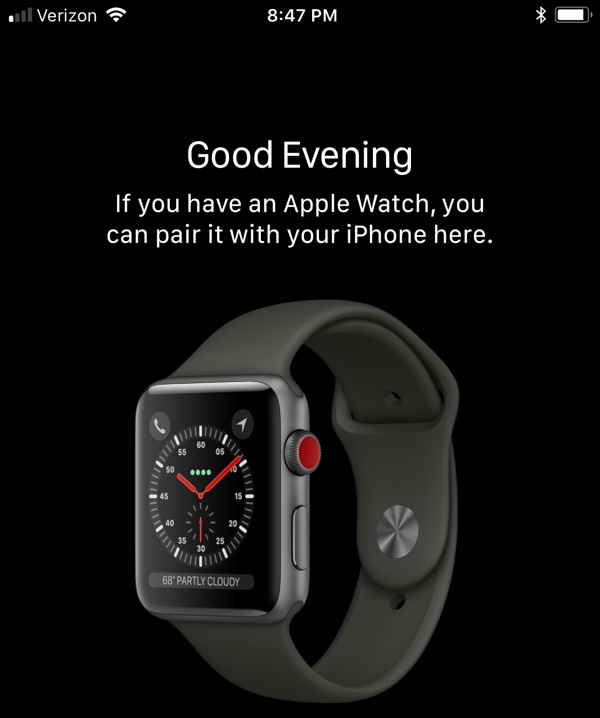
The iOS 11 Golden Master has been leaked, giving us a huge slew of leaks for both the iPhone 8 and Apple Watch Series 3 [Source: MacRumors]. I'll get in to more of these in a separate post, but I wanted to spotlight our first look at Apple's next wearable. Apple Watch Series 3 has been rumored for sometime now to feature LTE connectivity. This image basically confirms this. Looking at the watch, we see 5 blue dots, which we can assume represent cellular reception. The crown is also red, something we haven't seen in an Apple Watch Sport before. With these leaks, I don't know how much Apple will have left to surprise us with.
 |
| Image Credit: MacRumors |
Saturday, August 5, 2017
Apple Watch Series 3 May Have LTE
The Apple Watch Series 3 will likely be released this fall. According to Jeffrey Grossman via Twitter, we have HomePod firmware evidence that Apple Watch Series 3 will have LTE connectivity. I'm not sure how this will work. Maybe it's just me, but there aren't many times where I don't have my iPhone, but I have my Apple Watch. Maybe this will make it retrieve data faster, or it will just drain the battery more. Hopefully, Apple Watch Series 3 will have a better battery and faster processor.
After the earlier Apple Watch LTE rumors, I took another look at the HomePod firmware and found this (Gizmo is the codename for Apple Watch) pic.twitter.com/F1sFFwv4Cr— Jeffrey Grossman (@Jeffrey903) August 5, 2017
Saturday, July 22, 2017
Theater Mode in watchOS
I used to think that Theater Mode was an unneeded feature in watchOS. Then I went to a symphony. I put my watch into Theater Mode. Someone in front of me didn't, and every time their wrist was at just the wrong angle, I had 500-1000 nits of lights directed right at my face. Needless to say, it helps out. It would be nice if Apple took this a step further. For example, having it enabled could dim the screen when you turn on the display, ensure your phone is silenced and also dim your phone's screen if you take it out. That would be awesome.
Friday, June 16, 2017
Sunday, April 16, 2017
Custom Watch Faces
This will be my biggest hope for watchOS 4: Custom Watch Faces. Similar to iMessage Stickers, Apple should make easy-to-create watch faces for Apple Watch. Companies and organizations could make their own color schemes and logos fit into their watch face. University students could have their school's mascot and colors incorporated. Fallout could have a Pip-Boy themed watch face. The possibilities would be endless. Make it happen Apple!
Monday, March 27, 2017
Newest iOS, macOS, watchOS, and tvOS Versions Released
Apple has finally released their latest updates to iOS, macOS, watchOS, and tvOS. iOS 10.3 includes Find my AirPods. macOS 10.12.4 includes Night Shift. watchOS 3.2 includes Theatre Mode. tvOS 10.2 includes improved scrolling. Be sure to install these major updates when you get a chance.
Sunday, February 12, 2017
Watch Face Showcase: Cat Photos
 |
| My Cat Photo Watch Face |
 |
| My iPhone Lock Screen |
Thursday, November 24, 2016
Apple Watch Thanksgiving Badge
If you own an Apple Watch, then you might know about how you can earn badges through workouts. For Thanksgiving, Apple would issue a special badge for those who did a workout that was more than 5K in distance, or 3.1 miles. I managed to earn mine this morning and I personally love the design. In addition, you get a Messages sticker when you earn this badge. It looks the same as the medal, except the design is flat. Hopefully, we see more special badges like this in the future.


Friday, July 29, 2016
Apple Watch 2 Design
The Apple Watch 2 could have a significantly different form than its predecessor according to DigiTimes. The original Apple Watch featured Glass on Glass (G/G) technology. G/G uses two pieces of glass. The Apple Watch 2 could have One Glass Solution (OGS) instead, which uses only one piece of glass. This is a thinner solution, opening up possibilities like a thinner design or more internals. What it would look like? We have no idea, but it seems likely that it would look very different with this design choice.
Tuesday, June 14, 2016
A Quick Recap of WWDC 2016: watchOS 3
Yesterday, we had some huge announcements at WWDC. So, here is what went down with watchOS 3. Now, this will be a brief recap, without any of my opinions. However, I intend to give a big recap of this week, including WWDC and E3 (which is also taking place this week). I'm looking forward to sharing my thoughts and impressions of what all of these companies had to show off.
watchOS 3
watchOS 3 brings big changes in performance to the Apple Watch. Apps will load instantly. In fact, they're loaded and refreshed in the background, so you don't have to wait to open apps anymore. There are new watch faces. In addition, you can compete with your friends using Activity Rings. If you use a wheelchair, you will be able to receive notifications that encourage rolling instead of standing. There is a new Breathe app that encourages relaxation through deep breathing. If you find yourself in situations where you can't dictate a text response, you can draw out your response, letter by letter. When near your Mac, you can unlock your Mac automatically with your Apple Watch. Finally, if you need to call emergency services, you can hold down the side button of your watch and the country's emergency service number will be called, along with contacting emergency contacts and showing your Medical ID on your watch. So, these are the changes for watchOS 3. They're mostly under the hood, but it adds a lot of performance.
Subscribe to:
Posts (Atom)