When you take a photo in the Messages app, you're presented with a smaller version of the camera interface. You can take a photo by tapping the little button at the bottom of the frame. However, with an iPhone 6s or later, this will usually take a Live Photo. To disable this Live Photo for each individual photo you're about to send, tap the Live Photo icon in the top left corner of each picture you took. This will put a slash there, signifying that it will not be Live.
Showing posts with label iMessage. Show all posts
Showing posts with label iMessage. Show all posts
Saturday, February 10, 2018

Wednesday, June 21, 2017
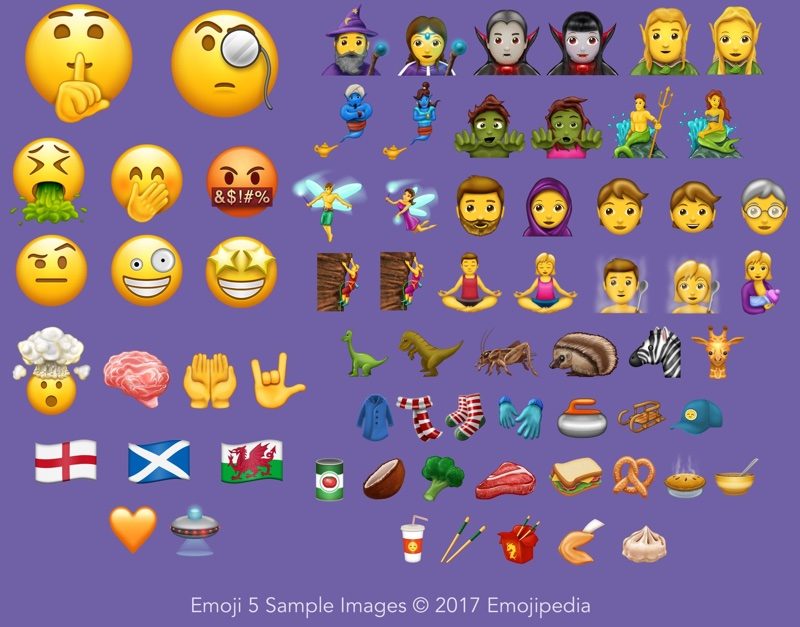
Unicode 10's New Emoji
With another update to Unicode standards, we see more emoji. We see a followup to the infamous thinking face 🤔, the thinking face with monocle. Speechless and can't use words? The mind blown emoji is just for you! And don't even get me started on how we've made it this far without an emoji with a raised eyebrow. Endless riveting text conversations. I can already imagine a second Emoji Movie. Anyways, I'm hoping we'll see these emoji in iOS 11 in the fall, but we'll probably see it in October in a supplementary update, like iOS 11.1.
Sunday, June 11, 2017
iOS 11 Business Chat
iOS 11 will be offering a more subtle feature focused on connecting businesses and customers: Business Chat. Business Chat allows customers to use iMessage to communicate with local businesses regarding queries, appointments, and support. No more having to call businesses to receive a long, boring automated message. If there's enough adoption, this could be a really cool feature.
Sunday, May 21, 2017
Happy Birthday Messages
In iOS 10, animations for iMessages where introduced. However, using a phrase like "Happy Birthday" will automatically add a balloon effect to your message. It's a neat touch that adds surprise to those who don't know about the effects. Be sure to try it out next time you wish someone happy birthday!
Friday, September 30, 2016
Apple Debuts Balloon Ad
For their first iOS 10 ad, Apple based it around the Screen Effects available in Messages. This ad shows a red balloon go through different areas until it is joined by hundreds of other balloons. The ad ends with someone receiving a happy birthday message with the Balloons Screen Effect. The advertisement is embedded below.
Saturday, September 24, 2016
iMessage App Store Grows to Over 1,500 Apps
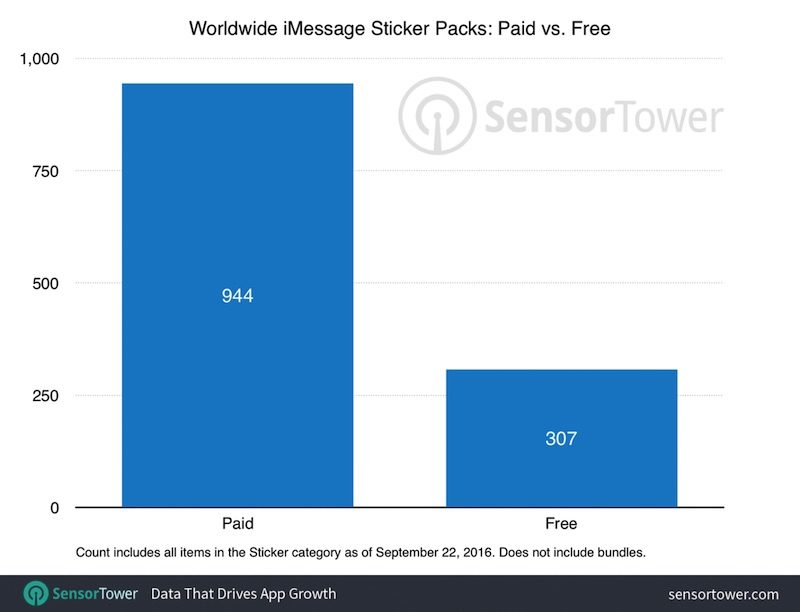
According to TechCrunch, the iMessage App Store has grown to over 1,650 apps after about 10 days. More interestingly, 75% of these apps are sticker packs. There are 307 free sticker packs and 944 paid sticker packs. Of the paid stickers, 86 percent cost $0.99, 12 percent cost $1.99, 1 percent cost $2.99, and only one sticker app in the entire store costs $3.99. If you haven't had a chance to check out the iMessage Store, I highly recommend you do and check out any stickers that might interest you.

Monday, September 12, 2016
iMessage App Store Launches
Tomorrow, iOS 10 will be officially released to the public. However, developers and beta testers got an early preview in terms of what other developers have been working on. In addition to iOS 10 app updates being pushed out, the iMessage App Store was opened. Sticker packs, like Super Mario Run, will be among the pioneers of this new genre of app. iOS 10 will be released publicly tomorrow at around 10 a.m. Pacific Time.
iMessage App Store quickly populating and many iOS apps are being updated to support #iOS10 at this point.— Alex Baratti (@alexsmbaratti) September 12, 2016
#SuperMarioRun stickers are now available for #iOS10 users. iOS 10 public release tomorrow.https://t.co/dILp3CNZjc pic.twitter.com/gDxRkSrTbf— Alex Baratti (@alexsmbaratti) September 12, 2016
Saturday, September 10, 2016
iOS 10: Stickers
 |
| Adding a sticker to an existing message |
 |
| The iMessage apps section |
Tuesday, August 16, 2016
Individual Read Receipts in iOS 10
In iOS 10, you can choose to send or restrict read receipts from specific conversations. Read receipts tell your recipient the time you read their iMessage. To toggle this option, tap the Details button in any iMessage conversation and use the switch "Send Read Receipts." This is very similar to how you can toggle "Do Not Disturb" for conversations. I hope this helps any beta testers or developers! iOS 10 will come out in September.
Thursday, July 7, 2016
iMessage App Store Now Open in iOS 10 Beta
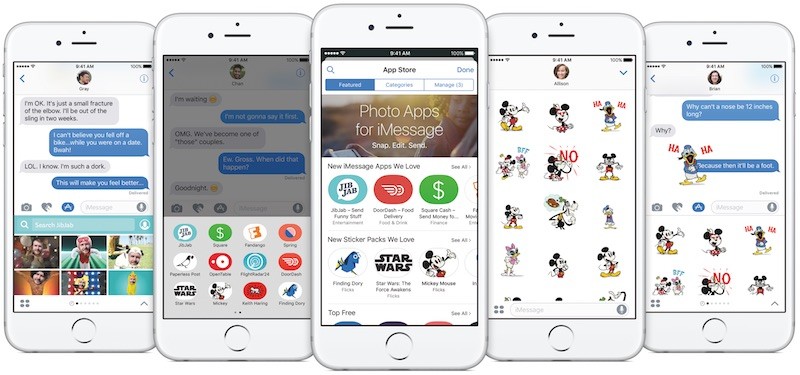
The developer and public betas for iOS 10 now have the iMessage App Store. Personally, I'm very excited for this. My personal favorite on the store so far is the Classic Mac sticker pack. If I find a dedicated phone to install iOS 10 on, I'll definitely try to post some of the stickers. Anyways, the iMessage App Store allows iMessages to contain different embedded items, like stickers or money. iOS 10 is expected to release this fall.

Friday, June 17, 2016
Why iMessage Isn't On Android
After a rumor, many people were expecting iMessage to come to Android. This has been requested by many Android users because many of their friends have iOS and the Google equivalent of iMessage, Google Hangouts, is unpopular. Walt Mossberg asked Apple about this matter. In short, it's because the iOS user base would only benefit if Apple didn't expand iMessage to Android. Here's his full quote below.
"When I asked a senior Apple executive why iMessage wasn’t being expanded to other platforms, he gave two answers. First, he said, Apple considers its own user base of 1 billion active devices to provide a large enough data set for any possible AI learning the company is working on. And, second, having a superior messaging platform that only worked on Apple devices would help sales of those devices — the company’s classic (and successful) rationale for years."
Sunday, May 1, 2016
Auto Re-Correct
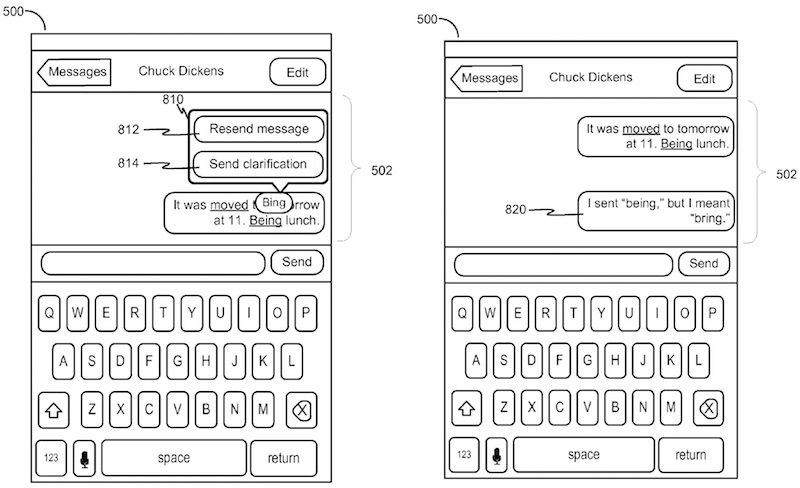
You know when you accidentally send a text message and autocorrect messes up what you wrote? Well, Apple has filed a patent that may alleviate this issue. If you sent an incorrect message, it would let you either resend your message with a correction (which would hopefully include editing messages for iMessages) or send a clarification message. If you received an incorrect message, you could request a clarification message. Both of these ideas are outlined below.



Saturday, May 30, 2015
Apple Provides Temporary Fix For Text Message Bug
If you've gotten one of those text messages that crashes your phone, Apple has provided a temporary fix before they release an update for it.
"Apple is aware of an iMessage issue caused by a specific series of unicode characters and we will make a fix available in a software update. Until the update is available, you can use these steps to re-open the Messages app.
1. Ask Siri to "read unread messages."
2. Use Siri to reply to the malicious message. After you reply, you'll be able to open Messages again
3. In Messages, swipe left to delete the entire thread. Or tap and hold the malicious message, tap More, and delete the message from the thread."Personally, my iPhone is in Do Not Disturb mode 23 hours a day, because... life, and as a result, my iPhone doesn't crash. It's something to consider.
Monday, January 12, 2015
Auto-Delete Messages
If text messages are clogging up your phones storage, you might want to consider having them auto delete after a month or a year. Just go to Settings > Messages > Keep Messages and select your preference. I hope this helps!

Saturday, December 20, 2014
Quickly Find Attachments In Messages
Did you know that you can quickly access all of the attachments that you've sent in a conversation? Just go to a conversation and tap "Details" in the top-right corner. Scroll down to find all of the attachments in the chat. I hope this helps!

Saturday, December 13, 2014
Quickly Reply to Text Messages With iOS 8
Let's say you're watching a video and don't want to switch between apps to reply to a friend who's texting you. There's something for that in iOS 8. If you don't want to have to open the Messages app to reply to a message, just use this trick. When you receive a banner notification from a text message (shown below on left image), just pull down on it to get a reply sheet. From there, you can send a message without leaving the app. I hope this helps!


Sunday, November 9, 2014
Apple Makes Tool To Deregister iMessage
In an interesting move by Apple, they have created a web tool that allows non-iPhone users that have switched from an iPhone to deregister iMessage. Without this, people that send messages from an iPhone to someone who switched from an iPhone won't be able to carry on a conversation. This is because the messages from the iPhone are going to the non-iPhone user's iMessage conversations.

Monday, October 20, 2014
How To Setup SMS Relay on iOS 8
With iOS 8.1 available today, one of the main features (especially if you don't have an iPhone 6) is SMS Relay. This allows your other iOS devices and Macs to send and receive SMS (which is different from iMessage). Here's how to set it up.
You'll Need:
You'll Need:
- An iPhone (Running iOS 8.1)
- Someone to text who doesn't have an iPhone
- An iOS device (NOT an iPhone; Running iOS 8.1) and/or a Mac (Running OS X Yosemite)
The Procedure:
- On your iPhone, go to Settings > Messages > Text Message Forwarding
- Change one of the switches next to your device from grey to green.
- Pick up the device you picked and look for a code.
- If this doesn't happen instantly, go back to Settings > Messages on your iPhone and toggle iMessage off and turn it on again.
- If this still doesn't work, be sure that the two devices are on the same WiFi network.
- Enter the code on your iPhone.
- Celebrate with cake!
- Realize that the cake was a lie.
Tuesday, October 14, 2014
Quickly Mark iMessages As Read From Lock Screen
If you're like me, then you hate having to unlock your phone to end up locking it two seconds later just to have your recipient know that you read the message. In iOS 8, this is much quicker to do. Just swipe from right to left on the notification on the lock screen (when you get an iMessage) and click the little "x" to dismiss it. This marks the message as read and doesn't badge your messages app. I hope this helps!

Wednesday, July 2, 2014
iOS 8 Voice Messaging May Be Essential Function of iWatch
When you think about it, iOS 8 voice messaging makes a lot of sense! At first, many found it to be another random feature, however, when you incorporate the iWatch into it, it makes sense. Although Apple's voice-to-text service is very accurate, when it goes wrong, there's no keyboard to fix it. For example, saying "Raspberry Pi" may result in "raspberry pie." In addition, Tim Cook says that it is an important feature.

"When we visited with Tim Cook, he said that walking down streets in China one sees people speaking into their phones sending voice rather than text messages. Porting this capability to the watch makes sense as it is easier to send a voice message from a device already on the wrist than pulling out a phone. It also could aid penetration of China, which Cook said has a ways to go."
- Steve Milunovich

Subscribe to:
Posts (Atom)