iOS 9 will be released tomorrow and Apple has released a new statistic on what percentages of iOS devices are running which iOS. iOS 8 is at 87% as of yesterday. To put that into perspective, Android Lollipop, which is also at the end of its lifespan is at 5.1%. Furthermore 11% are running iOS 7 and 2% are running an earlier version of iOS. Tomorrow, you can update to iOS 9 by going to Settings > General > Software Update > and follow the prompts. It'll take up about 1 GB of space. Good luck!
All of your Mac and iOS questions and rumors can be answered! How? Easy! Just ask a teenager! What's better? Ask an Apple Certified teenager! Ask me! Alex! Writing once every single day since 2012!
Showing posts with label iOS 8. Show all posts
Tuesday, September 15, 2015
Friday, July 17, 2015
Use Handoff to Open iPhone Apps From Apple Watch
If you need to be ultra productive, try this advanced tip. If you need to open an app on your iPhone (that isn't on your Apple Watch), activate Siri on your Apple Watch (with the digital crown or by saying "Hey Siri") while taking out your iPhone. Then, say "open [app name]." Siri shouldn't be able to open up the app and will offer to use Handoff to complete the action on iPhone. On your iPhone, swipe up from the bottom of the lock screen if you're in the lock screen. If you're anywhere else, use Multitasking (double-click home button) and swipe to the right to reveal the Handoff tab and tap on it. I hope this helps.
Thursday, July 2, 2015
Replay Beats 1 Songs
If you missed out on a part of Beats 1, you can replay it. It should be noted that commentary is not replayed, only the songs. This can be useful if you don't like the commentary. To do this, open the Music app and tap the "Radio" tab. Without tapping the "Listen Now" button, tap on the Beats 1 station. Select one of the shows and the date of the show that you would like to listen to. You will be shown a playlist. You can pick the entire playlist or an individual song to listen to. I hope this helps!
Wednesday, July 1, 2015
How To Disable Automatic Renewal for Apple Music
Most people need a way to disable automatic renewal for Apple Music so they don't have to pay for a subscription. To do this, you'll need an iOS device running iOS 8.4 and an active trial to Apple Music. In any tab in the Music app, tap the top-left button to show your account settings. Tap "View Apple ID" and sign in to your iTunes account. Tap on "Manage." Select "Apple Music Membership" and turn off "Automatic Renewal." That's it! I hope this helps!
Wednesday, June 10, 2015
iPhone-Breaking Text Message Bug To Be Fixed in iOS 8.4
If you've been annoyed by the bug that crashes an iPhone, the fix is coming just before June 30th. The fix comes in the form of iOS 8.4. For those unfamiliar, a specific string of Unicode characters can crash an iPhone, leaving people who don't know the temporary fix unable to text people. The temporary fix is to ask Siri to "read unread messages" and to reply to the message with any message. This should fix it.
| Image Credit: MacRumors |
Wednesday, May 6, 2015
Everything Changes With iPad
Apple has created a new ad campaign for the iPad. It showcases the tagline, "Everything changes with iPad." Like most of their campaigns, it shows how iPad can be used in really cool ways for different parts of life. Be sure to check out the new site for the campaign and the video below.
Friday, May 1, 2015
Do Not Disturb Turns Off AirDrop
Here's something I figured out recently. If you turn on Do Not Disturb on your iOS device, it'll turn off AirDrop. Keep that in mind when you want to use AirDrop. To turn on Do Not Disturb, swipe up from the bottom of the screen, and tap the moon icon (it's on if the icon is white). To turn on AirDrop (even if Do Not Disturb is on), swipe up from the bottom of the screen and tap AirDrop. AirDrop is compatible with iPhone 5 and later, iPad 4 and later, and iPod Touch (5th Generation).
Monday, March 23, 2015
Hidden iOS 8.3 Feature: Siri Does Speakerphone
iOS 8.3 is currently only available to iOS developers, but there are some cool additions coming with the update. One of the is a new functionality to Siri. If you were to say "call [name] on speakerphone," Siri will put your call on speakerphone, provided that you're using iOS 8.3. This would be helpful for Bluetooth devices too.
| Image Credit: MacRumors |
Monday, March 16, 2015
Screenshots of the Apple Watch App
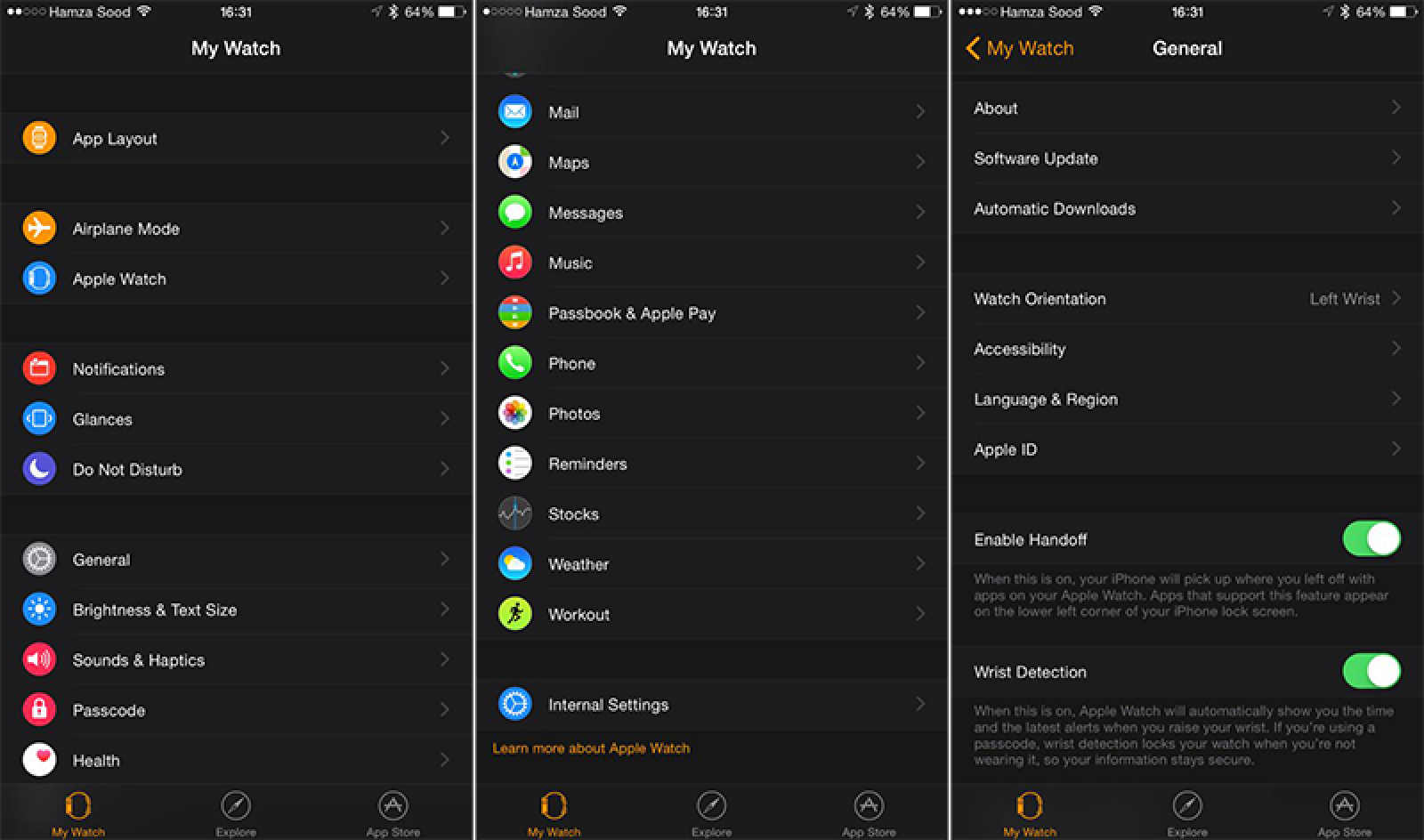
So if you upgraded to iOS 8.2 on your iPhone, you've probably noticed the Apple Watch app. It can be quite annoying as it mocks you for not having an Apple Watch by not letting you delete it and shows videos advertising the product. Thanks to Hamza Sood, you can see what the app is actually going to look like with an Apple Watch connected. It won't solve your problem, but it will make you want an Apple Watch even more though.
A few more interesting things. You can select playlists to sync accros, with an adjustable limit up to 2GB pic.twitter.com/d40El8N9sq
— Hamza Sood (@hamzasood) March 13, 2015
Saturday, March 14, 2015
Fitness App Available on iOS 8.2 After An Apple Watch Is Connected
The Fitness app, a companion app for the Apple Watch, will be available once you connect one. This comes from Hamza Sood, who has done cool work on debugging iOS updates in the past. The tweet is embedded below. Check out Hamza's profile for more cool tidbits.
So the Fitness app does exist on 8.2, it's just hidden until you connect an Apple Watch pic.twitter.com/R1BgnKYRHe
— Hamza Sood (@hamzasood) March 12, 2015
Thursday, March 12, 2015
iOS 8.2
Tuesday, March 10, 2015
GameStop to Accept Apple Pay
GameStop will accept Apple Pay in the near future in its retail stores. Considering their scanner system wouldn't even read my PowerUp Rewards Card from the screen of my phone prior, this is a big step up. Now I can waste my money on amiibo even faster! Apple Pay support will be rolling out this month.
Labels:
Apple,
Apple Pay,
Apple Watch,
Games,
iOS,
iOS 8,
iOS 8.1,
iPhone 6,
Video Games
Thursday, March 5, 2015
iOS 8.2 To Be Released To The Public Next Week With 'Spring Forward' Announcement
With the Apple event next week, we have reason to believe that iOS 8.2 will be released next week. This makes sense as Apple has done this in the past. This event is expected to focus on the Apple Watch and possibly a 12" MacBook Air. The event will be on March 9th, this coming Monday. iOS 8.2 is a relatively simple update despite it being a semi-major update. It adds stability to the Health app and other apps.
Labels:
Announcement,
Apple,
Health,
iOS,
iOS 8,
iOS 8.2,
Mac,
MacBook,
MacBook Air
Friday, February 27, 2015
iOS 8.2 May Come Out Next Week
According to BGR, iOS 8.2 may come out as soon as next week. This update is expected to have support for the Apple Watch. There have been five betas of iOS 8.2, so a public release is imminent.
Monday, February 23, 2015
OS X 10.10.3 and iOS 8.3 Will Introduce New Apple Emoji
In the next version of OS X and iOS 8, new emoji focusing around Apple's products will be added. The watch emoji will be an Apple Watch, the iPhone emoji resembles the iPhone 6, and the computer emoji resembles an iMac. Of course, since emoji is just code being replaced by an image, if you were to text any of these emojis to a non-Apple device, it wouldn't be an Apple product emoji.
| Image Credit: MacRumors |
Saturday, February 21, 2015
Easily Turn Off Notifications for Specific Apps
In iOS 8, turning off notifications for specific apps is much easier. Before, you would have to turn off sounds, badges, and lock screen notifications, in addition to notification styles. If you want to turn off notifications for a certain app just go to Settings > Notifications > [App Name] > and turn off Allow Notifications. I hope this helps!
Labels:
Apple,
iOS,
iOS 8,
iPad,
iPad Air 2,
iPhone,
iPhone 6,
iPhone 6 Plus,
tips
Friday, February 20, 2015
Raise To Listen
If you receive an audio message on your iPhone, you can quickly listen to it by raising your iPhone to your ear. Be sure the feature is enabled in Settings > Messages > Raise to Listen. This will enable you do listen to audio messages without tapping your screen. I hope this helps!
Labels:
Apple,
Apple Watch,
iOS,
iOS 8,
iPhone,
iPhone 6,
iPhone 6 Plus,
tips
Monday, February 16, 2015
Rearrange Order Of Apps That Appear In "Open In..." Prompts
Did you know that you can rearrange the order of apps that appear in the "Open In..." prompts in iOS? Of course you did! It's in the title of the post! Anyways, just download a file of some sort, tap "Open In...", and hold on the app that you want to rearrange. Drag it to where you want it. It's that simple!
Saturday, February 14, 2015
Quickly Dismiss Notifications From Lock Screen in iOS 8
If you are tired of notifications blocking your wallpaper in the lock screen, you can dismiss them. Just swipe to the left on any notification and tap the "x" that appears. It's that simple. The notification will disappear. I hope this helps!
Monday, February 9, 2015
iOS 8.3 Beta Released to Developers
Right after iOS 8.2 was seeded to developers for the fifth time (and still hasn't been released to the public), iOS 8.3 has been released to developers. Notable features include wireless CarPlay, a new emoji keyboard, and two-step verification for Google accounts. In addition, iOS 8.4 is expected to be in the works currently, in addition to the imminent announcement of iOS 9 this June.
| Image Credit: MacRumors |
Subscribe to:
Posts (Atom)