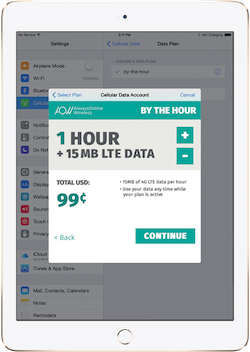
For those with a cellular iPad Air 2 with Apple SIM, you can now use AlwaysOnline Wireless as a carrier option. AlwaysOnline Wireless is a carrier that sells short-term data plans. Like, really short. As in, why would you use this little data in 2015? Plans start a $0.99 an hour for 15 MB. Wow. I mean, hey, whatever works for you. If you want to learn more about Apple SIM, check out the official website.
All of your Mac and iOS questions and rumors can be answered! How? Easy! Just ask a teenager! What's better? Ask an Apple Certified teenager! Ask me! Alex! Writing once every single day since 2012!
Showing posts with label iPad Air 2. Show all posts
Friday, December 11, 2015
Sunday, October 4, 2015
The Best Way to Use Siri
Although Apple is pushing the "Hey Siri" command, I personally thing the best way to activate and use Siri is still through the home button (at least when you're holding it or if it's in close proximity). Just hold down the home button, talk, and then release the home button. Think of it like a walkie-talkie or an intercom. This saves a lot of time with Siri as you don't have to wait for the phone to detect the end of your speech. I hope this helps!
Labels:
Apple,
iOS,
iPad,
iPad Air 2,
iPhone,
iPhone 6s,
iPhone 6s Plus,
Siri,
tips
Monday, July 13, 2015
Apple Constraining Certain Products To Third-Party Retailers
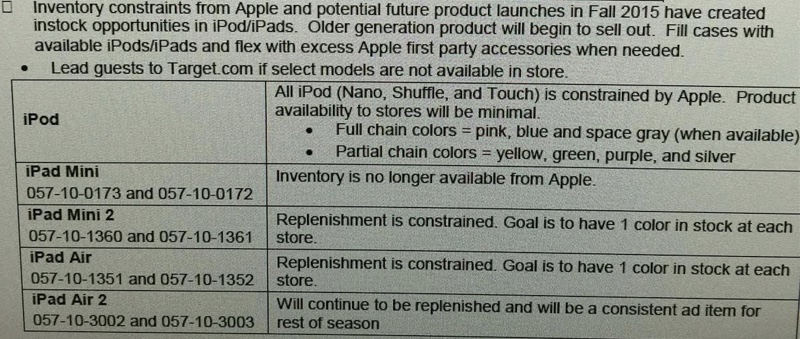
An inventory analysis from Target shows that Apple will be constraining some products. Products affected include the entire iPod lineup, iPad mini, iPad mini 2, iPad Air, and iPad Air 2. This points to a color refresh in the iPod lineup, leaked in an iTunes update. The iPads are most likely be removed in favor of the latest iPad Air 2 and iPad mini 3. This seems to confirm a lot of recent rumors.
| Image Credit: Target Employee |
Saturday, February 21, 2015
Easily Turn Off Notifications for Specific Apps
In iOS 8, turning off notifications for specific apps is much easier. Before, you would have to turn off sounds, badges, and lock screen notifications, in addition to notification styles. If you want to turn off notifications for a certain app just go to Settings > Notifications > [App Name] > and turn off Allow Notifications. I hope this helps!
Labels:
Apple,
iOS,
iOS 8,
iPad,
iPad Air 2,
iPhone,
iPhone 6,
iPhone 6 Plus,
tips
Sunday, February 8, 2015
Apple Releases New iPad Air 2 Ad Ahead of Grammy Awards
As I type, the Grammy Awards are going on. Today, Apple released an ad about the iPad Air 2 focusing on its potential for music. It features Elliphant, a Swedish singer, Gaslamp Killer, a band, and Riton, a DJ. The video is embedded below.
Monday, January 26, 2015
Quickly Swipe Between Tabs on iPad
In Safari for iPad, you can quickly switch between tabs with a flick of the wrist. Just take two fingers and swipe up or down. Depending on the direction you swiped, you will see another tab. I'm not sure which versions of iOS support this, but I tried it on an iPad Air 2 running iOS 8. Anyways, I hope this helps!
Wednesday, January 14, 2015
WeMo and HomeKit: Update
Several months ago, I talked about Belkin's plans to integrate HomeKit with their home automation product line, WeMo. Now, we know that this will be a reality thanks to MacObserver.
"WeMo will continue to evolve as we deliver on our promise of being the most approachable entry point to the connected home, and it is a natural progression based on Belkin's long-term partnership with Apple that compatibility with HomeKit will be a part of that evolution.
We are currently in conversations with Apple, but no specifics have been finalized at this point. Though our primary goal will always be to create a robust WeMo platform and unparalleled user experience for both current and future WeMo users, we are actively engaged in bringing HomeKit compatibility to fruition in the very near future. Stay tuned."Note how this spokesperson says "very near future." We can only hope we'll get more information on this as soon as they say it will. As for how this update would apply to existing WeMo products, I don't know. I'm sure myself and many other people hope that it's a software update. Otherwise, people would have to buy all new WeMo devices. At $50 a pop, that's an expensive update. It should be noted that WeMo devices are capable of receiving software updates. However, it should also be noted that HomeKit devices use a chip for their capability. Of course, because Apple and Belkin are in talks together, they may allow Belkin to make a software update with the chip's code on it. I assume the chips are mostly intended for new home automation products from new brands. I could ramble on about this all night. Anyways... Let's hope for a software update.
Labels:
HomeKit,
iOS,
iOS 8,
iOS 8.1,
iPad,
iPad Air,
iPad Air 2,
iPhone,
iPhone 6,
iPhone 6 Plus,
Siri,
WeMo
Monday, January 12, 2015
Auto-Delete Messages
Labels:
iMessage,
iOS,
iOS 8,
iOS 8.1,
iPad,
iPad Air,
iPad Air 2,
iPhone,
iPhone 6,
iPhone 6 Plus,
tips
Saturday, January 10, 2015
Flyover City Tours
Labels:
Apple,
Apple Maps,
iOS,
iOS 8,
iOS 8.1,
iPad,
iPad Air,
iPad Air 2,
iPhone,
iPhone 6,
iPhone 6 Plus,
tips
Sunday, January 4, 2015
Disable Zoom on iOS
Many of my friends have been having a problem with the zoom feature of iOS. For some reason, zoom is enabled by default. This can lead to people inadvertently zooming their screen and they won't know how to get out of it. The fix is simple! Just double-tap the screen with three fingers at once. To disable this feature, just go to Settings > General > Accessibility > Zoom > and switch off the "Zoom" switch. I hope this helps!
Labels:
iOS,
iOS 8,
iOS 8.1,
iPad,
iPad Air,
iPad Air 2,
iPhone,
iPhone 6,
iPhone 6 Plus,
tips
Saturday, January 3, 2015
Send Last Location To Find My iPhone When Battery Is Low
When the battery of your iOS device is low, that's the worst possible time you want to lose it. However, in iOS 8, you can have the last location of your iOS device sent to Find My iPhone automatically when its battery is critically low. You can enable this by going to Settings > iCloud > Find My iPhone > and switching "Send Last Location" on. It should be noted that this is disabled by default. I hope this helps!
Friday, January 2, 2015
Apple Launches 'Start Something New' Campaign
Apple has launched a new Apple campaign called "Start Something New." It highlights real masterpieces from real people made on iOS devices and Macs. They're quite amazing. Each story shows what device the story was made on. In addition, the app used to make the story is also shown. Be sure to check it out!
Labels:
Ads,
Apple,
iOS,
iOS 8,
iOS 8.1,
iPad,
iPad Air,
iPad Air 2,
iPhone,
iPhone 6,
iPhone 6 Plus,
Mac,
Yosemite
Tuesday, December 30, 2014
Choose To Share Data With App Developers
In iOS 8, you can choose whether you want to share crash data with app developers. To check or change your settings on the matter, go to Settings > Privacy > Diagnostics & Usage > and apply your settings to the "Share With App Developers" switch. Will you be the reason your favorite app doesn't crash?
Labels:
iOS,
iOS 8,
iOS 8.1,
iPad,
iPad Air,
iPad Air 2,
iPhone,
iPhone 6,
iPhone 6 Plus,
tips
Sunday, December 28, 2014
Customize The Contacts Shortcut
In iOS 8, Apple introduced a contacts shortcut that shows up in the app switcher. It shows recent and favorite contacts by default. However, maybe you just want favorites or no contacts at all... The fix is simple! Just go to Settings > Mail, Contacts, Calendars > Show In App Switcher (Scroll down to Contacts) > and select what you want to be shown. It should be noted that iPads and iPod Touches don't have a "favorites" option, so you either have recent contacts or nothing. I personally have favorites show up, but feel free to customize it to your desire! I hope this helps!
Labels:
iOS,
iOS 8,
iOS 8.1,
iPad,
iPad Air,
iPad Air 2,
iPhone,
iPhone 6,
iPhone 6 Plus,
iPod Touch,
tips
Friday, December 19, 2014
Remove iOS 8 Spotlight Suggestions
Let's be honest... Spotlight Suggestions in iOS 8 never really help us. I mean, it shows websites and App Store suggestions. If I need those, I'll go to their respective apps. So, how can I get rid of these annoying suggestions? Simple! Just go to Settings > General > Spotlight Search > and turn off Spotlight Suggestions. Now you can search without random suggestions and advertisements.
Labels:
iOS,
iOS 8,
iOS 8.1,
iPad,
iPad Air,
iPad Air 2,
iPhone,
iPhone 6,
iPhone 6 Plus,
tips
Wednesday, December 10, 2014
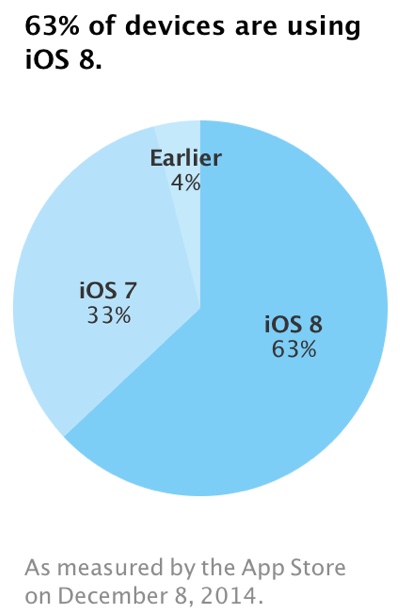
iOS 8 Is Now Installed On 63% Of Active iOS Devices
Two months after its release, Apple has reported that iOS 8 is installed on 63% of devices. This slow install rate is possibly due to major bugs disabling HealthKit, cellular data, and Touch ID on some devices, but these have been since fixed. In addition, users who are reluctant to upgrade due to storage limitations should consider upgrading through iTunes. Be sure to read my tips on upgrading an iOS device before proceeding.
Sunday, December 7, 2014
Apple Releases 'Change' Ad for iPad Air 2
Apple released a new ad today depicting the iPad Air 2 working wonders for artists, Post-It Note users, motorcyclists, and more. In addition to the ad, Apple posted a new page for the ad called "Change". The video is embedded below.
Saturday, November 15, 2014
Apple Store Gift Cards Based on iPhone Colors
I know this is pretty insignificant, but I find this kind of cool. In addition to Apple having a completely independent gift card display at my local grocery store, the Apple Store gift cards are based on the colors of the iPhone 5c, iPhone 5s, iPhone 6, and the iPads. The custom priced gift card is based on the iPhone 5c's white color. The $25 gift card is based on the iPhone's silver color. The $50 gift card is based on the iPhone's space gray color. The $100 gift card is based on the iPhone's gold color. It's an interesting Easter Egg. Check out the pictures below.
![]() |
| The Silver, Space Gray, and Gold iPhones Respectively |
| The Display for the Gift Cards |
| iPhone 5s/6 Gold Gift Card |
| iPhone 5c White Gift Card |
| iPhone 5s/6 Silver Gift Card |
| iPhone 5s/6 Space Gray Gift Card |
Friday, October 24, 2014
AT&T Doesn't Allow Apple SIM Users To Switch Carriers
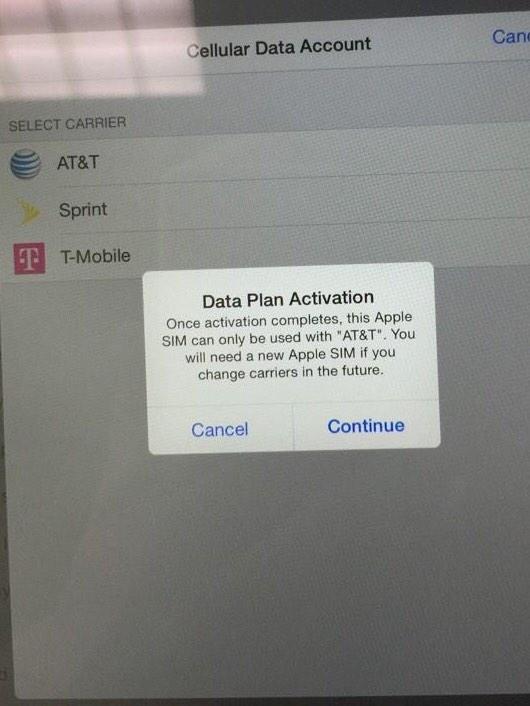
One of the nice things about the new iPads is the new Apple SIM. This allows you to pick a carrier after you buy an iPad and switch without buying a new iPad. Usually you'd have to buy an iPad with a specific carrier with no way to switch carriers. AT&T has disabled the ability to switch carriers after choosing AT&T. An AT&T spokesperson said "it's just simply the way we've chosen to do it." It's clear they did it so you can't change carriers and support the competition.
| Image Credit: John Legere |
Friday, October 17, 2014
Pre-Order Your iPad Air 2 or iPad mini 3 Today!
Today, the new iPads are available. Be sure to pick up yours as soon as possible if you want one. Also, there are new prices for these iPads. You can pickup a shiny, new iPad for the low, low price of $249 (for a 16 GB iPad mini). Take it a step up for an additional $50 for an iPad mini 2 (16 GB). Another $100 ($399) will get you an iPad mini 3 (16 GB) or an iPad Air (16 GB). Finally, another $100 will get you a 16 GB iPad Air 2. Head on over to the Apple Online Store to get your iPad by the end of next week.
Labels:
Announcement,
Apple,
Event,
iOS,
iPad,
iPad Air,
iPad Air 2,
iPad Mini,
iPad Mini 3,
Retail
Subscribe to:
Posts (Atom)