Punchh, a cloud-based loyalty program, has announced that they will bring Apple Pay support to multiple restaurants. The restaurants include Quiznos, Smashburger, MOD Pizza, and more. I have been waiting a long time for more businesses to adopt the Apple Pay loyalty passes. Hopefully, we'll see much more of this in the future. Gone are the days of installing individual apps for every business we go to, just for some rewards card.
Showing posts with label Passbook. Show all posts
Showing posts with label Passbook. Show all posts
Thursday, June 22, 2017

Saturday, May 14, 2016
UK Working on Driver's License Compatible with Apple Wallet
When Passbook first came out, I hoped that driver's licenses would be compatible in some way. Today, an official version of this has yet to be seen, but the UK is currently working on a solution. According to Oliver Morley of the UK's Driver and Vehicle Licensing Agency, a prototype is being developed for a digital driver's license compatible with Apple Wallet. It should be noted that it is intended as an "add-on" for a driver's license, not a complete replacement. My only hope is that if this takes off in the UK, the US will be quick to follow.
So here's a little prototype of something we're working on #drivinglicence pic.twitter.com/a5eItrdiNI— Oliver Morley (@omorley1) May 13, 2016
Monday, October 12, 2015
Apple Pay Coming To KFC and Chili's
I forgot to mention that full Apple Pay integration will also be coming to KFC and Chili's. I'm not sure if they have any rewards programs, but if they do, they'll probably be getting the same support that Starbucks will get. What's cool is that Chili's will have a small Apple Pay-enabled kiosk that will enable people to pay with Apple Pay from the table and leave without needing to pay an actual person. Let's hope we see more restaurant chains doing this in the near future!
Sunday, October 11, 2015
Apple Pay Coming To Starbucks
Apple Pay is coming to Starbucks, and here's why you should care. At Apple's WWDC event, whenever they talk about Passbook, Wallet, or Apple Pay, it's always a disappointment to see what they talked about isn't available, or at least doesn't function as advertised, at launch with the launch of the next iOS release later that year. However, Starbucks is going to prove this wrong with a fast rollout (hopefully) next year. Let me explain... At WWDC, Apple revealed that you'd be able to hold your iPhone (or Apple Watch) near a compatible NFC reader, and it would pull up any rewards card or coupons for that store. Then, you'd use Touch ID to beam that info to the terminal and it'd be applied to your transaction. Sounds pretty cool, right? Now my hope is that Starbucks will implement this into their system, allowing users to use their Starbucks gift cards to earn Starbucks rewards all via NFC and Touch ID. That's my hope anyways... Apple Pay VP, Jennifer Bailey, says it will support Starbucks Rewards, and she did brag about this feature at WWDC, so I think that's a reliable source. However, we have seen other companies go back on their word to support Apple's services (Adobe, Fitbit, etc.). Anyways, let's hope we get this feature.
Tuesday, October 7, 2014
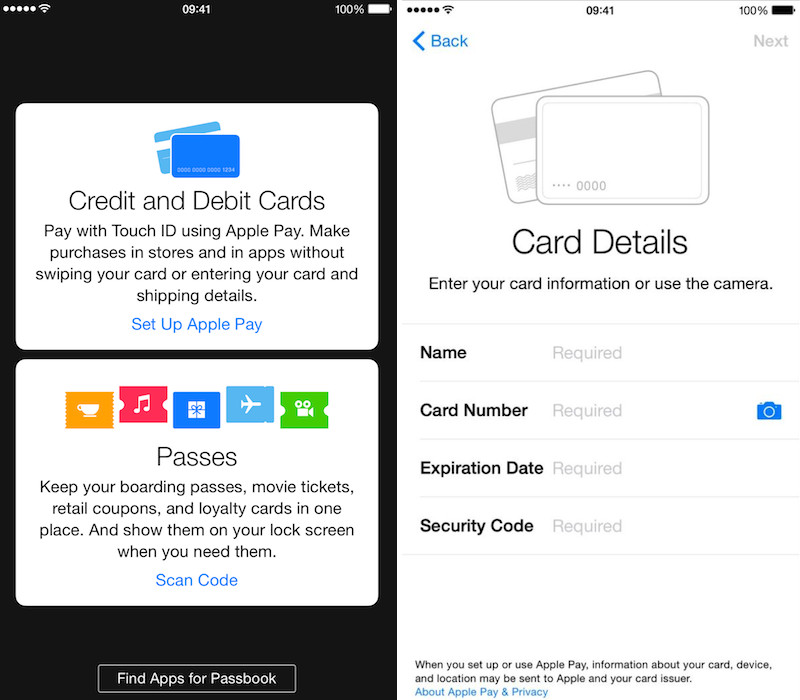
Apple Pay Setup Process Shown in iOS 8.1 Beta
Today, Apple released iOS 8.1 to developers. Hamza Sood found a setup screen for Apple Pay in the Passbook app. It was previously in the Settings app. Because the first screenshot shows the credit card option on top, it seems that credit cards will be the main focus of Passbook. It is expected that Apple Pay and iOS 8.1 will be released with the new iPads on October 16.

Wednesday, September 10, 2014
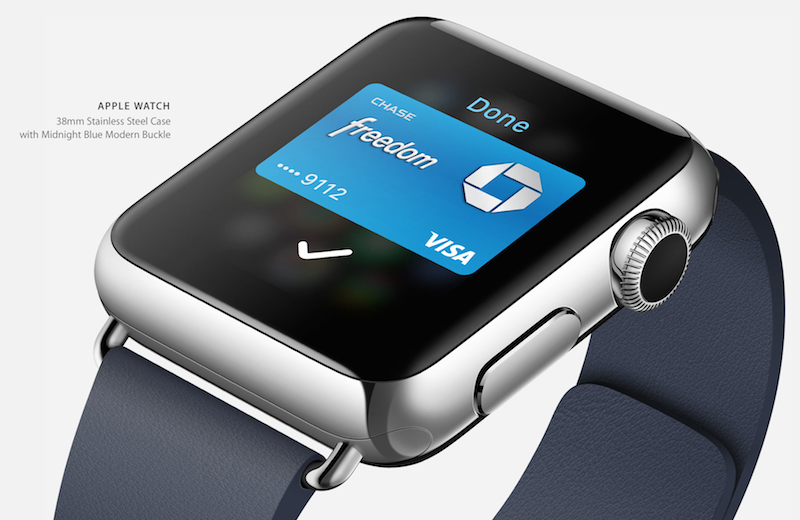
How Apple Pay Will Work On The Apple Watch...
Apple announced Apple Pay yesterday, but they never really explained how it would work on the Apple Watch. Well, now we know! Basically, Apple Watch knows when it's being worn. When you put it on, it requires a passcode. While it's being worn, you can use it to buy purchases hands-free. When it's taken off, it must have a passcode entered for the purchase to be completed.
P.S. I will do a review of what happened at the Apple Special Event soon! I'm sorry for the delay, but it's been a bit of a hectic week!

P.S. I will do a review of what happened at the Apple Special Event soon! I'm sorry for the delay, but it's been a bit of a hectic week!
Wednesday, July 16, 2014
iTunes Pass
iTunes Pass has released to the public in North America (Japan got it yesterday). iTunes Pass allows you to walking into an Apple Store, tell a Specialist that you want to add credit to your iTunes account, and let them scan your pass from Passbook. To get iTunes Pass, go to the iTunes Store on your iPhone (running iOS 6 or later), scroll to the bottom, find the "Redeem" button, tap it, and tap "Get Started" (under the iTunes Pass section), and add the pass to Passbook.

Monday, May 12, 2014
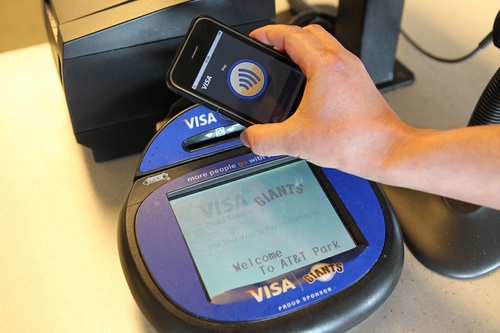
iPhone 6 To Have NFC
The new iPhone is supposed to have a new feature, NFC. NFC stands for Near Field Communication. It allows phones to communicate with each other with a tap and allows people to pay with their phone. It will be interesting as to how Apple will incorporate this with Passbook.
 |
| Image Credit: MacRumors |
Thursday, January 10, 2013
Passbook: My Book Is Boring
Want a pass to an Apple event to show off to your friends? Try out this site I found. It works with Passbook. The site is:
www.passsource.com
From here, you can create real or fake passes. Try it out! I'll give a tutorial as I learn more about it.

www.passsource.com
From here, you can create real or fake passes. Try it out! I'll give a tutorial as I learn more about it.
Wednesday, January 9, 2013
Passbook: My book is "passless!"
If you need more passes in your Passbook (Requires iOS 6), try the Gyft app. It's totally passbook integrated and has many gift card brands. Just add a plastic gift card and add it to Passbook. Here's the process in pictures.
 |
| Add a gift card to Gyft |
 |
| It appears in the Gyft Library |
 |
| Tap on the Gyft Card and tap "More" |
 |
| Select "Add to Passbook" |
 |
| A confirmation appears |
 |
| It appears with the rest of your cards |
Subscribe to:
Posts (Atom)