iOS 12 released about two weeks ago and Mixpanel has some interesting information about the iOS install base. iOS 12 is sitting about neck and neck with iOS 11 in terms of installation percent. As of writing this, iOS 12 barely takes the cake with 47.49% install, over iOS 11 with 45.65% install (the remaining percent being an older operating system). Today was the day where iOS 12 overtook iOS 11. That's definitely a perk for iOS developers, as Android's install base has historically been scattered. When I got my Moto G for Android development about five years ago, Android Lollipop made up a few percentage points at best of the install base. Today, it is the default version of Android to develop for due to its install base.
Showing posts with label iOS 11. Show all posts
Showing posts with label iOS 11. Show all posts
Thursday, October 4, 2018

Wednesday, May 30, 2018
iOS 11.4 Released
iOS 11.4 has been released, finally bringing AirPlay 2 support. This means you can have stereo support if you have two HomePods. Apple TV is also compatible with AirPlay 2. In addition, Messages in iCloud is finally here. All your messages can be stored in iCloud. This is noticeable when deleting a conversation or getting a new device. This will likely be the last major update in iOS 11 before iOS 12 is released this fall.
Saturday, April 21, 2018
iOS 11 App Store Fostering App Downloads
iOS 11 introduced a revamped App Store, with curated articles and app collections. According to TechCrunch, apps featured as "App of the Day" or "Game of the Day" by the new App Store may see a download boost by up to 800 percent. Developer stories and app lists increase downloads by up to 240 percent. Overall, it's nice to see how the new App Store can help increase downloads for developers.
 |
| Image Credit: Sensor Tower |
Thursday, March 29, 2018
iOS 11.3 Released... Actually
iOS 11.3 has been released for all compatible devices. This comes after Apple released iOS 11.3 exclusively for the new iPad that customers didn't have yet. This update has some nice features, including Battery Health, Health Records, Business Chat, ARKit 1.5, new Animoji, and more. The update is available now on iOS from Settings > General > Software Update. It should take around 20 minutes to update.
Wednesday, March 28, 2018
iOS 11.3 Released... Kinda
iOS 11.3 was not mentioned at yesterday's event, even though its release was imminent. Well, we can't say it wasn't released soon after, because it is... but only for the new iPad. Keep in mind, this new iPad isn't currently in the hands of any consumers, so this is as good as not released. I assume this is a day one software update for the iPad. Because of this, we can assume that a full release of the software will come very soon. Probably in the next few days. Interestingly enough, we don't have a golden master for iOS 11.3 yet. Despite this, I still believe that we will get a release in the very near future.
Tuesday, February 20, 2018
AirPlay 2 Features Removed from Latest Betas
iOS 11.3 and tvOS 11.3 have been in beta for about a month now. When we first saw it, AirPlay 2 was one of the main features, but in the latest beta, all functionality has been removed. This is the third beta, so given that it was around in the first and second betas, does this mean it has been delayed further? Who can say? It seems fairly clear that this was intentional. Hopefully it just needs a bit of under the hood tweaking for now.
Monday, February 19, 2018
iOS 11.2.6 Released with Critical Character Fix
Today, Apple released iOS 11.2.6, which contains an important fix for a specific character in the Indian language, Telugu. If sent or received in Messages, Safari, and many other apps, the app would become unresponsive. I think it's important to note that if someone sends this character to someone else, both parties are affected, if running iOS. If you run iOS 11, I recommend you update.
Tuesday, February 6, 2018
Our First Look at iOS 11.3's Battery Health Features
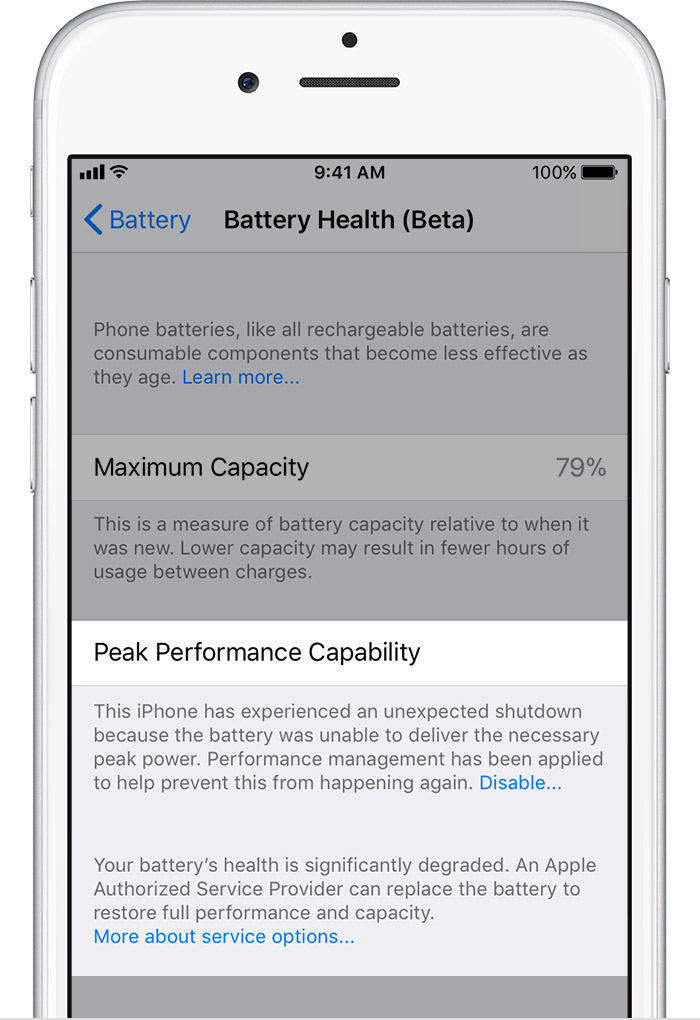
Apple promised that we would get new battery health features in a near update. In iOS 11.3's latest beta, we see what this is. In the Battery settings, there is a new section for Battery Health. This will show the maximum capacity a battery is capable of holding. Third party apps could already show us this, but it's nice to see this officially from Apple. From here, you can disable the performance management option if your battery is degraded enough and suffers an unexpected shutdown. Once you disable it, you cannot re-enable it until your phone suffers another unexpected shutdown.
I should reiterate that this whole thing wasn't a big deal from the start. If you've read me for a while, you know I have quite a few gripes with Apple and their decisions, but I think the flack they've gotten from this is just ridiculous. Mostly because people kept acting like it was a conspiracy or something and that someone found this out from a datamine or something. No, Apple publicly disclosed this and the news spread faster than it could be told accurately. Also, the general public likely wasn't educated on how a lithium-ion battery chemically degrades, and I don't expect them to. We Americans also really love class-action lawsuits because "we didn't pay for this!" But in the end, I guess it all works out, because there's a neat new tool for battery health now and the general public can freak out over it. I'm fine with this, but I can see why Apple didn't want to make this available. Apple has always been about keeping the user from worrying about the technical aspects of a device, especially with iOS. Having a phone manage performance for you was part of that. The next thing you know, people will start filing class action lawsuits because their iPhone 3GS doesn't run 99% of apps in 2018 or because their phone didn't defy gravity and the screen cracked.
I should reiterate that this whole thing wasn't a big deal from the start. If you've read me for a while, you know I have quite a few gripes with Apple and their decisions, but I think the flack they've gotten from this is just ridiculous. Mostly because people kept acting like it was a conspiracy or something and that someone found this out from a datamine or something. No, Apple publicly disclosed this and the news spread faster than it could be told accurately. Also, the general public likely wasn't educated on how a lithium-ion battery chemically degrades, and I don't expect them to. We Americans also really love class-action lawsuits because "we didn't pay for this!" But in the end, I guess it all works out, because there's a neat new tool for battery health now and the general public can freak out over it. I'm fine with this, but I can see why Apple didn't want to make this available. Apple has always been about keeping the user from worrying about the technical aspects of a device, especially with iOS. Having a phone manage performance for you was part of that. The next thing you know, people will start filing class action lawsuits because their iPhone 3GS doesn't run 99% of apps in 2018 or because their phone didn't defy gravity and the screen cracked.
 |
| Degraded Battery Health |
 |
| Normal Battery Health |
Friday, January 26, 2018
iOS 11.3
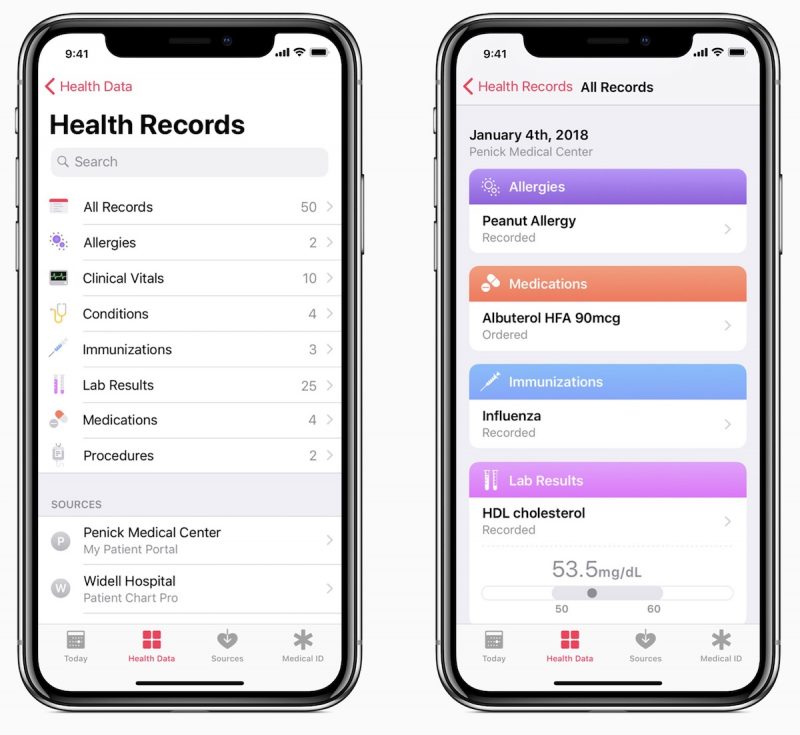
iOS 11.3 will be very exciting. It brings iMessage Business Chat, iMessage in iCloud, new Animoji, AirPlay 2, Health Records, and more. iMessage Business Chat hopes to replace those calls to a store with simple text messages and embeds. This makes it much easier and faster to connect with support for different businesses. No more hold music! iMessage finally makes its way to iCloud, which doesn't mean much for the average consumer, but just means your messages are no longer solely stored on local devices, but also in the cloud. There are now dragon, bear, skeleton, and lion Animoji. ARKit receives some improvements as well. AirPlay 2 will finally be implemented, but is missing a lot of functionality in the current beta, so we don't have all the details we'd like to know about how it works. Very exciting is the new Health Records. These existed in the Health app before, but they weren't presented well and required an XML file. Now in testing at participating medical centers, the new Health Records will help you keep track of your health appointments and what you need to do moving on. Additionally, we will get that whole battery tracking feature in iOS 11.3, which will let you choose if you want your battery to die faster or phone to go slower. iBooks is expected to have a major redesign, with parts of it inspired by the new App Store. It will be renamed to just "Books." So, yeah. iOS 11.3 is very exciting an has a lot of substance to it. Hopefully, it comes out within February or early March.
Sunday, January 21, 2018
Next iOS 11 Version Will Likely Launch with HomePod
With the launch of HomePod imminent, the next version of iOS 11 is also imminent. Currently, the beta of iOS 11.2.5 is nearing release, likely this week. It seems doubtful that HomePod support and the AirPlay 2 protocol would be quickly patched into a minor update. I’m speculating that iOS 11.3 could be released for HomePod support, alongside a new tvOS version for AirPlay 2 support. The only question left is when the HomePod will release. Apple will likely silently release it and sell out quickly. Probably within a few weeks.
Monday, December 4, 2017
Apple Pay Cash Now Available
Apple Pay Cash, which was not activated in yesterday's update, is now officially live. Going to Settings > Wallet & Apple Pay and switching on Apple Pay Cash will guide you through the setup process. After the setup, you'll have a nifty new card your Wallet app with a holographic design based on your phone's gyroscope. With this, you can add a debit card to add funds and send money to friends and family. With credit on the Apple Pay Cash card, you can use it like you would at Apple Pay accepting locations or choose to add the funds to your bank account. I'm sure Apple will eventually have some incentives to use Apple Pay Cash in the future as well.


Sunday, December 3, 2017
A Critique of Apple's New User Interface
Below is an image provided by Apple Developer's design guidelines. This style, where the page name is in large text near the top of the screen, has become a staple in iOS 11. This was actually originally confined to the Music app in iOS 10 if I remember correctly. While I'm somewhat glad they made it consistent across system apps and not just an odd one out in the Music app, I can't say I'm happy with this design choice. First off, with all of this screen space available with the iPhone X, putting "Favorites" in text that big seems like a waste. "Woah, I'm in the favorites screen. I would've never guessed." We don't need such extravagant text for every single screen. The screen will be better used and more aesthetically pleasing if the title text was shrinked and center-aligned between the "+" and "Edit" buttons. Now you can't un-see it. Look at all of that blank space! What justifies that? It looks like the UI designer made a mistake and let it slide into the golden master build. This works in some situations, especially on tvOS, where large titles are necessary to understanding where you are in the system. However, it's unnecessary on an phone, where screen space is limited and basic design principles keep users from getting confused or lost (which is basically every app except Snapchat and YouTube).

Saturday, December 2, 2017
iOS 11.2 Released
iOS 11.2 was released today and it brings some important updates. First off, we have Apple Pay Cash. This lets you make peer-to-peer payments through Apple Pay and iMessage. It's being rolled out currently, so it may not be available right away. Next is faster wireless charging. iPhone 8, iPhone 8 Plus, and iPhone X now support 7.5W wireless charging, which is faster than the 5W power brick included with the phones. It also adds a Sports section to the TV app, where you can keep track of your favorite sports teams. This also fixes the "I.T" keyboard bug.
Monday, November 27, 2017
Another iOS 11 Keyboard Bug
After the famous "A[?]" autocorrect bug, which would auto correct "I" to "A[?]", we have another bug, which corrects "it" to "I.T". This isn't happening for everyone, but a few hundred people have complained about it [Source: MacRumors]. My guess for these errors would have to be Apple's deep learning algorithm takes keyboard data from users around the world who consented and found that enough people used "I.T" to justify the autocorrect. This would make some sense considering "I.T." can be an abbreviation of Information Technology.
Monday, November 13, 2017
iOS 11.2 Will Give Better Explanation of Network Controls
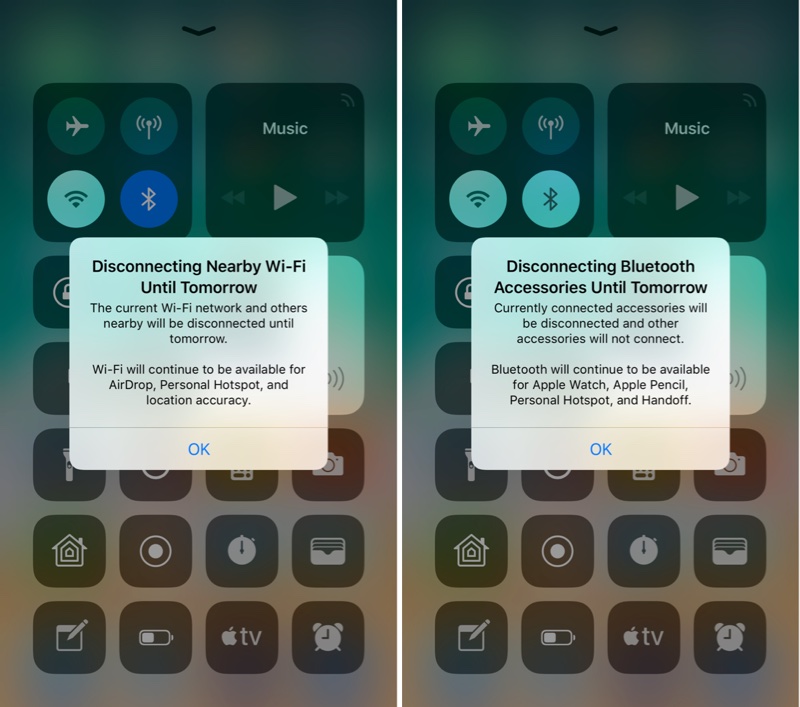
If you enable or disable Wi-Fi or Bluetooth in iOS 11's Control Center, there's a lot that isn't revealed about what is happening. Disabling Wi-Fi will still allow Wi-Fi processes such as AirDrop, location accuracy, and Personal Hotspot. Disabling Bluetooth will still allow Handoff, Apple Watch connections, and Apple Pencil connections. These will automatically re-enable at 5 a.m. the next morning. iOS 11.2 will make this much more clear by providing a one time pop-up explanation and descriptive text each time you do this.
 |
| Image Credit: MacRumors |
Thursday, October 12, 2017
iOS 11 is Installed On More Active iOS Devices than iOS 10
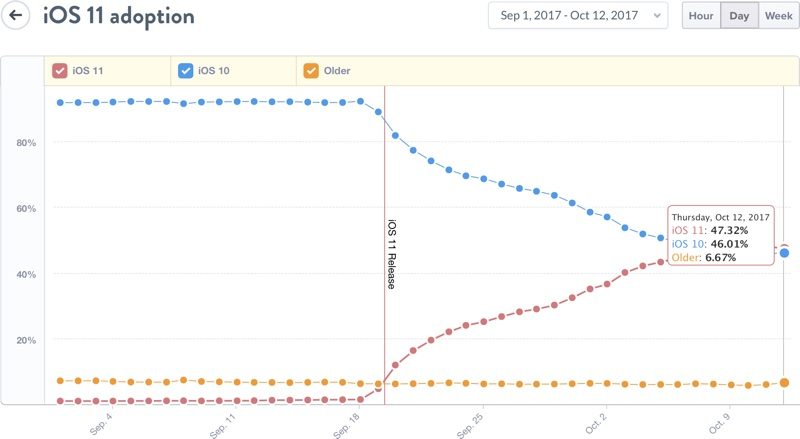
iOS 11 is now on the majority of active iOS devices. Just over three weeks and iOS 11 is at 47.32% adoption [Source: Mixpanel]. iOS 10 is at 46.01% adoption, with the remaining 6.67% on an older version. This is the tipping point I suppose, since the OS is on the majority of devices. As an Android developer, I can confirm what Apple says about Android adoption is true, and having more users on your latest operating systems helps a lot with keeping apps fresh and accessible.
Friday, October 6, 2017
iOS Updates Don't Slow Down Devices Intentionally
I've always found this conspiracy theory funny. The idea that Apple intentionally slows down older devices through iOS updates. That's not how that works. Older hardware (which cannot be changed mid-use) does not account for new software (which can be changed on the fly). Major iOS updates typically take advantage of new features on the newest phone. Your older phone does not anticipate these updates since hardware has so many limitations once it's pushed out. That's also why recalls are such a big deal. Futuremark put this entire theory to the test and confirmed that the theory is wrong. Benchmarks of CPU and GPU showed very consistent results over multiple years. While it's not completely definitive, it's a good way to judge these things. Check out their site for the full results.
Monday, October 2, 2017
iOS 11 Removes Wish List
iOS 11 has made the unfortunate decision to remove the wish list. This was a feature I've waited forever for before it was finally added in iOS 7. It's a shame that they removed it when Apple made a big deal about the remodel of the App Store in iOS 11. The wish list was a great way for me to keep track of apps I wanted to buy. I would also check it if apps were on sale. If I got an iTunes gift card, I was sure to check my wish list before anything else. Now, I don't know what to spend it on. It's a mystery why Apple would remove this feature.
Friday, September 29, 2017
32 Bit Apps in iOS 11
As I’ve discussed, 32 bit apps no longer work in iOS 11. However, I’ve never talked about what it looks like. Essentially, you’ll see a cloud icon next to the app name, and tapping on the app will display a message. The app will not open and will need to be updated for use.


Thursday, September 21, 2017
Automatic Setup in iOS 11
iPhone 8 pre-orders will be delivered tomorrow for many, so here's how you can quickly setup your new iPhone with an existing device running iOS 11. First, power on the new device and pick a language. Hold your two devices near each other and the existing device should have a prompt appear. Tap continue, and you can follow the prompts from there. This will transfer your settings and preferences, but you can choose whether you want to restore from a backup or start fresh with the new device.
Subscribe to:
Posts (Atom)