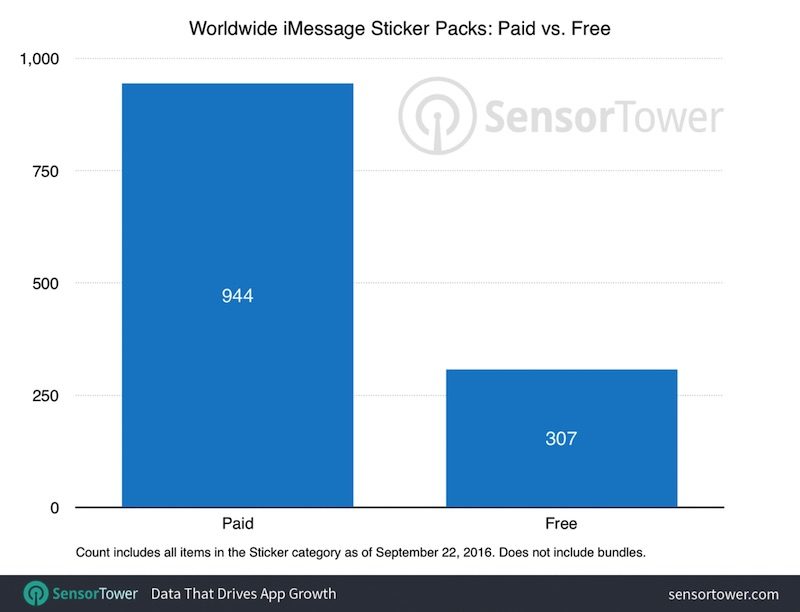
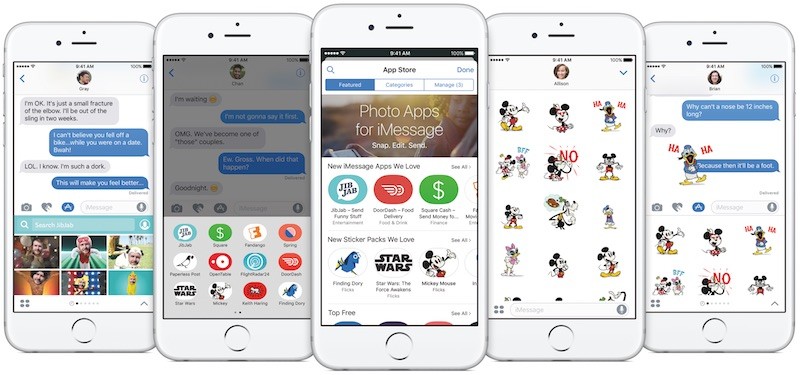
According to TechCrunch, the iMessage App Store has grown to over 1,650 apps after about 10 days. More interestingly, 75% of these apps are sticker packs. There are 307 free sticker packs and 944 paid sticker packs. Of the paid stickers, 86 percent cost $0.99, 12 percent cost $1.99, 1 percent cost $2.99, and only one sticker app in the entire store costs $3.99. If you haven't had a chance to check out the iMessage Store, I highly recommend you do and check out any stickers that might interest you.
All of your Mac and iOS questions and rumors can be answered! How? Easy! Just ask a teenager! What's better? Ask an Apple Certified teenager! Ask me! Alex! Writing once every single day since 2012!
Showing posts with label Stickers. Show all posts
Saturday, September 24, 2016
Monday, September 12, 2016
iMessage App Store Launches
Tomorrow, iOS 10 will be officially released to the public. However, developers and beta testers got an early preview in terms of what other developers have been working on. In addition to iOS 10 app updates being pushed out, the iMessage App Store was opened. Sticker packs, like Super Mario Run, will be among the pioneers of this new genre of app. iOS 10 will be released publicly tomorrow at around 10 a.m. Pacific Time.
iMessage App Store quickly populating and many iOS apps are being updated to support #iOS10 at this point.— Alex Baratti (@alexsmbaratti) September 12, 2016
#SuperMarioRun stickers are now available for #iOS10 users. iOS 10 public release tomorrow.https://t.co/dILp3CNZjc pic.twitter.com/gDxRkSrTbf— Alex Baratti (@alexsmbaratti) September 12, 2016
Sunday, September 11, 2016
iOS 10: First Impressions
Yesterday, I downloaded the golden master of iOS 10, which will likely be the same version of iOS that will be distributed to the public on September 13. When I first saw iOS 10, I was glad to see a feature-heavy major software upgrade to iOS, something we really needed after two years of performance enhancements. When I upgraded, I figured it'd be a decent upgrade, but nothing special. However, iOS 10 was a breath of fresh air for me. For the first time since around iOS 5 or iOS 6, I was pleased and excited by the new features.
The Good
By far, my favorite part of iOS 10 had to be iMessage. I texted a few of my friends who had installed the beta and tried sending some stickers and used some apps. It was a lot of fun for all of us. We shared YouTube videos and watched them without leaving the app, shared our favorite video game songs using Apple Music, and I even got to send some of my custom sticker packs I made in Xcode. Keep in mind, this is before the iMessage App Store has any apps on it, so consider that the icing on the cake when September 13 comes.
I also liked Memories in the Photos app. It let me give my photos a nice place to be displayed. Each one had a different theme. I gave my trip to Arizona a complementing title font that made it look like a desert.
I'll get to the lock screen later, but I found that Apple may have given a bit of leeway to Touch ID. I found it to be more accepting when I misplaced my thumb, which is a change I'm fine with. Touch ID on my iPhone 6s was fast and accurate, but it was nit-picky if my finger was dirty, sweaty, or misplaced. I'm not expecting anyone with a near identical fingerprint to pick up my phone anytime soon.
The News app had a nice redesign that made me want to use it a lot more. First, I'm glad to see notifications to catch me up on important news I may have missed. I also like the small touch of adding the local weather to the top-right corner of the For You tab. In short, I've finally ditched Flipboard for this.
And because I know people have been asking for this, yes, you can delete built-in apps. Not all of them, but the non-essential ones. You can delete apps like Stocks, Home, Maps, Calendar, Notes, Apple Watch (thank goodness), and more.
The Bad
One of the issues that will plague everyone in iOS 10 will be getting used to what's new. If people didn't like the lock screen in iOS 7, they're gonna hate this lock screen. It's no longer slide to unlock, but instead tap the home button. I got used to this in about a day, but it was a little annoying. Touch ID (as I mentioned earlier) makes up for a lot of this, but if it doesn't work, it gets a bit annoying.
Again with getting used to changes, notifications are a bit wonky at first. I'm still getting used to them. Whether it's from the lock screen or a banner, they're hard to get used to.
This one affects very few people, however in the OS X version of the Photos app, if you tagged people's faces, they don't transfer over to iOS 10 (even though it worked with iOS 9). I'm not sure if this is because I haven't upgraded my computer to macOS Sierra, but it's annoying for sure.
The Pending
A lot of features haven't been available to beta testers. These features rely on apps that utilize APIs announced at WWDC. For example, CallKit doesn't work because apps that support CallKit haven't been released to anyone yet. SiriKit doesn't work either for the same reason. It's not good or bad. It's just the nature of a beta. These features only work if you're a developer. The only part of this I got to try was the custom sticker packs, which require a developer account. I am definitely looking forward to see what stickers, iMessage apps, and Siri commands we'll be able to use in iOS 10.
Saturday, September 10, 2016
iOS 10: Stickers
| Adding a sticker to an existing message |
| The iMessage apps section |
Thursday, July 7, 2016
iMessage App Store Now Open in iOS 10 Beta
The developer and public betas for iOS 10 now have the iMessage App Store. Personally, I'm very excited for this. My personal favorite on the store so far is the Classic Mac sticker pack. If I find a dedicated phone to install iOS 10 on, I'll definitely try to post some of the stickers. Anyways, the iMessage App Store allows iMessages to contain different embedded items, like stickers or money. iOS 10 is expected to release this fall.
Subscribe to:
Posts (Atom)