Wednesday, October 17, 2012

iPad Mini Invite

Here's my doodle of how the apples are
to my perspective.
Very recently, Apple sent out invitations to the iPad Mini announcement. First off, it probably won't be called the iPad Mini. The invite doesn't say. Second, the iPad Mini is said to focus about iBooks. I just had to get that out of the way. I hope to talk more about that later but first, let's talk about the invite. Notice the colors in the background. Do you see that they are all larger apples that grow smaller leading down to the white apple? This probably shows that there is a dramatic change in size of the iPad. Also, think of the word "little" as a key word. This probably means a little iPad. Like most Apple events, it will probably begin with minor Apple News. Meaning, they may address the Maps problems and the "Purple Halo" problems. We will just have to wait.
No, I didn't get an invite. Picture Source: All About Phones
UPDATE: The iPad Mini event will be held at the California Theatre in San Jose, California. Not your ordinary Apple Event.

Picture Source: Cult of Mac

Tuesday, October 16, 2012

Swipe to Delete

Throughout iOS, you can swipe on certain items to delete them. This includes emails, songs, text message conversations, notes, and more! A red confirm box will appear to make sure you want to delete the item.
You can swipe to delete notes.

Monday, October 15, 2012

Navigate Typing Fast

Here's how to quickly navigate text in a document in iOS with a keyboard or in Mac OS X. Simply go to any word, hold the "alt" or "option" key, and use the left and right arrow buttons to move the word cursor a word at a time. Also, you can use the up and down arrow buttons without the "alt" or "option" button to quickly go to the beginning or end of a document.

Sunday, October 14, 2012

iPad Mini: New Release Date

Well, it's past October 10th and there's no iPad Mini. The iPad Mini announcement is expected to be released on October 23rd. We don't have an invitation yet, so we can't be sure. Check back for more iPad Mini news.

Saturday, October 13, 2012

Halftime Show 4 Geeks

Here's an amazing video of Ohio State Halftime show from last Saturday. I hope you enjoy it.


No iPod Demos 4 Geeks

If you're thinking of going to the Apple Store to test out the new iPod lineup, good luck. At least at my Apple Store, they don't have them on display! I am dying to test out an iPod Touch and the iPod Touch Loop. But they only have them in the back storage for paying storage. Please comment if you got your hands on a demo. Thanks!

Friday, October 12, 2012

iPod Classic. What's next?

Recently, iTunes removed the iTunes Ping feature. With that, iTunes removed the click wheel games. This was like the app store for the other iPods and it only sold games. It wasn't compatible with iPods without click wheels (iPod Nano, iPod Shuffle, iPod Touch, etc.) and none were free. How it would work is that you would buy the game from your computer. Then, you sync it to the compatible iPod. Finally, you would enjoy the game. Although the feature is gone, Apple still advertises the feature on the iPod Classic's feature page. Now it's gone and with that, I wonder what will happen to the only iPod that hasn't been updated for at least the past two iPod events. It is also the only iPod to not have a pair of EarPods included. And it may have 160 GB capacity but, come on, what are you going to do with 40,000 songs. If you're going to get an iPod for music, videos, and photos, you might as well buy the new iPod Nano for $149 instead of $249. The only reason to get it is because it's the only iPod with the design of iPod with a real click wheel. And no, I don't count the click wheel on the iPod Shuffle a real click wheel (no offense to iPod Shuffle users). But times are changing. For all we know, the iPod Classic may look like the first generation of the iPod Touch.

Thursday, October 11, 2012

Show your  Pride!

If you see random gibberish in the title, it is an Apple logo.

Here's how to make the Apple symbol above. If you want to do this on an iOS device, you will need a physical keyboard. It doesn't matter if it's a dock or wireless. This trick also works on Macs. In any text file, press the "alt" or "option" key, the "shift" key, and the "k" key. You will see an Apple logo appear. This may not work on any Windows computers.

Written on an  Mac.

Wednesday, October 10, 2012

EarPods Review

The EarPods are made to fit right into your ears perfectly.
I recently bought some EarPods at the Otay Ranch Apple Store. They bring a whole new definition of music to your ears. Try your favorite song with them. It sounds great! It feels like that good feeling when you're relaxed in a jacuzzi. They didn't fall out when I shook my head as hard as I could. Nor did they fall out when I ran on a treadmill for a mile. I highly recommend them. I am giving EarPods five out of five geek glasses. What are you waiting for? Go get some!

For more information about Apple's EarPods, click here.


Tuesday, October 9, 2012

Otay Ranch Apple Store

This past Saturday, I had the pleasure of visiting the Otay Ranch Apple Store. Like all Apple Stores, this store is lively and fun. From the iPhone 5 to the LaCie RuggedKey, this place has it all. While I was browsing the accessory wall, an Apple Creative Specialist came up to me and complemented me on my t-shirt and asked if he could get his picture taken with me. He even let me wear his lanyard for the picture. Apple employees are the nicest, most friendly people in the tech world. Compare it to the Microsoft store I walked into last week. But I'll save that for another post. Let's just say that there was a Blue Screen of Death (To go to this article, go to http://techtalk4geeks.blogspot.com/2012/11/the-microsoft-store-is-it-even-worthy.html).

For information about the Otay Ranch Apple Store, click here.

Monday, October 8, 2012

iCloud Extends Free Storage 4 Geeks

I recently got an email about iCloud's free storage upgrade for those who had MobileMe. For those who don't know, Apple has been trying for years to perfect syncing. Starting with eWorld. Their first syncing service that was started in 1994 and ended in 1996. In 2000, a new service came named iTools. It evolved into .Mac in 2002 as a paid subscription. Then, it was MobileMe in 2008. It was a flop. Syncing wouldn't work as smoothly as what iCloud would be. They sold MobileMe subscriptions in Apple Stores then. In 2011, iCloud took over MobileMe and was a free service. The people who paid for MobileMe, including me, were given a free year of 25 GB of storage.

Apple recently gave us an additional year of this special offer. No action was required for these users.

Here's a picture of the email. The hyperlink to the article is not meant to work.

How to remove a SIM card

WARNING: Use with caution. Small parts can be easily lost.

Here's something you can brag about. To remove your iPhone's or iPad + Cellular's SIM Card, find the SIM Card removal tool in the box your device came in. It looks like a metal rectangle that has a tip at the end. Turn off your iOS device. Find the small hole (usually on the left side on the iPad and iPhone; on the top for the iPhone 3GS and before) and stick the SIM Card remover into the hole. The compartment will pop out. Remember, which way the card was facing. Hold it carefully. Blow any dust off the card and in the socket. Put it back in the way you found it. Push it in. That's all.

When will you use this? If the top left part of the screen ever says, "No SIM" or if you get a notice saying something among those lines, use this technique.

Sunday, October 7, 2012

Next Song 4 iPod Nano

Here's how to quickly go to the next song while your sixth generation iPod Nano (iPod Nano with square touch screen) screen is off. Simply double click the lock button (rounded rectangular button at the top). It's that easy.

Saturday, October 6, 2012

Recently Closed Tabs

Here's how to quickly access recently closed tabs in Safari for iPad. This is only for iPad with iOS 5 or later as far as I know. Go to Safari and look for the plus in the top right corner. Hold the plus to find your recently closed tabs. There you go! Just tap the one you wish to open. It will open in a new tab.

Friday, October 5, 2012

One year anniversary of Steve Jobs' Passing

It's been one year since Steve Jobs has left us and Apple has issued a statement and has made a video.

Apple's CEO wrote:
"Steve’s passing one year ago today was a sad and difficult time for all of us. I hope that today everyone will reflect on his extraordinary life and the many ways he made the world a better place.

One of the greatest gifts Steve gave to the world is Apple. No company has ever inspired such creativity or set such high standards for itself. Our values originated from Steve and his spirit will forever be the foundation of Apple. We share the great privilege and responsibility of carrying his legacy into the future.

I’m incredibly proud of the work we are doing, delivering products that our customers love and dreaming up new ones that will delight them down the road. It’s a wonderful tribute to Steve’s memory and everything he stood for. - Tim"


Fast Typing 4 iPad

When the iPad was created, one of it's great but forgotten features is the fact that in any iPad app with a keyboard (not an iPhone keyboard), you can go in to landscape mode (turn the iPad so it is landscape instead of portrait; it doesn't matter which way it is turned as long as it is landscape) and touch type like on a real keyboard. It's full sized and on the screen. Very smart.

Thursday, October 4, 2012

Apple speaking out about their Maps flaws

Recently, Apple C.E.O. Tim Cook wrote a letter concerning iOS 6's Apple Maps flaws. I couldn't find any problems in my area, however, if you search for the Eiffel Tower, you might just find the aftermath of a giant squashing the entire city.

Tim Cook stated:

"To our customers,

At Apple, we strive to make world-class products that deliver the best experience possible to our customers. With the launch of our new Maps last week, we fell short on this commitment. We are extremely sorry for the frustration this has caused our customers and we are doing everything we can to make Maps better.

We launched Maps initially with the first version of iOS. As time progressed, we wanted to provide our customers with even better Maps including features such as turn-by-turn directions, voice integration, Flyover and vector-based maps. In order to do this, we had to create a new version of Maps from the ground up.
There are already more than 100 million iOS devices using the new Apple Maps, with more and more joining us every day. In just over a week, iOS users with the new Maps have already searched for nearly half a billion locations. The more our customers use our Maps the better it will get and we greatly appreciate all of the feedback we have received from you.
While we’re improving Maps, you can try alternatives by downloading map apps from the App Store like Bing, MapQuest and Waze, or use Google or Nokia maps by going to their websites and creating an icon on your home screen to their web app.
Everything we do at Apple is aimed at making our products the best in the world. We know that you expect that from us, and we will keep working non-stop until Maps lives up to the same incredibly high standard.
Tim Cook
Apple’s CEO"

Wednesday, October 3, 2012

Happy National Techies Day!

Based on the title, you may be wondering what National Techies Day is. I didn't know what it was until 2:15 today. It is celebrated every October 3rd. How do you celebrate? Easy. Just thank the tech geek in your life. You know, the one who fixes your printer, saves your documents, and explains that a cloud is a personal hub, in addition to being a wet, fluffy puff in the sky. Or you could return the favor by using your expertise if it is not technology. Nobody knows the creator of this holiday. That doesn't mean we can't embrace it! I wish you a happy National Techies Day!

Need a mirror?


Has there ever been a time where you needed a mirror, but you didn't have one? If you have a iOS device with a front-facing camera, go to the camera app (not the photos app) and tap the camera switch button if the camera is showing outside (button with camera and arrows, shown below). If the camera is showing your face, skip tapping the button. You should now have the front facing camera. Use it as a mirror. There are also many mirror apps on the App Store. Some are free.

Tuesday, October 2, 2012

iOS 6: Review

iOS 6 is finally here! I tested out some of it's features. What wonders is it hiding? Let's find out!

Maps:
Ok. I'm not going to lie. The Maps app can have its flaws. Especially, with the fact that the roads lead into bodies of water. However, Apple has written a letter regarding the flaws and will address them. And when it is right, it works like a charm. It even shows traffic details. The turn by turn directions are nice. But, one of the best features has to be flyover. However, it only works in places with tall buildings (Downtown San Diego, Metro L.A., Manhattan, etc.) but when it works, it looks amazing.


Find My iPhone:
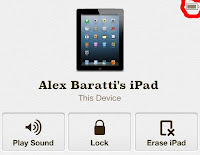
The new Find My Friends app now shows battery levels.
The new Find My iPhone app has some great new features! There's Lost Mode, which lets you track where your iOS device has been and even sends a phone number that lets the one who finds it call you with ease. In addition, the new Find My iPhone app lets you see the battery levels of your iOS device. However, the battery level feature doesn't work for Macs. Even the picture of the device changes based on it's condition. For example, the screen of the device may be black if it's offline. It's the little things that make it nice.

Siri:
Siri now has restaurant references, movie times, and sport scores. And I've got to say, all my friends and I enjoy Siri when it comes to football. She even has more responses. Ask her, "How much wood would a wood chuck chuck, if a wood chuck could chuck wood?"


Facebook:
The Facebook feature isn't my favorite feature as I am not a social butterfly, but others might enjoy it. It has the same functions of Twitter. You know, post, integration, and adding the information to your contacts. Except, that you can choose who you can share with.

The Lost Features:
If you remember the iOS 6 part of WWDC 2012 with Scott Forstall, you may have seen some of the hidden features in the Keynote. If you looked deep enough, you would see a feature that said, "Location-Based Reminders for iPad". They only had that for iPhone at the time. So, where is it? I went to the app and I couldn't find the function. Not even Siri could help me. Perhaps it works over iCloud. Meaning that you would have to create the reminder on your iPhone and get it from the cloud. I don't know as I currently do not have an iPhone.
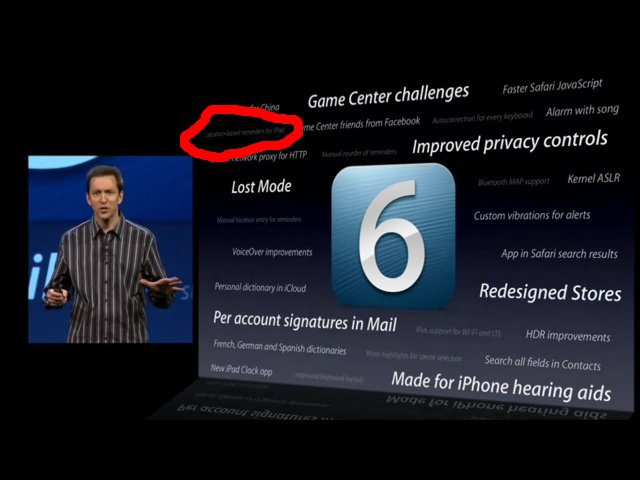
In the top left corner, one of the features say, "Location Based Reminders for iPad".
You may know that the YouTube app has been removed from iOS and is now a free iPhone app from the App Store. But in this Apple made screenshot of an iPad (sorry about the quality), it shows the YouTube app along with all the other apps. But it's not on the iPad.
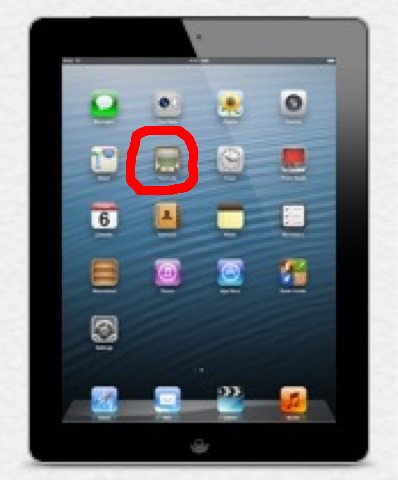
Notice that among the apps is the removed YouTube app.