Showing posts with label iOS 6. Show all posts

Friday, June 30, 2017

Native iOS YouTube App Removal was YouTube's Decision

In iOS 6, along with the transition into Apple Maps, had the removal of the YouTube app. It was added to the App Store as an app published by Google. It has been revealed that this was Google and YouTube's decision. It had a lot to do with the growing smartphone market and the deployment of YouTube on those devices. The decision was not affected by Apple Maps in iOS 6. Many argue that the new YouTube app is not a good user experience, which I can vouch for. While the old YouTube app designed by Apple would not work today, we would see support for picture-in-picture since it would be designed by Apple. The fundamentals of the app would not be changed as frequently as it is today. One example is how a recent minor update completely changed how the scrubber bar detects when it is being pressed. And of course, there would be less bugs and glitches. YouTube uses a custom-made "Material" design used in Android. However, that doesn't work in iOS. Icons are different, it looks foreign, and it leads to bugs. Orientation may get stuck and buttons may not work. Anyways, rant over and mystery solved.

Saturday, June 21, 2014

Apple Maps Have Improved

Since its release, Apple Maps have been the pinnacle of criticism for users. There were many incorrect directions and addresses. However, Apple has been improving their service. Many people find that they see improvements every Friday. In addition, Apple has bought some mapping companies which could assist with Maps in iOS 8.


Wednesday, March 27, 2013

The Button to End All Buttons!

Chevy has unveiled their new TV ad for the Chevy Sonic. This ad showcases the world's first car to use Siri Eyes Free (it's about time too!). Eyes Free is integrated into iOS devices (iOS 6 or later) and allows you to ask Siri to do tasks from your car, all without lighting the screen up. Any task that requires turning on the screen won't work.


Sunday, March 10, 2013

Panorama: From Left to Right AND Vise-Versa

When taking a panorama on an iPhone or iPod Touch, you can tap on the window of the panorama to switch the direction of the panorama. This works both ways. I hope this helps.

Friday, February 1, 2013

Report a Maps problem

In iOS 6.1, you can report problems in Apple Maps now! Just tap the little flap in the bottom right corner of the Maps app and tap "Report a Problem". I hope this helps!

Wednesday, January 30, 2013

128 GB iPad

Yesterday, Apple released a new 128 GB iPad model. 128 GB is twice the amount of the current highest amount of storage which was 64 GB. While there was no keynote, Apple did release it in the press info. This was expected as the code in the iOS 6.1 beta seed refers to 128 GB devices. iOS 6.1 is out now and will be talked about tomorrow. The 128 GB is NOT a new generation iPad and is categorized under the fourth-generation iPad. The 128 GB iPad will cost $799 for Wi-Fi and $929 for Wi-Fi + Cellular and will be available on February 5th. The 16, 32, and 64 GB models of the fourth-generation iPad will still be available when the 128 GB iPad comes out.

Thursday, January 10, 2013

Passbook: My Book Is Boring

Want a pass to an Apple event to show off to your friends? Try out this site I found. It works with Passbook. The site is:

www.passsource.com

From here, you can create real or fake passes. Try it out! I'll give a tutorial as I learn more about it.

Wednesday, January 9, 2013

Passbook: My book is "passless!"

If you need more passes in your Passbook (Requires iOS 6), try the Gyft app. It's totally passbook integrated and has many gift card brands. Just add a plastic gift card and add it to Passbook. Here's the process in pictures.

Add a gift card to Gyft

It appears in the Gyft Library


Tap on the Gyft Card and tap "More"

Select "Add to Passbook"


A confirmation appears


It appears with the rest of your cards

Thursday, January 3, 2013

Government Alerts

In iOS 6, you can receive emergency alerts in your area. These include AMBER alerts. They are automatically set on. You can turn these off at Settings > Notifications and scroll to the bottom. It should show AMBER alerts and emergency alerts. Turn them off by tapping on the switch next to the alert. However, I don't recommend turning them off. I hope this helps.

Saturday, December 29, 2012

Do Not Disturb

If you're ever in a meeting or don't want to be bothered by a call while sleeping, enable Do Not Disturb. It silences all notifications. This is available in iOS 6. Go to Settings, and switch it on. Tap it again to turn it off. You can also have it scheduled by going to Settings > Notifications > Do Not Disturb. Choose the time that's right for you. You can also customize the terms of Do Not Disturb. I hope this helps you guys.

Wednesday, December 12, 2012

Find My iPhone Update 2.0.1

Apple released a new update for the Find My iPhone app. This allows you to get directions to your device within the app. This requires iOS 6. The app also has details and options of the device to be hidden until tapped. This is probably used to prevent accidental deletion or locking of iOS devices.

Tuesday, December 11, 2012

iOS 6 Compatibility

iOS 6 is the most-advanced operating system for mobile devices. However, this only works on select devices. It works on iPhones including the iPhone 3GS, iPhone 4, iPhone 4S, and iPhone 5. iPad compatibility includes the iPad 2, iPad 3 (Discontinued), iPad 4 (iPad with Retina Display), and the iPad Mini. iPod Touch fourth-generation and fifth-generation work with iOS 6. I hope this helps out the people still upgrading to iOS 6.

Friday, November 9, 2012

The Greatest Time-Saving Tips in iOS 6 That No One Notices

In iOS 6, there are two features you will not notice but help you a lot! The first one is the fact that there is no password required for updating apps. This is very helpful because before we would need to type in our Apple ID password before updating apps (Just so you know: updating is free). Next, is that when you set up an Apple ID, you no longer need a credit card. Some people want to buy only free apps. We used to need a credit card for that but now we don't! This is very helpful to new Apple users!

Wednesday, October 24, 2012

iPad Mini (and friends): The Scoop

Lots of things came out to conclude the 2012 year yesterday, not just the iPad Mini. It started out with the 13" MacBook Pro with Retina Display. Which is pretty much self explanatory. No new features other than the display and the new USB 3.0.

Next up was the Mac Mini. Phil Schiller made a funny joke about that one.
"You knew there would be something called 'mini' in this presentation, wouldn't you."
- Phil Schiller 
The iMac's new display is
very slim.
For those who don't know, this is not a brand new product and has been around for years. Apple has somehow put a 1 TB drive in this tiny box. The Mac Mini is also made with the latest I/O, including Thunderbolt, USB 3.0, SD slot, and even HDMI.

Even the packaging is strange.
Also, the iMac was updated with an ultra slim display. Apple packed everything they could in that slim display. Not to mention, both of these desktops include Fusion Drive. The first combination of a 1 TB hard drive (Capacity) with flash storage (Performance). It moves files that you use more often to the flash so those files run faster. Smart.

In addition, iBooks Author comes with new ways for portrait views. Special math equation symbols work great and look beautiful. And you can now use custom fonts in your books.

iBooks 3.0 came with purchased books in your bookshelf. Now, there is a special scrolling view as an alternative for flipping pages. Foreign characters (like Japanese characters) are now supported in books. While reading a book, you can select certain text and share it via Twitter, Facebook, or Mail.

And of course, the iPad! The fourth generation iPad (full sized, not the mini) introduced the A6X chip. The new iPad also has the new Lightning cable. That's pretty much it.

The iPad Mini!
The iPad Mini brings a 7.9" screen. Cellular is a option. However, there is no Retina Display and it is stuck back at the A5 chip. That's all the way back to the iPad 2! Not the third generation iPad, but the iPad 2. In other features, there are new Smart Covers with two creases instead of three just for the iPad Mini. The video that depicts them focus on color even though there are less colors then the other Smart Cover. No leather Mini Smart Covers. The video is available at the bottom of this post.I personally think I like the full sized iPad, mainly because of performance and display. But, it all depends on who you are and what you do.

And that is the iPad Mini event in a nutshell. A very, very large nutshell. Let's end this blog post with a quote.
"Why is iPad so successful? Well, there's a simple explanation. People love their iPads. We are just getting started. We're not taking our foot off the gas."  
 - Tim Cook
iPad Mini Smart Cover Video

P.S. Apple made a funny iPad Mini commercial. Here it is:
Source: EverythingTech97

Tuesday, October 23, 2012

iPad Mini: What I Could Dig Up


Today is the big day. That means it's time to soak in all the information and rumors I could find. And if you read the iPhone 5: What I Could Dig Up article, then yes, this is turning into a series. Let's get started.

The four products expected to be announced at the event are of course, the iPad Mini, along with the iMac, Mac Mini, and 13" Retina Display MacBook Pro. And I wouldn't be surprised if that new iTunes would be released with it too. It is also rumored that iBooks will have an update to 3.0. iBooks 2.0 brought the textbooks to the iBookstore. I'm not sure what iBooks 3.0 brings, but it probably has to do with the iPad Mini because the iPad Mini may become competition for the Kindle. In addition, the iPad Mini has been going on and off about cellular data. Some rumors say that Apple may remove cellular data from the iPad Mini and vise versa. I personally always get cellular data with my iPads for decent syncing with iCloud, photo locations, and more. However, with many users now have with iPhones and they either use their iPhone (or smartphone) to tether the connection to their iPad or they simply use their iPhone (or smartphone) to browse the web or go on the Internet over their phone's cellular when they're on the go instead of buying cellular data for their iPad. Finally, some sources say that the third generation iPad may be updated with the Lightning connector along with the iPad Mini. And that's it for this What I Could Dig Up. Check back later for news about the event and a special edition of The Scoop for the iPad Mini. Until then, feel free to leave comments about your opinions, rumors, tips, or anything.

UPDATE: Apple will be streaming the event live on Apple TVs and on their website. Here's the link to the feed:
www.apple.com/apple-events/october-2012/

Wednesday, October 17, 2012

iPad Mini Invite

Here's my doodle of how the apples are
to my perspective.
Very recently, Apple sent out invitations to the iPad Mini announcement. First off, it probably won't be called the iPad Mini. The invite doesn't say. Second, the iPad Mini is said to focus about iBooks. I just had to get that out of the way. I hope to talk more about that later but first, let's talk about the invite. Notice the colors in the background. Do you see that they are all larger apples that grow smaller leading down to the white apple? This probably shows that there is a dramatic change in size of the iPad. Also, think of the word "little" as a key word. This probably means a little iPad. Like most Apple events, it will probably begin with minor Apple News. Meaning, they may address the Maps problems and the "Purple Halo" problems. We will just have to wait.
No, I didn't get an invite. Picture Source: All About Phones
UPDATE: The iPad Mini event will be held at the California Theatre in San Jose, California. Not your ordinary Apple Event.

Picture Source: Cult of Mac

Thursday, October 4, 2012

Apple speaking out about their Maps flaws

Recently, Apple C.E.O. Tim Cook wrote a letter concerning iOS 6's Apple Maps flaws. I couldn't find any problems in my area, however, if you search for the Eiffel Tower, you might just find the aftermath of a giant squashing the entire city.

Tim Cook stated:

"To our customers,

At Apple, we strive to make world-class products that deliver the best experience possible to our customers. With the launch of our new Maps last week, we fell short on this commitment. We are extremely sorry for the frustration this has caused our customers and we are doing everything we can to make Maps better.

We launched Maps initially with the first version of iOS. As time progressed, we wanted to provide our customers with even better Maps including features such as turn-by-turn directions, voice integration, Flyover and vector-based maps. In order to do this, we had to create a new version of Maps from the ground up.
There are already more than 100 million iOS devices using the new Apple Maps, with more and more joining us every day. In just over a week, iOS users with the new Maps have already searched for nearly half a billion locations. The more our customers use our Maps the better it will get and we greatly appreciate all of the feedback we have received from you.
While we’re improving Maps, you can try alternatives by downloading map apps from the App Store like Bing, MapQuest and Waze, or use Google or Nokia maps by going to their websites and creating an icon on your home screen to their web app.
Everything we do at Apple is aimed at making our products the best in the world. We know that you expect that from us, and we will keep working non-stop until Maps lives up to the same incredibly high standard.
Tim Cook
Apple’s CEO"

Tuesday, October 2, 2012

iOS 6: Review

iOS 6 is finally here! I tested out some of it's features. What wonders is it hiding? Let's find out!

Maps:
Ok. I'm not going to lie. The Maps app can have its flaws. Especially, with the fact that the roads lead into bodies of water. However, Apple has written a letter regarding the flaws and will address them. And when it is right, it works like a charm. It even shows traffic details. The turn by turn directions are nice. But, one of the best features has to be flyover. However, it only works in places with tall buildings (Downtown San Diego, Metro L.A., Manhattan, etc.) but when it works, it looks amazing.


Find My iPhone:
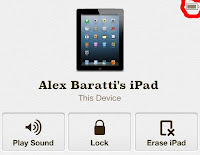
The new Find My Friends app now shows battery levels.
The new Find My iPhone app has some great new features! There's Lost Mode, which lets you track where your iOS device has been and even sends a phone number that lets the one who finds it call you with ease. In addition, the new Find My iPhone app lets you see the battery levels of your iOS device. However, the battery level feature doesn't work for Macs. Even the picture of the device changes based on it's condition. For example, the screen of the device may be black if it's offline. It's the little things that make it nice.

Siri:
Siri now has restaurant references, movie times, and sport scores. And I've got to say, all my friends and I enjoy Siri when it comes to football. She even has more responses. Ask her, "How much wood would a wood chuck chuck, if a wood chuck could chuck wood?"


Facebook:
The Facebook feature isn't my favorite feature as I am not a social butterfly, but others might enjoy it. It has the same functions of Twitter. You know, post, integration, and adding the information to your contacts. Except, that you can choose who you can share with.

The Lost Features:
If you remember the iOS 6 part of WWDC 2012 with Scott Forstall, you may have seen some of the hidden features in the Keynote. If you looked deep enough, you would see a feature that said, "Location-Based Reminders for iPad". They only had that for iPhone at the time. So, where is it? I went to the app and I couldn't find the function. Not even Siri could help me. Perhaps it works over iCloud. Meaning that you would have to create the reminder on your iPhone and get it from the cloud. I don't know as I currently do not have an iPhone.
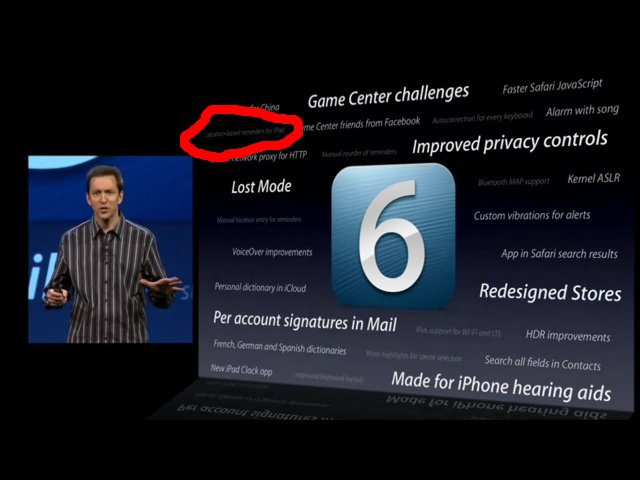
In the top left corner, one of the features say, "Location Based Reminders for iPad".
You may know that the YouTube app has been removed from iOS and is now a free iPhone app from the App Store. But in this Apple made screenshot of an iPad (sorry about the quality), it shows the YouTube app along with all the other apps. But it's not on the iPad.
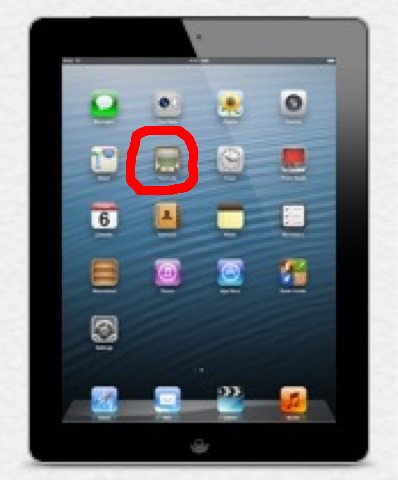
Notice that among the apps is the removed YouTube app.

Wednesday, September 19, 2012

We Have A Go 4 iOS 6!

You may have read my snippet telling you to not upgrade to iOS 6 because of a Wi-Fi issue. I am proud to say that the issue has been resolved. If you have already upgraded, there is no need for any more upgrades. For some reason, Apple's method to find if users are connected to paywalled networks leads to a 404 error. All that aside, I believe that it is now safe to upgrade to iOS 6. I recommend to check for any bugs before upgrading by searching for it on Google or the Apple Support Forums. Search for items like:
iOS 6 Bugs
iOS Bug
Etc.

It will save you in the long run.

Tuesday, September 18, 2012

iCloud and Passbook

A few days ago, I looked deep in Apple's website and found a screenshot of the iCloud settings in iOS 6. What I found is a setting showing Passbook using iCloud. Does this exchange passes over the cloud? Probably. However, Passbook is not compatible with the iPad. Meaning, that you can't exchange passes with the tablet. That leaves you with the iPod Touch. Unless you have two iPhones using the same iCloud account.

What do you think? Leave your ideas, questions, comments, or whatever you want (within reason) in the comments below.