Once again, Amazon will be celebrating Prime Day. It will be taking place July 12th. It is comparable to Black Friday. Also, Prime Day is only available for Amazon Prime members (totally worth it still). There are supposed to be over 100,000 items on sale. If you are a Prime member, definitely check out what's in store. You'll never know what you might find.
All of your Mac and iOS questions and rumors can be answered! How? Easy! Just ask a teenager! What's better? Ask an Apple Certified teenager! Ask me! Alex! Writing once every single day since 2012!
Thursday, June 30, 2016
Wednesday, June 29, 2016
Procreate Pocket Available For Free Through Apple Store App
This week, Procreate Pocket can be downloaded for free through the Apple Store App, a $2.99 value. Procreate Pocket brings powerful drawing and sketching tools to the iPhone. On iPhone 6s, 3D Touch can be used to achieve different strokes. To get Procreate Pocket for free, just open the Apple Store App [Direct Link], scroll to the bottom of the Featured tab, and find the promotion. This will allow you to redeem a code that will let you download the app. Happy drawing!
Tuesday, June 28, 2016
Apple Music for Students
Students seem to get a lot of perks from tech companies. Free copies of Microsoft Office, free developer kits, and now discounted Apple Music subscriptions! I've never had an Apple Music subscription, but now that I do, it's pretty awesome. I usually only listen to video game music, which you can't get on music stores usually, but Apple Music did a pretty good job recommending songs that it did have. If you're an eligible student, you can get Apple Music for just $4.99 a month, instead of $9.99 a month. To get setup, either find the promotion in the iTunes Store, or sign up normally in the Music app.
Monday, June 27, 2016
Dark Space Gray iPhone 7
A while back, I wrote about a rumor about a Deep Blue iPhone 7. According to AppleInsider, this Deep Blue color is actually expected to be a Dark Space Gray. It is described that it will be "close to black, though not quite black." Hopefully that's good news to most people who didn't like the blue color.
| Image Credit: Mike Cronin |
Sunday, June 26, 2016
Location Based Tweets
Twitter started to rollout location based tweets on Friday, according to TechCrunch. This means you can look up a location in Twitter and view all of the tweets from there. This is useful for events of all scales, including Comic Con. Instagram has had this feature for sometime as well. Twitter is available for free from the Apple App Store [Direct Link].
![]() |
| Image Credit: TechCrunch |
Saturday, June 25, 2016
Netflix Offline Viewing
The popular streaming service Netflix seems to have plans to add offline viewing by the end of the year according to LightReading. In addition to this, Reed Hastings, the CEO of Netflix, said he would keep an "open mind" for offline viewing. Offline viewing would be a big push for Netflix, effectively eliminating one of the few barriers to watching videos. This would be especially useful to those with smaller data plans.
Friday, June 24, 2016
The Return of the Thunderbolt Display?
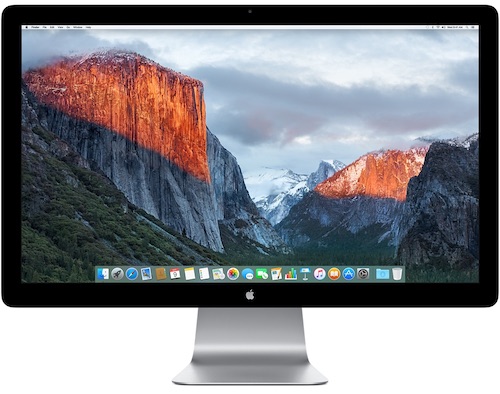
Yesterday, I talked about how Apple planned to discontinue the Thunderbolt Display. Today, John Paczkowski said that the next generation Thunderbolt Display will have an integrated GPU, a big step up. If this is true, this may reignite hope for a 5K Thunderbolt Display. With the GPU, it could work with virtually any Mac as well. Let's hope this rumor holds true.
Thunderbolt Display takes dirt nap as expected. Sources telling me next-gen display will indeed have integrated GPU https://t.co/kx6n0vQGMf— John Paczkowski (@JohnPaczkowski) June 24, 2016
Thursday, June 23, 2016
The End of the Thunderbolt Display?
Today, Apple told TechCrunch and other news sources that they would be discontinuing their Thunderbolt Displays. Many have speculated that this signals that Apple will soon announce a long awaited 5K display. Others believe this is just to give notice to schools and institutions, as the summertime would be when they would stock up. Either way, the stock left in Apple Stores and the Apple Online Store is all that's left for now. If you need one, be sure to get one now!
"We're discontinuing the Apple Thunderbolt Display. It will be available through Apple.com, Apple's retail stores and Apple Authorized Resellers while supplies last. There are a number of great third-party options available for Mac users."
Wednesday, June 22, 2016
iOS 10 Has Unencrypted Kernel
According to MIT Technology Review, the current iOS 10 beta has an unencrypted kernel. The kernel typically is the core of a computer's function. While that may seem bad, Apple has told TechCrunch their reasoning.
"The kernel cache doesn’t contain any user info, and by unencrypting it we’re able to optimize the operating system’s performance without compromising security."Let's hope this statement stays true...
Tuesday, June 21, 2016
iPhone 7 May Have Multiple SIM Card Trays
According to Engadget, the iPhone 7 could have multiple SIM card trays. This would allow for multiple carriers or phone numbers. It should be noted that this is different from Apple SIM. Apple SIM allows for one iPad to be purchased, and to easily switch between carrier plans.
| Image Credit: Rock Fix |
Monday, June 20, 2016
iPhone 7 May Ship With Lightning Adapter For Headphones
Since there will likely not be a headphone jack on the iPhone 7, people have speculated what headphones the iPhone 7 will ship with. According to Mac Otakara, the iPhone 7 will come with standard 3.5mm EarPods. However, a Lightning adapter will come with it. This has its pros and cons. It's another piece to carry around, but the EarPods are more compatible. In addition, you could use your normal headphones with your iPhone 7.
Sunday, June 19, 2016
TextEdit Coming in iOS 10?
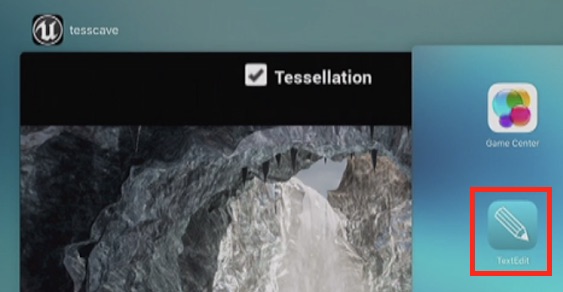
In a WWDC workshop, something strange was spotted. An app was spotted called TextEdit. In macOS, there is an app called TextEdit with iCloud capabilities. This clearly suggests that TextEdit is likely coming to iOS, or at least iPad. The icon can be spotted 17 minutes and 58 seconds into the workshop video.
| Image Credit: MacRumors |
Saturday, June 18, 2016
A Quick Recap of WWDC 2016: iOS 10
The biggest thing announced at WWDC 2016 was without a doubt iOS 10. So let's get right into it.
iOS 10
iMessage received a huge update. You can have your text bubbles move in different ways to add more meaning to your texts. You can send drawings and stickers. In addition, when you send a message, add an animation or put your words in invisible ink, where the recipient will slide their finger over the message to reveal the words. Next up, Siri is finally available for developers. Ask Siri to request an Uber or to send money to someone. There's a new Home app that lets you take control of your HomeKit enabled devices. Another new addition is the new lock screen. It should be noted that you no longer slide to unlock. You now press to unlock. Sliding will display widgets and other information. There are a ton of more features in iOS 10, but I felt I covered the most interesting ones. If you wish, you can view the others on Apple's website.
Friday, June 17, 2016
Why iMessage Isn't On Android
After a rumor, many people were expecting iMessage to come to Android. This has been requested by many Android users because many of their friends have iOS and the Google equivalent of iMessage, Google Hangouts, is unpopular. Walt Mossberg asked Apple about this matter. In short, it's because the iOS user base would only benefit if Apple didn't expand iMessage to Android. Here's his full quote below.
"When I asked a senior Apple executive why iMessage wasn’t being expanded to other platforms, he gave two answers. First, he said, Apple considers its own user base of 1 billion active devices to provide a large enough data set for any possible AI learning the company is working on. And, second, having a superior messaging platform that only worked on Apple devices would help sales of those devices — the company’s classic (and successful) rationale for years."
Thursday, June 16, 2016
A Quick Recap of WWDC 2016: macOS Sierra
Yes, it happened. OS X is no more. But, that's not necessarily a bad thing. We'll all get used to it eventually. I know I already have. Now, here's what you need to know about macOS Sierra.
macOS Sierra
macOS Sierra's biggest feature is definitely Siri. Siri's appearance on the Mac comes with a few perks that weren't available in the iOS version. Siri can look up files for you, which can be a big help. This is a huge push in productivity and multitasking in macOS. Another big feature is that Apple Pay works with websites. If you buy from a compatible website, you can pay with Apple Pay. At checkout, choose to pay with Apple Pay, and use Touch ID on your iPhone or tap the side button on your Apple Watch to pay. Speaking of Apple Watch, you can unlock your Mac with it. Also, if you copy on your Mac, you can paste that on your iOS device (and vice versa) with Universal Clipboard. iCloud Drive now stores your Desktop files and Documents folder. You can easily free up space by sending irregularly used files to iCloud Drive automatically. And finally, you can use Picture in Picture to watch videos while doing other work.
Wednesday, June 15, 2016
A Quick Recap of WWDC 2016: tvOS 2
At WWDC, Apple announced the first major update to tvOS, the operating system for Apple TV. So, let's dive into the details.
tvOS 2
tvOS 2 adds some great new features to your TV. Starting with Siri, you can ask for movies based on topics or search content via apps ("Search YouTube for cat videos"). If you use streaming services, you know what it's like to sign in to them. You get a screen with a code and you have to go on your computer to complete the process. Single Sign-on fixes this. You now just have to sign in once with your TV provider on your TV, and compatible apps will use this login. There's also a dark mode, similar to the dark mode in macOS. Photos and Music now reflect the new designs in iOS 10. An app will be released that will allow you to control your new Apple TV. I'm not sure if this is the Remote app, or a completely new app. HomeKit is now available from Apple TV, so you can control your HomeKit enabled devices from your couch. Finally, if you download an app on your iPhone that has a tvOS app, it'll automatically download to the Apple TV. Overall, there are some nice features here that will help you better enjoy your content.
Tuesday, June 14, 2016
A Quick Recap of WWDC 2016: watchOS 3
Yesterday, we had some huge announcements at WWDC. So, here is what went down with watchOS 3. Now, this will be a brief recap, without any of my opinions. However, I intend to give a big recap of this week, including WWDC and E3 (which is also taking place this week). I'm looking forward to sharing my thoughts and impressions of what all of these companies had to show off.
watchOS 3
watchOS 3 brings big changes in performance to the Apple Watch. Apps will load instantly. In fact, they're loaded and refreshed in the background, so you don't have to wait to open apps anymore. There are new watch faces. In addition, you can compete with your friends using Activity Rings. If you use a wheelchair, you will be able to receive notifications that encourage rolling instead of standing. There is a new Breathe app that encourages relaxation through deep breathing. If you find yourself in situations where you can't dictate a text response, you can draw out your response, letter by letter. When near your Mac, you can unlock your Mac automatically with your Apple Watch. Finally, if you need to call emergency services, you can hold down the side button of your watch and the country's emergency service number will be called, along with contacting emergency contacts and showing your Medical ID on your watch. So, these are the changes for watchOS 3. They're mostly under the hood, but it adds a lot of performance.
Labels:
Announcement,
Apple,
Apple Watch,
E3,
Event,
the scoop,
watchOS,
watchOS 3,
WWDC
Monday, June 13, 2016
Feature Request: Workout Events
Today is the day. WWDC is here. So, for a last minute post, here's one feature that I want to see for watchOS 3. Anyone who has used the Workout app for Apple Watch knows that it's a bit cumbersome to start a workout. First you have to get to the Workout app, which involves finding the small icon in your ocean of apps packed into a tiny screen, followed by picking the type and goal of the workout. It can be pretty annoying. I would love to see Workouts embedded into calendar events. As someone who does tennis lessons on a recurring basis, having a notification from the Calendar app prompting me to start a workout I've already setup prior would be perfect for me. I would just tap the big "Start Workout" button from the notification and that's it! If not in watchOS 3, I would love to see this feature in some update. The sooner, the better.
Sunday, June 12, 2016
Siri Workshop at WWDC
While looking through the WWDC app, I found this particular workshop a bit interesting: the Siri workshop. Why is this significant? Well, Siri has never been available to developers, and with all of the rumors suggesting that Siri will open up to developers and come to macOS (OS X), it seems likely that this workshop all but confirms it. We'll see... The WWDC Keynote will start at 10 AM PDT tomorrow and can be watched live from Apple's website.
Saturday, June 11, 2016
Facebook Moments
If you use Facebook's photo syncing feature, you might want to hear this. Unless you install Facebook's new Moments app, your photos will be deleted if they're using the photo syncing feature. You're fine if you have an extra copy on your phone, but I would install this app just to be safe. These photos will be accessible until July 7 without installing Moments. Moments is available for free from the Apple App Store [Direct Link].
Subscribe to:
Posts (Atom)