Apple has finally released their latest updates to iOS, macOS, watchOS, and tvOS. iOS 10.3 includes Find my AirPods. macOS 10.12.4 includes Night Shift. watchOS 3.2 includes Theatre Mode. tvOS 10.2 includes improved scrolling. Be sure to install these major updates when you get a chance.
Showing posts with label Sierra. Show all posts
Showing posts with label Sierra. Show all posts
Monday, March 27, 2017

Wednesday, October 26, 2016
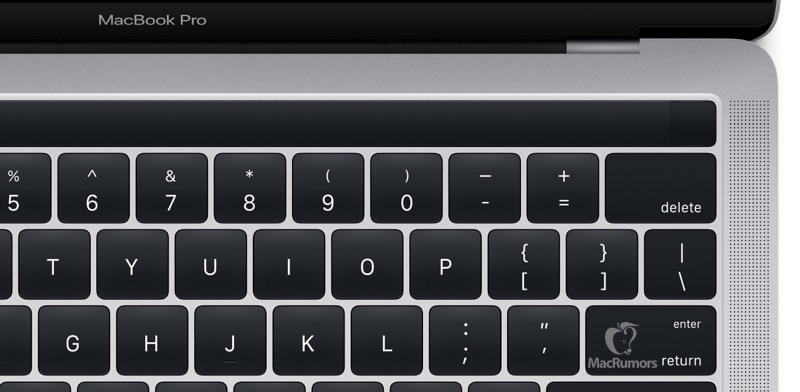
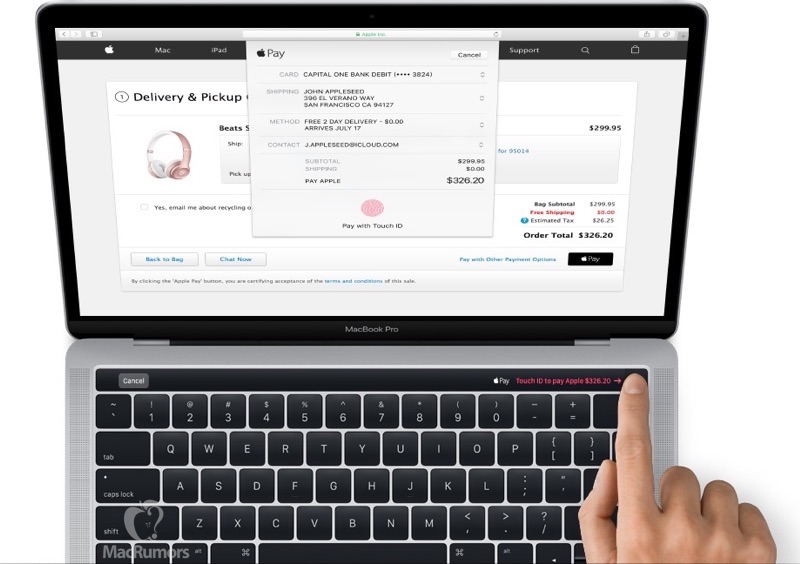
Leaked Images of the Magic Toolbar
The Magic Toolbar, which will be announced tomorrow alongside a new MacBook Pro, has had images leaked thanks to source files in the latest macOS Sierra beta [Source: MacRumors]. It appears that the Touch ID area will be embedded into a small square near the right side of the bar. I'm looking forward to seeing everything it's capable of tomorrow at Apple's "Hello Again" event.


Monday, September 26, 2016
Optimize Space with macOS Sierra
My MacBook Pro has had very little space for the past few months. It would often fluctuate between out of space and 20 GB due to caching and other factors. As a result, my computer got slower. With macOS Sierra, I managed to get my laptop up to 40 GB free. The new storage management is probably one of the best features of macOS Sierra. Just open "About This Mac" from the Apple menu, go to Storage, and press the "Manage..." button. While I don't use the store in iCloud feature, I would recommend using the Optimize Storage function. It will remove watched movies and TV shows from your Mac. Note that they will still be available in the cloud. You can also look through a variety of apps and file types and remove some files. For me, I found myself deleting podcasts and Steam games. This saved a lot of storage. I would definitely recommend trying this out, even if you're not out of storage yet.

Tuesday, September 20, 2016
Siri on macOS Doesn't Support HomeKit
macOS Sierra was officially released to the public today. By far, the biggest update to macOS is Siri functionality. And with iOS getting a big push for HomeKit functionality, you might think that macOS would get the same treatment. Unfortunately, HomeKit does not work on macOS Sierra. Asking Siri to activate a HomeKit appliance will leave her to say, "Sorry, I can't help you with HomeKit here." Hopefully, this will be included in a future update. It doesn't seem to hard to implement. Most likely, we will see it eventually, just not now.

Thursday, June 16, 2016
A Quick Recap of WWDC 2016: macOS Sierra
Yes, it happened. OS X is no more. But, that's not necessarily a bad thing. We'll all get used to it eventually. I know I already have. Now, here's what you need to know about macOS Sierra.
macOS Sierra
macOS Sierra's biggest feature is definitely Siri. Siri's appearance on the Mac comes with a few perks that weren't available in the iOS version. Siri can look up files for you, which can be a big help. This is a huge push in productivity and multitasking in macOS. Another big feature is that Apple Pay works with websites. If you buy from a compatible website, you can pay with Apple Pay. At checkout, choose to pay with Apple Pay, and use Touch ID on your iPhone or tap the side button on your Apple Watch to pay. Speaking of Apple Watch, you can unlock your Mac with it. Also, if you copy on your Mac, you can paste that on your iOS device (and vice versa) with Universal Clipboard. iCloud Drive now stores your Desktop files and Documents folder. You can easily free up space by sending irregularly used files to iCloud Drive automatically. And finally, you can use Picture in Picture to watch videos while doing other work.
Subscribe to:
Posts (Atom)