Monday, March 31, 2014

Save Data with iOS 7

Have you been going over on your data lately? Perhaps an app is using some data without you knowing. To see a handy overview of cellular usage (iOS 7 only), go to Settings > Cellular > and scroll down to "Use Cellular Data For:" to see what apps are using data and to disable their ability to use data. You might just be surprised.


Sunday, March 30, 2014

MuseScore

Some people are very passionate about music. For those people, I have a great app to tell you about! It's called MuseScore. You can digitize your sheet music, play the music, add your own little touch, and print new, crisp, clean sheets of music. In addition, you can write your own music. This has a very nice music editor that's user friendly for those who know how to write. In addition, you can import various file types, including MIDIs. MuseScore is available at it's official website for free on Mac, Windows, and Linux!


Saturday, March 29, 2014

About 50% of Macs are Running Mavericks

OS X Mavericks, Apple's flagship operating system, has about half of all Macs running it in less than six months. The runner-up operating system is the previous version of OS X, Mountain Lion. Because computers have a longer lifetime than iOS devices, the fact that many computers are ineligible for the upgrade may be to blame for the slower adoption rate. iOS 7 has about 90% of iOS devices running it. Hopefully, Mavericks sees better results because it's the first major operating system to be free from Apple.


Friday, March 28, 2014

Microsoft Office for iPad Apps Top App Store in a Day!

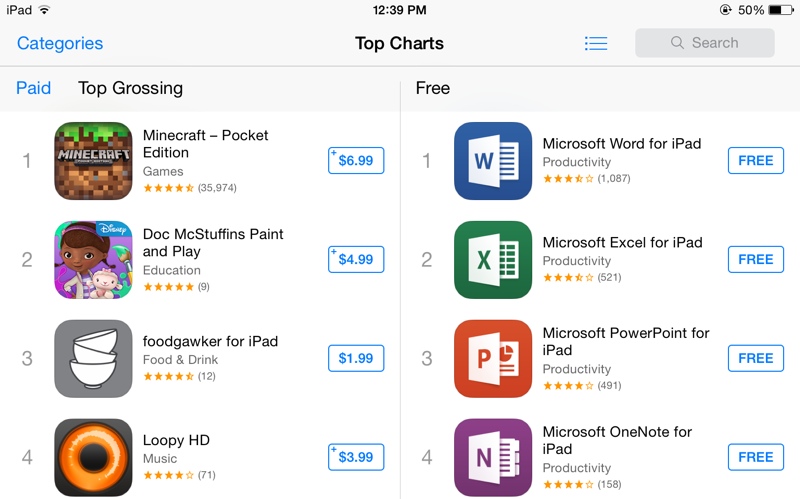
The Microsoft Office Apps (Word, Excel, PowerPoint, and OneNote) have topped the Apple App Store's free app listings in a single day! That's pretty impressive for an app that's not a Flappy Bird clone. To learn more about these Office apps, check out my post about what they're all about!

Credit to: MacRumors

Thursday, March 27, 2014

Microsoft Finally Gets Office On iPad and Apple Gets a Slice of the Profits

Today, Microsoft released their Office for iPad suite. This suite consists of Word, Excel, PowerPoint, and OneNote (It should be noted that OneNote was already on the Apple App Store). These apps require an Office 365 subscription ($99.99) to be able to edit documents. What's interesting to note is how Office 365 is purchased. You can purchase a subscription from Microsoft directly or through an in-app purchase through the Apple App Store. The guidelines for the Apple App Store state that Apple receives 30% of all App Store purchases. That means if you buy an Office 365 subscription through the in-app purchase, Apple will receive about $30 from your purchase. However, if you buy it through Microsoft, Microsoft gets 100% of the purchase. It is thought that this is the reason Office hasn't been on the iPad before. Microsoft Word [Direct Link], Microsoft Excel [Direct Link], Microsoft PowerPoint [Direct Link], and Microsoft OneNote [Direct Link] are available from the Apple App Store on iPad for free. The Office 365 subscription is available for $99.99 from multiple retailers and the Office apps mentioned above (excluding OneNote).

Wednesday, March 26, 2014

Happy 500 Millionth!

Apple has sold their 500 millionth iPhone! That's a lot of iPhones! Apple has done giveaways for milestones for their app store and have given away gift cards. It is not known if they are doing a giveaway for this, but it seems unlikely as this wasn't even an announcement. On to 1 billion!


Tuesday, March 25, 2014

Spritz

Have you ever wanted to read a book in less than two hours? Well, now you (technically) can! Introducing Spritz! Did you know that when you read a book, you spend about 80% of the time getting your positioning correct and only 20% is actually reading and analyzing? Spritz is a new service that allows you to read without making you move your eyes. This lets you read at a faster pace! Eventually, you could have the potential of reaching 1000 words per minute! This project is still in beta, but you can learn more and try out a demo by going to Spritz's official website.


Monday, March 24, 2014

Google Docs Add-Ons

Google Drive has recently announced and released a new idea for Google Docs. It's called "add-ons". They're pretty much what the name tells you. Little widgets and tools to help you make a document. Some of the most popular include a consistency checker, a bibliography generator, and a translator. Go get started, go to Google Drive, open a doc, and click the "Add-ons" menu item.


Sunday, March 23, 2014

Windows XP Support is Ending

It's about time that I touch on this subject. Windows XP support is ending April 8, 2014. Why is this a big deal? A lot of people are still running this operating system (P.S. It's 12 years old). What does this mean to you? If you're still running XP, no more security updates or support articles will be available from Microsoft. Either way, it doesn't mean your PC is at anymore risk than it was before. If you choose to upgrade to Windows 8, don't. Unless you're buying a touch screen for Windows 8, it's a pain to use. If you can possibly get a hold of a Windows 7 upgrade, do that. Windows 7 is a lot like XP and it doesn't assume that you have a touch screen. You can learn more about XP support ending here.


Saturday, March 22, 2014

WeMo Switches

Have you ever wanted to control a fan or light from your phone? You can! With just a $50 investment (okay, maybe it's not cheap), you can buy a WeMo switch! These switches allow you to turn lights and anything that plugs into an outlet on and off. Check them out! I intend to make a review on this soon!


Friday, March 21, 2014

iBeacons: Now in Your Home

A recent tech craze has been going on recently. iBeacons! Basically, iBeacons are little beacons that can be stuck to make a "digital field" that iPhones can detect to notify the user of something. For example, stick an iBeacon in the cereal section of a grocery store and when an iPhone goes near it, it could get a notification on a deal on cereal. Well, now (credit to TechCrunch) you can stick them around your house for different areas with the help of a new app, Placed. If you walk into your kitchen, you can have a timer app open for when you cook. Check out this video for more info.

Image Credit to MacRumors

Thursday, March 20, 2014

Apple Celebrates The First Day Of Spring In Their Own Way

While many people were looking at the Google Doodle of the first day of Spring, I found a hidden detail that Apple made to their most obscure series. The Tumblr account, isee5c, is where Apple posts funny, short clips of animations of dots from the cases of the iPhone 5c to show off personalities (or just to hopefully get some customers into the failed phone). Today, a new animation was posted of a white iPhone 5c with a green case created a rather cute animation of a dandelion being blown and turning the white iPhone 5c into a green one. It's rather hard to explain in the word, so why don't you just watch it here?


Wednesday, March 19, 2014

Flappy Bird is Coming Back to the App Store!

Today at the Game Developers Conference (in San Francisco), Dong Nguyen, creator of popular game Flappy Bird, ran into several fans. The fans tweeted that he told them that Flappy Bird was coming back to the App Store. When asked, he said "Yes. But not soon." Flappy Bird was pulled front the App Store in February because Nguyen said it was too addictive. The new Flappy Bird will come with a warning to ask players to "take a break."


Tuesday, March 18, 2014

iPad 4 Replaces iPad 2

After a long lifetime, the iPad 2 is no longer sold. It has been replaced by the iPad with Retina Display (iPad 4). This iPad costs $100 more, but features a Retina Display, an A6X chip, and a Lightning port to charge. The iPad 4 was discontinued when the iPad Air came out. The 16 GB WiFi iPad 4 is available for $399 and the 16 WiFi + LTE iPad 4 is available for $529.


Monday, March 17, 2014

Microsoft OneNote for Mac

Today, Microsoft has released Microsoft OneNote for Mac on the Mac App Store. In the past few hours, it has been the most popular free app. Yes, surpassing OS X Mavericks. That's a lot of downloads! Even Apple has advertised this app on their featured page. For those who don't know, OneNote is part of the Microsoft Office suite (Word, Excel, PowerPoint, etc.) and allows one to make a digital notebook of snippets and images from other apps or within the app. Microsoft OneNote is available for Mac from the Mac App Store for free [Direct Link].


Sunday, March 16, 2014

Make Your Own eBooks!

Did you know that you can make your own homemade eBooks? It's pretty cool and simple. All you need is Pages (Mac software), a Mac, iBooks for Mac (optional; available in OS X Mavericks). Unlike iBooks Author (if you don't know what this is, don't worry about it), this is for making reading books for stories, not textbooks or anything. In addition, these are also compatible with iPhones, Kindles, Nooks, and most other eReaders. All you have to do is type your story in a new document in Pages, export it to an ePub format (File > Export To > ePub) and open the file with iBooks for Mac to test it out. There you go! You've just made your first eBook!


Saturday, March 15, 2014

3D Chicken Wings!

3D printing is the next big thing and 3D printed food may just be the next big art craze. Basically, some people in Japan (specifically iJet) used a 3D scanner on a KFC chicken wing and created this little chicken. What other foods could become of this?


Friday, March 14, 2014

Pi Day 2014

Today is Pi Day! March 14! 3-14. For those who don't know, pi is a magical number (3.14) that never ends. Celebrate with pie and pizza! And next year, it'll be 3-14-15! Pi is 3.1415! Then, at 9:26 and 53.589 seconds, it'll be the ultimate pi day! Let's look forward to that!


Thursday, March 13, 2014

iPhone 5c Ads on Tumblr

In a desperate attempt to sell more iPhone 5c's, Apple has resorted social media! Apple doesn't usually do this kind of thing. Well, the Tumblr page is essentially just a compilation of fancy ways to show off how different colors show different personalities. My personal favorites are the Pac Man and Tetris ones. Find your favorite by clicking here!


Wednesday, March 12, 2014

Happy 25th Birthday Internet!

Back in the olden days of 1989, the world wide web was born. It proved to bring new purpose to connecting friends and family and educating children. It's been a wild road trip. From 2000, when people thought that computers would destroy the world because of the new millennium, to modern times where people practically find the internet like oxygen. Or when Netscape (Yes, Netscape!) was a popular web browser. Remember American Online? Sure, it's still alive, but it still holds a special place in the internet's heart when it was the only place to get emails from. So, thrive on internet and happy birthday! And I hope to see you in 2039 for your 50th birthday!

Source: TTLG