This past week was one of the hardest for me because I had to make do without my laptop. It was having its battery replaced. I got it back today and found that the logic board was replaced and several USB-C ports were fixed, so the cables would snap into the port better, in addition to the battery replacement. My keyboard was also fully replaced. My hard drive was wiped and the software was reset to macOS Sierra, which came out about two years ago. I had to setup my Mac and update the software before I could restore from my backup, which took a considerable amount of time. The thing to take away from this is that Apple may perform additional repairs on your Mac, so make sure you do a backup no matter what. I figured only my battery would be replaced, but I took a backup just in case. I'm glad I did.
Showing posts with label MacBook Pro with Retina Display. Show all posts
Showing posts with label MacBook Pro with Retina Display. Show all posts
Friday, March 8, 2019

Saturday, March 2, 2019
Servicing My MacBook's Battery
My 2016 MacBook Pro has been losing charge very quickly in the past few months. In a 75 minute lecture, with just a few, low-power apps open, my MacBook Pro will go from 100 percent to between 40 and 60 percent. After the Service Battery notification popped up, I finally got the chance to bring it into an Apple Store. While iPhone battery replacements often take about an hour, a MacBook Pro battery replacement seems to take between 3 to 5 days. In addition, it will end up costing me about $200. The 2016 MacBook Pro batteries were flawed from the start, resulting in Consumer Reports being unable to recommend the laptop temporarily. These batteries also caused macOS to stop estimating the time left in one charge, because Apple no longer felt confident in the estimate. I can only hope that the replacements are of better quality than the batteries that shipped with the laptop.
Monday, February 18, 2019
Apple's Potential Shift That Could Satisfy Pro Users
For several years, Apple has dropped the ball when it comes to its pro user base, and Apple has acknowledged that. 2019 is supposed to be the decisive year to finally turn that around. Thanks to Ming-Chi Kuo, we have some new information that supports this. Kuo says that we can expect an all new design for the MacBook Pro and Mac Pro. In addition, Apple will ship a 31-inch 6K display for use with the Mac Pro. Apple creating a display adds up with statements Phil Schiller said a few years ago. Kuo is a very reliable source, so it's exciting to hear this kind of news. While this is a vague outline of everything these products could be, it gives us an idea of how Apple is responding to criticism of their pro products.
Sunday, February 17, 2019
MacBook Pro Batteries
In 2016, Apple released the first MacBook Pro with a Touch Bar, and one of the biggest issues consumers had with the device was the poor battery life. Eventually, Apple pushed a software update that supposedly fixed the poor battery life. And while it did improve battery life, Apple also removed the estimated time remaining indicator for battery life. With Apple supposedly less confident in the laptop's battery performance, all MacBooks were affected by this and now no one can get an estimate of how much longer a battery will last. From here, there hasn't been much news on these models. I use my 2016 MacBook Pro for virtually everything I do and in the past few months, the battery has been depleting more and more quickly. My previous MacBook Pro didn't get this bad after four years, so it's disappointing to see my new MacBook Pro get this bad after just over two years. Now, macOS warns me that I need to service my battery soon and something tells me that we may hear more about this in the news soon. I would hope Apple had a replacement program for these models, because it's fairly common knowledge to owners of these laptops that the battery performance is very subpar, especially for a MacBook Pro.
Tuesday, July 24, 2018
2018 MacBook Pro Thermal Throttling Fixed in Update
It didn't take long for Apple to fix some thermal throttling in the 2018 MacBook Pro. Although these are some of the most powerful MacBook Pros yet, there were some issues where they would be slower at certain tasks than previous, less powerful generations. Apple released a special update that fixes this issue. The update is a supplemental update (build 17G2208) only available for the 2018 MacBook Pro.
Sunday, July 22, 2018
2018 MacBook Pros Lack Logic Board Failsafe
In the rare event that the logic board fails on a previous MacBook Pro with Touch Bar, Apple has a way of recovering the data using an external tool to migrate the data. This is required because the SSD is non-removable. However, the 2018 MacBook Pros appear to not be able to use this recovery method due to the internal port being removed [Source: iFixit]. This is because of the new T2 chip, which acts as hardware encryption for the SSD. Apple is advising technicians to tell customers to frequently backup because of this [Source: MacRumors]. While this may seem dangerous, it is very rare for a logic board to fail under normal use, so this is no cause for alarm.
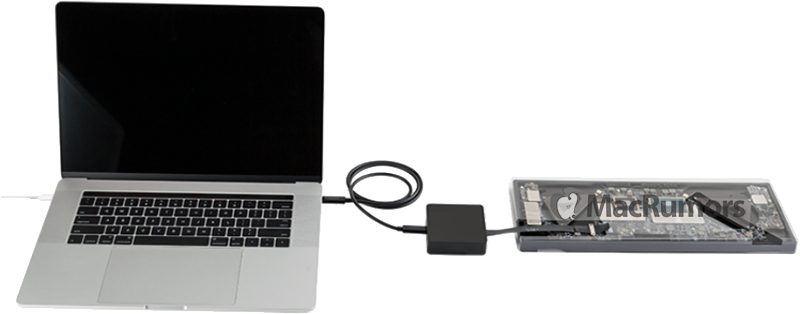 |
| Apple's Special Data Recovery Tool [Source: MacRumors] |
Thursday, July 19, 2018
Apple Confirms Third-Generation Butterfly Keyboard Prevents Dust Issues
The second-generation Butterfly Keyboard has been in the news lately for being susceptible to dust issues, causing unintentional inputs or lack thereof. The sudden release of a third-generation keyboard has shown that there is a silicone membrane to possibly prevent dust from entering. Now, Apple has confirmed that this was intended. This was acknowledged in documents to Apple Authorized Service Providers for repairs. Regardless of what may have happened internally at Apple, this was a quick response to the recent events concerning the keyboards.
Saturday, July 14, 2018
The Third-Generation MacBook Pro Butterfly Keyboard
The surprise announcement of a new MacBook Pro keyboard led to people wondering if the third-generation Butterfly keyboard would alleviate any of the issues presented with the second-generation. Apple advertises it to be quieter, which seems to be true. However, iFixit says that this is actually a side effect of Apple's new measure to keep dust out. There is a silicone barrier beneath the keys to prevent dust from getting into the keys and creating input issues. While it's not a hundred percent certain that this barrier was made to prevent dust from entering the key, it certainly is a pleasant surprise at least.
Thursday, July 12, 2018
The 2018 MacBook Pro
Apple announced their 2018 MacBook Pro today. There are considerable spec bumps that look really nice. The following changes only affect models with Touch Bar. All 13-inch models now have quad core 8th-generation Intel processors and can now have up to 2 TB of SSD storage. The 15-inch models all have 6-core 8th-generation Intel processors (including the i9 chip) and can have up to 4 TB of SSD storage. Both the main display and Touch Bar have True Tone displays. They also feature a third-generation Butterfly keyboard, which is up for debate if that's a good thing. The new T2 chip brings "Hey Siri" to the MacBook Pro. Finally, the leather sleeve accessories for the MacBook are now coming to the MacBook Pro. Overall, it's good to see some Apple hardware news after such a long drought, especially for the Mac. We'll hear more about this in the coming days.

Wednesday, July 4, 2018
First MacBook Pro with Retina Display is Now Vintage
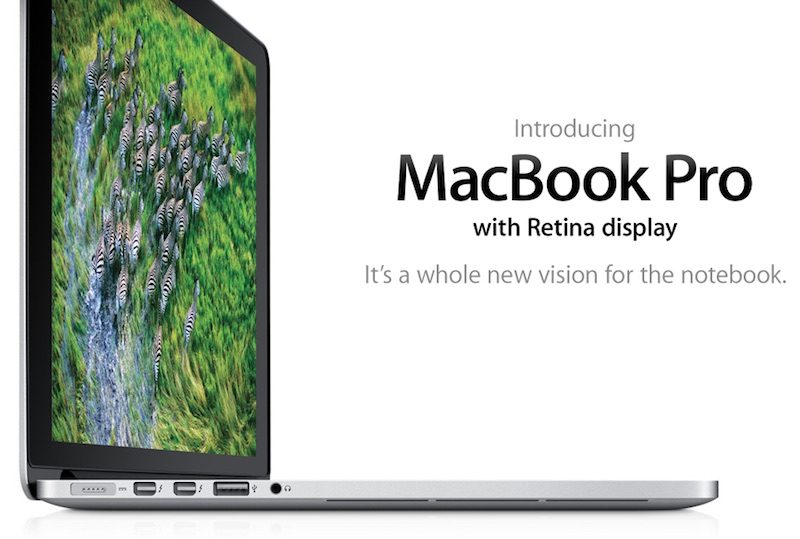
Apple's MacBook Pro with Retina Display first came out in 2012. I used the succeeding 2013 model throughout high school. It was my favorite MacBook given the time it came out. Sturdy battery life, sleek design, and a killer display. It came out less than a year after Steve Jobs passed away and many held it to critical acclaim. It opened up a new world of what a laptop could do. It was the industry standard. It was perfect for on-the-go content creators and professionals, with an SD card reader built in, a stunning display to properly view your content, and a lightweight and tough design that could take a hit. Now, it is declared vintage (just the first model in 2012), so Apple and authorized service providers may not be able to repair it anymore except where legally required. This doesn't mean much, but it does make me reflect on it a lot. The 2013 model (virtually identical to the 2012 model) is easily my favorite MacBook Pro. It got the job done each time.
Saturday, June 23, 2018
Fixing a Butterfly Keyboard at the Apple Store
I went to an Apple Store today to see if I could get my "b" key on my MacBook Pro fixed, which has been doing repeat inputs lately. Since Apple just launched their Butterfly Keyboard repair program, consumers have been able to get their keyboards fixed through a variety of methods. I made an appointment beforehand using the Apple Support app. A Genius took my MacBook and inspected the key in question by typing it many times. He also ran diagnostics. He noticed the issue and said I could either have my MacBook sent in to have all the keys replaced for 3-5 days, which wasn't an option for me, or he could just replace the key in the back. I had my repair done on the spot and went in and out in under 45 minutes. Now, my keyboard is fixed and I can come in for repairs until 4 years after the purchase date of my MacBook Pro, in 2020.
Friday, June 22, 2018
Apple Launches Butterfly Keyboard Repair Program
Apple has launched a special repair program for MacBooks and MacBook Pros that have faulty butterfly keyboards. Symptoms are described by Apple as "letters or characters repeat unexpectedly, letters or characters do not appear, and key(s) feel "sticky" or do not respond in a consistent manner." I know that my "b" key constantly does repeat inputs and my "j" key for a while was messed up. In short, Apple will replace keys or the entire keyboard after their examination for free. Check the official program to check for eligibility.
Tuesday, May 15, 2018
Apple's Butterfly Keyboard
I like the Butterfly Keyboard on the newer MacBooks. I really do. The click, the responsiveness. I've liked it since day one. I know not everyone's on the same level with that though. It is subjective. But remember when I said I liked the Butterfly Keyboard on the newer MacBooks? Yeah, my opinion just changed. That's because whenever I type the letter j, the key is awkwardly stuck. I can't stand it. Every other key feels crisp and tactile with every stroke. But then I hit that one key and I'm taken out of it. It feels like the experience is ruined. At least it's not as common as other letters. Whether or not this issue is related to the new lawsuit going on with the keyboard, I'm not sure. I experience the symptoms, so I'm willing to hop on board. I just need a repair soon. It's starting to drive me crazy.
Tuesday, April 3, 2018
Intel i9 Processors
With news of Apple making their own processor chips by 2020, Intel has just announced their new Intel i9 processors. These are specifically designed for laptop performance. It could possibly be in a MacBook Pro refresh this year. They also refreshed their i5 and i7 processors for desktops. Now, if you can't tell by how I'm writing this post, I'm not an expert on processors. I'm a software guy. So, putting this in relation to software, it's exciting to see a new standard of higher performance coming in the near future. Hopefully, we see some refreshes this year with WWDC coming soon.
Tuesday, October 17, 2017
Touch Bar Media Button
When playing music or media, Touch Bar will add a fifth button to the compressed Control Strip on the right. However, there are some instances where it can change. With a phone call, the button will change to a green phone icon. With Xcode, you'll get a debug icon. And with BetterTouchTool, you'll get their logo. It's a nice surprise to occasionally discover these new icons.


Tuesday, July 25, 2017
Google Chrome Finally Adds Touch Bar Support
It's nice to see when Google supports its competitor's operating systems. Google helped out Touch Bar users by adding support to it, making use of the touch strip. As shown below, it adds some basic functions, which is nice. It's subjective which is superior, but Safari will show previews of your tabs. I'm neutral on the issue, as sometimes it's useful and sometimes it's downright annoying. When you need it, it might be blocked out by text suggestions, or you have so many tabs open, it doesn't help. Plus, the previews are tiny. Anyways, I'm glad to see Chrome joining in on the party.


Wednesday, March 29, 2017
USB-C Multiport Adapter Update
The USB-C Multiport Adapter is one of the best adapters for the MacBook Pro with Touch Bar. It contains a USB-A port, USB-C port, and either an HDMI port or a VGA port. It's only $50 until March 31. However, new users will be prompted with a notification offering to update the adapter. This is the first time I've seen an update for an adapter. I'm not sure about the specifics, but it is interesting to see the potential for updates for future adapters that need security patches.


Sunday, March 26, 2017
Touch Bar Can Quickly Access Settings
On the newest MacBook Pro with Touch Bar, you can quickly access different settings. In the Control Strip (the area where the volume control typically is), you can hold option and tap an icon to access that button's System Preferences. For example, tapping Siri with option will open Siri's pane in System Preferences. I hope this helps.
Friday, March 3, 2017
Nintendo Switch and MacBook Pro
The Nintendo Switch uses USB-C as a charging port. MacBook Pro's newest model uses USB-C as a multipurpose port. So, one would think that the MacBook Pro would charge the Nintendo Switch when plugged into each other. According to Mike Murphy via Twitter, the Nintendo Switch actually charges the MacBook Pro. Furthermore, if the Nintendo Switch is turned off, the MacBook Pro will charge the Nintendo Switch.
Lol if you plug a Nintendo Switch into a new MacBook Pro, the Switch charges the laptop, not the other way around pic.twitter.com/YJhMct6fKO— Mike Murphy (@mcwm) March 1, 2017
Thursday, January 26, 2017
Touch Bar for Websites
Safari uses Touch Bar to show you all of your open tabs. However, when you're typing, keyboard suggestions and some font options appear in its place. This can be annoying, as I may reach for the Touch Bar to change tabs, and there's no tab bar. To be honest, the tab bar made a problem of itself because of this. Instead, we should have Touch Bar websites. Amazon would have a cart button and some other functions for Touch Bar. iCloud could allow you to quickly switch between different iCloud apps from any page. This would actually pair well with Apple Pay for the web. I would definitely give up the tab bar for this.
Subscribe to:
Posts (Atom)