Saturday, October 19, 2013

Swipe to Go Back in Mail

In iOS 7, you can swipe to navigate back in mail. If you're reading an email, just swipe from left to right to go back. It's that simple! Try it again to go back to your mailboxes. 


Friday, October 18, 2013

USB Bracelet

Have you gone to a Staples store recently? You should because it now has a special display for making a USB bracelet. This bracelet consists of a PNY flash drive and a band that can connect to the drive. The price of the flash drive varies around $8. The bracelets cost 99¢ each. This product will be put on my Holiday Gift List 4 Geeks.

Thursday, October 17, 2013

Send Money via Gmail!

When you're looking for a last minute holiday present, cash is usually the answer. However, if your recipient lives far away, you can't just send it using snail mail. Now, you can send money via Gmail. How does it work? Watch this video!


Pretty cool, right? If you want to learn more, click here. 

*You must be 18 years or older to apply

Wednesday, October 16, 2013

Chromebook: The Pros and Cons

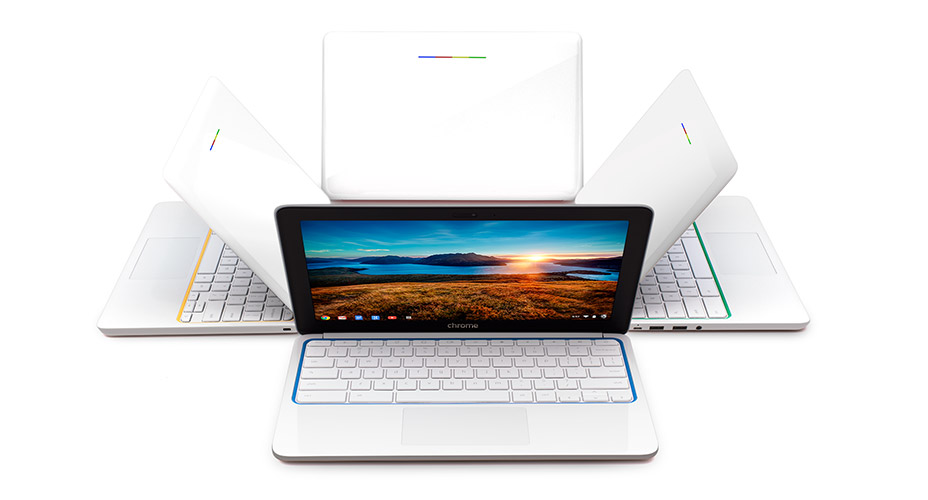
Today, I made a trip to do a quick review on the Chromebook OS. I tested this out on a Samsung Chromebook. For this post, I'll be listing the pros and cons of Google's new laptop, the Chromebook.


Speed and 10 Second Startup Time:

Pros:
First off, the Samsung Chromebook truly does have a 10 second startup time. It's really living up to its title.
Cons: 
The rest of the OS didn't seem to be nearly as fast as other laptops. Other tasks (such as searching the web) also took about 10 seconds. :-(

Uses:

Pros:
Have you been wondering why Google has been making seemingly random software that few people need (Google+ Hangouts, Google Cloud Print, Google Talk, etc.)? There are two reasons. First off, this is because that Google wants you to use their software specifically for the Chromebook.
Cons:
The other reason lies in the cons area unfortunately. The Chromebook really doesn't handle any other software than Google-made software. It has very little compatibility with third-party software. In fact, there is only one application on the Chromebook. That is Chrome. Every application is run from inside of a browser. Yes, even the settings. In summary, the Chromebook's "apps" are really just links to URLs that you could get on any other computer.* This means that the majority of tasks you can do on a Chromebook are online (With a purchase of a Chromebook, you get 100 GB of free Google Drive cloud storage). This is also why the Chromebook only has 16 GB of storage (a standard laptop has at least 64 GB).

"One Subject Notebook"

Pros:
One of the great parts of a Chromebook is how cost-efficient it is! Starting at $249! Which brings us to the "cons" section (P.S. Don't think I'm trying to rant on the Chromebook. It's truly a cool computer. I am simply telling the true facts.).
Cons:
The Chromebook has only a few functions and only is useful for one thing. You can make that school or work, but it's not the best tool for combining the two. It really is a modern version of a old computer. It's primary function is only one thing. Surfing the web.

My Thoughts Of The HP Chromebook 11:

Just as a little side note before I wrap up this post, this laptop symbolizes Google. It showcases all four of Google's primary colors (red, yellow, green, and blue) on its backlight and comes in your choice of the same colors, or black. You can even charge it using a micro-USB cable (the same cable that most Android phones use). It looks really cool for only $249. 


Final Thoughts of the Chromebook OS:

This is truly a great notebook. I find this notebook most useful for a student attending a school or college because of its amazing cost-efficency and integration of school-friendly apps such as Google Drive, Google+ Hangouts, and Google Search for research. For a full list of uses for the Chromebook, click here. This product is also on my Holiday Gift List 4 Geeks.

* You can get your Mac and PC apps using Chrome Remote Desktop (which also runs in the Chrome app). I haven't tested this out which is why I put this as a footnote.

Tuesday, October 15, 2013

October iPad Event Set For October 22nd: Invite Analysis

Apple has sent out their new invitations for the iPad event on October 22nd! It's time for a little analysis. Right away this invite holds a lot of resemblance to last year's invite (on the left). Even the text is similar. Both sentences refer to showing another "thing." That "thing" being a new generation of iPads. Both apples are in the foreground surrounded by colors. If you remember from last year's analysis, there are hidden apples in the background making the white apple look like it's shrinking (iPad Mini reference/hint). This year, the leaves of the apple are falling off in different colors. This could possibly hint at new colors, but it's not likely. The leaves seem to be shedding. The fact that they're falling off hint at the fact that the iPad 5 is expected to have thinner sides, thus shedding its old unibody. I have one more theory, but it's a long shot. The color and transparency of the leaves look like the new "Photos" app icon in iOS 7 (shown below). Does this hint at a better camera or camera app? That's all I've got. If you have any ideas, feel free to share them in the comment section below!

Last Year's Invite
This Year's Invite

Photos App

Monday, October 14, 2013

Recycling Your iPod Classic

To give your iPod Classic new potential, you can try this little trick. Plug it into a Mac and (NOTE: This will remove all data from the iPod and cannot be recovered; This procedure turns your iPod into a backup drive) go to System Preferences (app) > Time Machine > Select Disk > and find your iPod. If done correctly, you should have a working backup drive on your iPod Classic. Because of the iPod Classic's large hard drive, it can hold 160 GB of storage.


Saturday, October 12, 2013

Burst Mode

To take multiple shots of photos quickly on iPhone, simply tap and hold the photo button in the camera app. Depending on which model of iPhone you have, the amount of pictures per second vary. On an iPhone 5s, it can take 20 pictures per second! On an iPhone 5, it can take about 5 pictures. Try it out!

*Only works on iOS 7

Friday, October 11, 2013

Temple Run: Oz is FREE from the Apple Store App!

If you haven't gotten Temple Run: Oz (without offer: 99¢), you should! Temple Run is a never ending game where you must dodge obstacles and cliffs. Tilt the iPad to move and swipe to run, turn, and duck! To get the app for free, go to the Apple Store App (DIRECT LINK) and look on the "Featured" page and tap the download link.


Thursday, October 10, 2013

That's Not How That Is Pronounced

If Siri pronounces one of your friends' names wrong, then tell her/him "that's not how that's pronounced." Siri will then ask you to tell her/him how it is pronounced and will try to make the same pronunciation. Try it out! Suggestion: If you have a friend named AJ, she'll/he'll by default say it wrong. Correct her/him!

Wednesday, October 9, 2013

FaceTime Audio: The Terms and Conditions of Independence

For the past few years, Apple has been giving the iPad and iPod Touch more independence with each update. However, this is quite possibly the last piece that the iPad and iPod Touch needed for full independence. FaceTime audio allows you to call any iOS device with audio instead of video! Yeah, not the greatest feature. However, this doesn't use as much cellular data. Just another reason to upgrade to iOS 7. To call someone with FaceTime audio, just go to one's contact and press the phone icon where it says "FaceTime."


Tuesday, October 8, 2013

Time Stamps in iOS 7

In iOS 7, you can see what time EVERY message was sent. In past versions of iOS, time stamps would only appear when the first text was sent after a new quarter hour. To view time stamps, just pull to the left on a message. You'll be pleasantly surprised. 


Monday, October 7, 2013

Google's Sporting A New Look!

Google's New Logo
Google's Old Logo

Google's homepage has a new look. It's sporting a flat look. It has a new area for icons and a simplified look. Google apps can be accessed from the top-right area of the page where the tiny boxes are. Try it out!


Saturday, October 5, 2013

This Year's Holiday Gift List!

Every holiday season, Tech Talk 4 Geeks puts up a "Holiday Gift List 4 Geeks." This gift list is a large collection of products for just about anyone! It provides tips on how to buy gifts (located at the very bottom of the page). All gifts are sorted by price and near the bottom of the page, there are ideas for "stocking stuffers." Check it out!

P.S. Thank you Steve.

Friday, October 4, 2013

It's Siri's Birthday!

Be sure to wish Siri a very happy birthday! I'm being "Siri-ous." Actually wish her a happy birthday. She will (or he will depending on your settings) be pleasantly surprised. 


Two years ago today, Siri was unveiled by Apple with the iPhone 4S. Today, Susan Bennett said in an interview that she is the original voice of Siri. A few weeks ago, Siri was finally taken out of beta with a new voice (which is not Bennett's). Over the years, Siri also gained the ability to reserve tables, check sports scores, and more. 

Thursday, October 3, 2013

Notability

Notability is the best way to take notes (stylus not included). It uses advanced editing tools to allow you to quickly take a note. Just draw or write. It's simple. An intuitive welcome tutorial shows you the basics. It lets you export to a countless amount of apps. Notability is on sale for $2.99 on the Apple App Store. 


Wednesday, October 2, 2013

Google Drive Has A Big Drive

If you want to store some data, be sure to check Google Drive (drive.google.com)! It gives you 15 GB of storage for free. Not only that, but it doesn't count files created in drive and photos larger than about 2000 x 2000 pixels. Try it out!

Tuesday, October 1, 2013

Apple Ends Complimentary 20 GB of Storage on iCloud for MobileMe Members

Apple has ended their complementary 20 GB of storage on iCloud for MobileMe users. In 2011, iCloud was known as MobileMe, a famous Apple flop (Of course Steve Jobs fired the guy in charge of that!). iCloud dropped some of MobileMe's features and that forced users to back up everything which was annoying. Apple made this up for the rigorous process by offering 20 GB (+ the 5 GB included for free by default) for free for a year. A year later, Apple extended it another year. Today, many users received an annoying notification saying that they have run out of storage. 20 GB of storage costs $40 a year.