
Tuesday, August 20, 2013
Using Siri With A Headset
When using headphones or Bluetooth and Siri, you're going to want to choose where Siri's voice goes. First, connect the headphones. By default, the output source is set to connected headphones. Tap on the blue megaphone icon to pick the output source. Try it.

Monday, August 19, 2013
What I Could Dig Up: iPhone 5S/5C and iPad 5 - Part 1
Here's some quick facts about what we know about the new iPhone(s) and the new iPad. Part 2 will come out when more details are available.


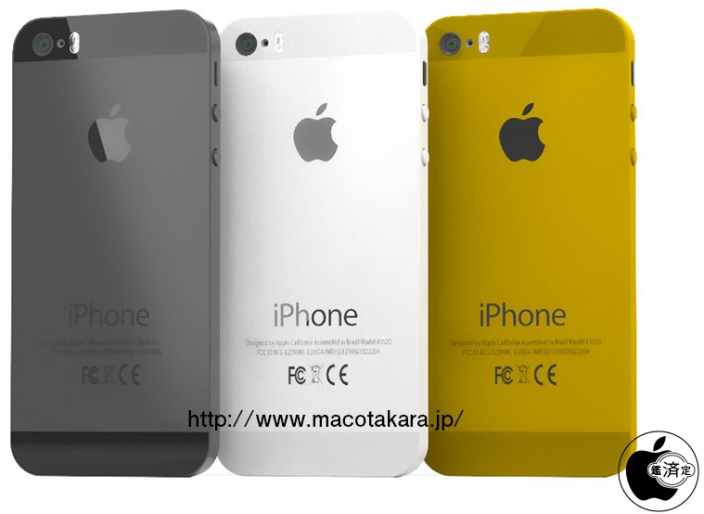
iPhone 5S:
- Announcement date: September 10th
- Possibly in a gold color option.
- Wider camera aperture.
- There is no change in the megapixels.
- Possibly a 128 GB option?
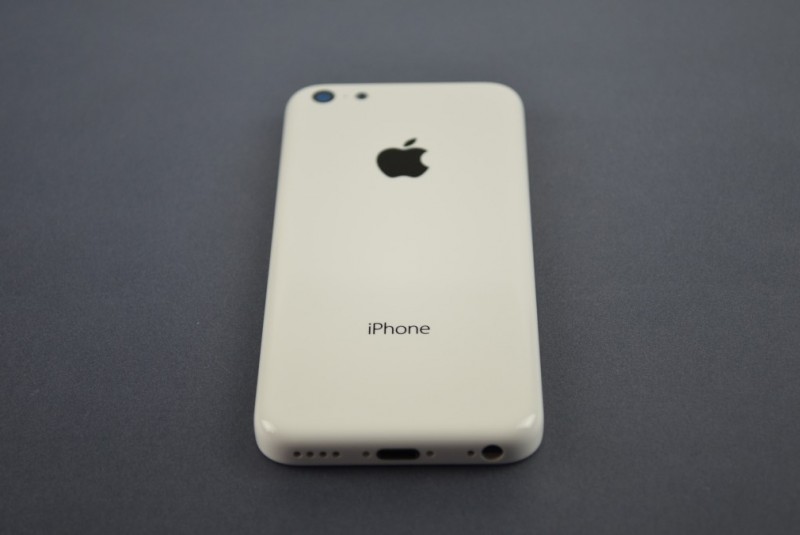
iPhone 5C:
- Will be announced alongside the iPhone 5S.
- No gold color option.
- It may replace the iPhone 5.
- Missing features to make it more cheap.
- It seems to be made of plastic.
- It still has a Lightning connector.
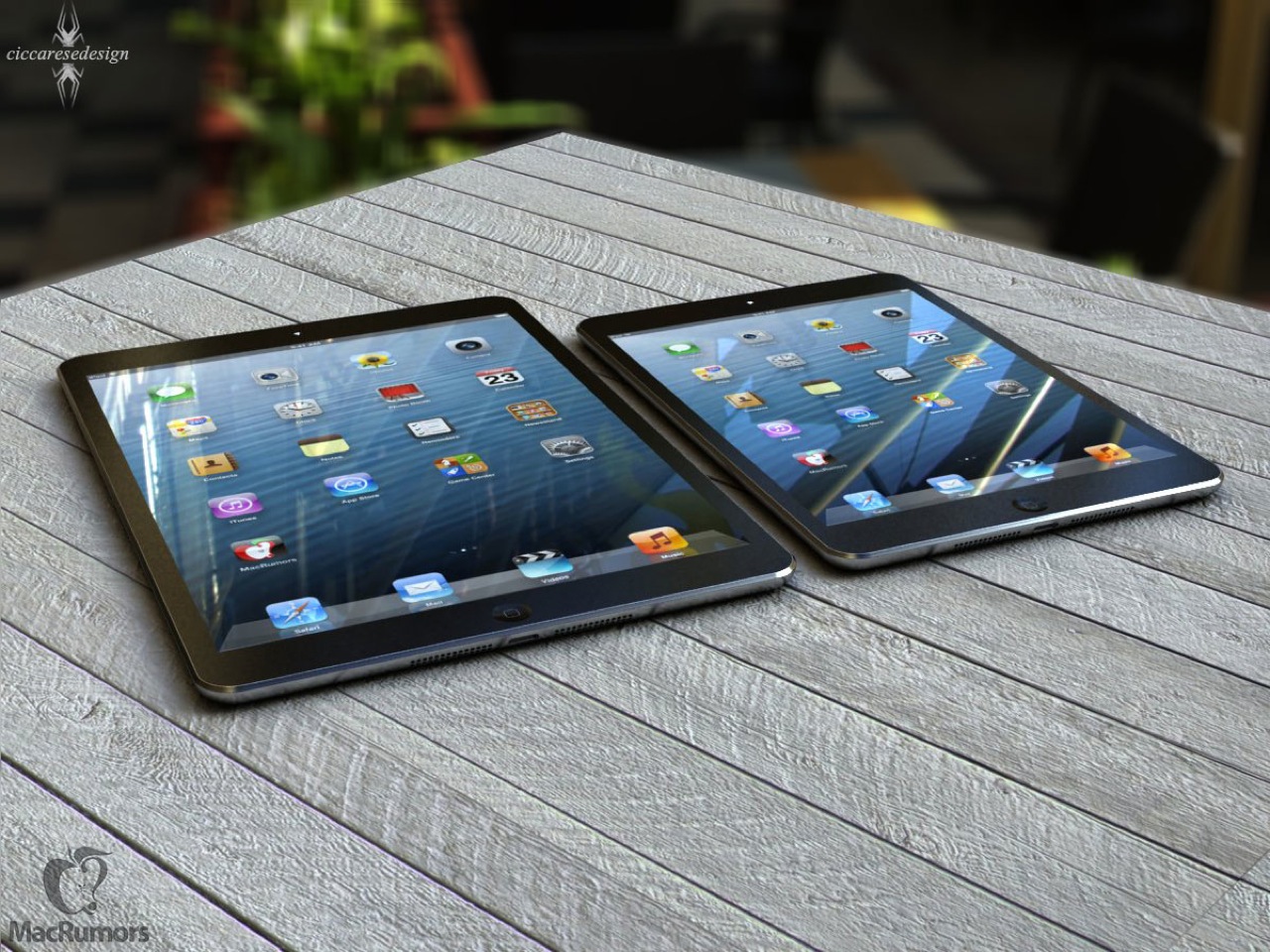
iPad 5:
- Thinner side bezels. Much like the iPad Mini.
- New back shell. Also like the iPad Mini.
- Back shell color reflects the color option on the front of the iPad.
- Overall, it looks like a big iPad Mini.
Sunday, August 18, 2013
The Mac Store
The Mac Store is an Apple Authorized Reseller located near Seattle. They sell products new and used. They also sell t-shirts that say "Macoligist". The Mac Store also have stores located in the Pacific North-west.

Here's the address for the store I visited:
815 NE 45th St
Seattle Washington 98105
United States
Saturday, August 17, 2013
How to turn off cellular data
When you travel abroad, data and voice costs more. A LOT more. $2.05 per megabyte (Verizon customers). You'll even get a text message.

To turn off data, follow the steps below.

iOS 6 Users:
Go to Settings > General > Cellular > turn off "Cellular Data".
iOS 5 Users:
Go to Settings > General > Network > turn off "Cellular Data".
When you return to your country of origin, be sure to turn "Cellular Data" back on.
Friday, August 16, 2013
The Microsoft Visitor Center
The Microsoft Visitor Center is a quick tour of Microsoft's franchises. It shows off a huge ball of Microsoft ads and products, XBox, Kinect, Surface, Windows, Windows Phone, and Skype (images shown respectively)!


Thursday, August 15, 2013
Microsoft Company Store
The Microsoft Company Store has amazing Microsoft swag! They even use the term "geek" on most of their t-shirts. The store is large! It seems that they've devoted each section of their store to represent most of their franchises.


- Microsoft in general
- Windows
- Bing
- XBox
- Office
- And more!
They have everything from piggy banks with glasses on them to lanyards for events. So check Microsoft out at building 92 at the visitor center.
Wednesday, August 14, 2013
+1
Have you ever wanted to remember a number for long-term memory? Or maybe you need an accurate counter for whatever reason. Try +1! A quick counter that lets you hold as many numbers as you want!* Search "+1 Thomas Castel" on the Apple App Store to find it! Try it for free!


*Requires in-app purchase of $0.99 (WORTH IT!)
Tuesday, August 13, 2013
How to right-click on a Mac
While on a MacBook or a mouse with special settings, you may find that you can't right-click. At any time, tap and hold the control button and click the mouse. Release the control button. You should've right-clicked. I hope this helps.
Monday, August 12, 2013
RedLaser
RedLaser lets you scan barcodes and QR (Quick-Response) Codes. It's pretty simple. It can get you product information, compare prices from UPC codes (EPIC DEAL FINDER!!!), and direct you to websites. QR Codes are common in the real-world so keep on the lookout and scan them. Here's a sample QR Code. RedLaser is available for free off of the Apple App Store.

Sunday, August 11, 2013
Airplane Mode: What is it?!
While on vacation, I took a plane. And I thought, why not make a quick explanation on Airplane Mode? For those who don't know, Airplane Mode (accessible from your Settings) is a mode that disables all wireless functions on your phone. You can optionally turn on WiFi manually after disabling it. When do you use it? On an airplane. Wireless communications can interfere with plane controls. TSA guidelines require that all electronics be turned off until the plane has reached 10,000 feet. Then, you can use a phone (or electronic) with Airplane Mode.


Friday, August 9, 2013
Deletion: How Does It Work?
How can a computer forget something by command? It can't exactly. When you put something in the trash, the computer only marks the file as void and it can't be used. When you empty the trash, it's still not gone. The computer marks the storage once accumulated by the deleted file as "free". If you have a recovery method or software, use it now. But if you "write over" the deleted data (download or create another file), then the file might become corrupt. This means that the deleted file might look completely random. But it's possible to"stitch" the file back together but it'll be expensive (check the internet for a free service first). It's kind of like putting shreedded pieces of paper back together.


Credit: Vsause from YouTube
Once, there was a photographer named Melanie Willhide had her laptop stolen and the thief deleted and corrupted her pictures. Eventually, she got it back. The photos were corrupted in a way that was cool, so she put them in an exhibit. Here's some of her photos below.
Windows Tablet Taunts The iPad Mini
Surface (which still can't talk) took a jab at the iPad Mini with another ad. These ads aren't proving effective. People are saying that the ads are embarrassing and should stop comparing it to the iPad. Here's the ad anyway:


While an average consumer may bite, the people who did research know that a 32 GB Surface only has 16 GB of available space.
Microsoft has been making many anti-iPad ads. For example, they leaked an ad taunting the iPad Mini's initial ad (never aired). Check it out!
Original Ad:
And I could rant on and on about this, but how about I end this post with some memes (pictures with text) I made. They're just my humble opinions.
Microsoft has been making many anti-iPad ads. For example, they leaked an ad taunting the iPad Mini's initial ad (never aired). Check it out!
Original Ad:
Leaked Ad:
The reality:
And I could rant on and on about this, but how about I end this post with some memes (pictures with text) I made. They're just my humble opinions.
Thursday, August 8, 2013
Travel Apps: Travelog
Want a quick, easy, and free way to remember your vacation? Travelog is the app for you. It lets you create "memory books" to organize your trips. It also uses a nice timeline to show your memories. Just add pictures, thoughts, check-ins, and more! Travelog is available for free off of the Apple App Store.


Wednesday, August 7, 2013
Travel Apps: Travel List
This app is probably one of the best ways to pack your stuff. It lets you keep track of what you've packed, set reminders, notifies you if you've forgotten to pack some items based on location, and plan when you leave. All of this and iCloud support. Travel List is available off of the Apple App Store for $2.99.

Link to app:
https://itunes.apple.com/us/app/travel-list-easy-trip-packing/id348737462?mt=8
Tuesday, August 6, 2013
iPad's Unique Dock
By default, the dock on an iPad has four apps on it. However, you can have up to six icons on the dock. Just drag and drop the icons onto the dock (tap and hold an app until it wiggles and move it; press the home button the stop the wiggle). Simple. You can take them out of the dock too. Just put them back on the home screen. Remember that this doesn't work on the iPhone or iPod Touch. Just iPad and iPad Mini.


Monday, August 5, 2013
Happy Anniversary Tech Talk 4 Geeks!!!
A year ago today, Tech Talk 4 Geeks was created. It started when I wanted to share my knowledge of iOS devices and Macs. I'd tried making magazines, writing books, and more! But none of those worked out because I didn't have enough time to fill a book, let alone a magazine (especially not every month). So, I had to find a method to share the knowledge with a service that would let me write as much as I'd want to and as often as I'd wanted. Then, I thought of Blogger. It made it easy to post on-the-go too! The next morning, I made my first post. So, while the first post was August 6th, this is the blog's creation date. It was created at night, so there was no time for me to post. And that's how Tech Talk 4 Geeks came to be. Thank you to all of you readers who have been with me whether you've found this blog the day it was founded or just yesterday.
Sunday, August 4, 2013
Travel Apps: Kayak
Kayak is one of the best travel apps I have on my iPhone. You can plan your vacation this Summer on Kayak.com and take it with you on your iOS device. Just go to the "My Trips" section on Kayak. On your iOS device, go to the trips section to get details. To forward your confirmation emails to automatically show up in your trips, forward the email to trips@kayak.com from the same email you use for your Kayak email. The process takes about 15 minutes. On your iPhone, you can get passes for Passbook by tapping the "Share" button (in the bottom right corner) in the plane or hotel details. More travel apps to come. 
Saturday, August 3, 2013
Apple Allows Apple IDs For Children Under 13
Apple will be revising the terms and conditions for Apple ID when iOS 7 comes out. The terms state that Apple IDs will be obtainable for children under 13 for education purposes. Of course, it's not like people read (let alone complied to) the terms.
Here are the new terms:
More to come on this with the release of iOS 7.
Here are the new terms:
"These App and Book Services are only available for individuals aged 13 years or older, unless you are under 13 years old and your Apple ID was provided to you as a result of a request by an approved educational institution. If you are 13 or older but under the age of 18, you should review this Agreement with your parent or guardian to make sure that you and your parent or guardian understand it."
More to come on this with the release of iOS 7.
Friday, August 2, 2013
Night Stand HD 2
If you have trouble waking up without tapping the snooze button, then this app is for you! It's an app with an "Aggressive Alarm". If you snooze the alarm twice, it will use low frequency square waves to interrupt sleep. The third snooze makes the snooze interval 10 seconds. The fifth snooze makes you do a challenge. If you wake up before 9 am, you get points and can spend them for new clocks. Night Stand HD 2 is available on the Apple App Store for $2.99.


Thursday, August 1, 2013
How 2 Save Your Battery Life
First off, a little disclaimer. Since iPad uses WiFi and when it uses cellular, the battery can handle it. So, I'll mainly be talking about the iPhone. Turn down the volume and the brightness. To save battery on the iPhone, start off with turning off Bluetooth when it's not used. Plug in your phone when possible. Just because the battery is at 90% when it's done charging doesn't mean you plain out shouldn't take it to work. Turn off apps in your multitasking bar (especially apps that use location all day like Find My Friends and Moves). Charge your phone every night (check out my tips for charging your phone)! Anyways, try these tips. I hope this helps! If it doesn't consider a portable charger.
Subscribe to:
Posts (Atom)